RQT9422
17
Press
i
to select “
SPEED
” and press
q
/
g
to enter.
1
2
3
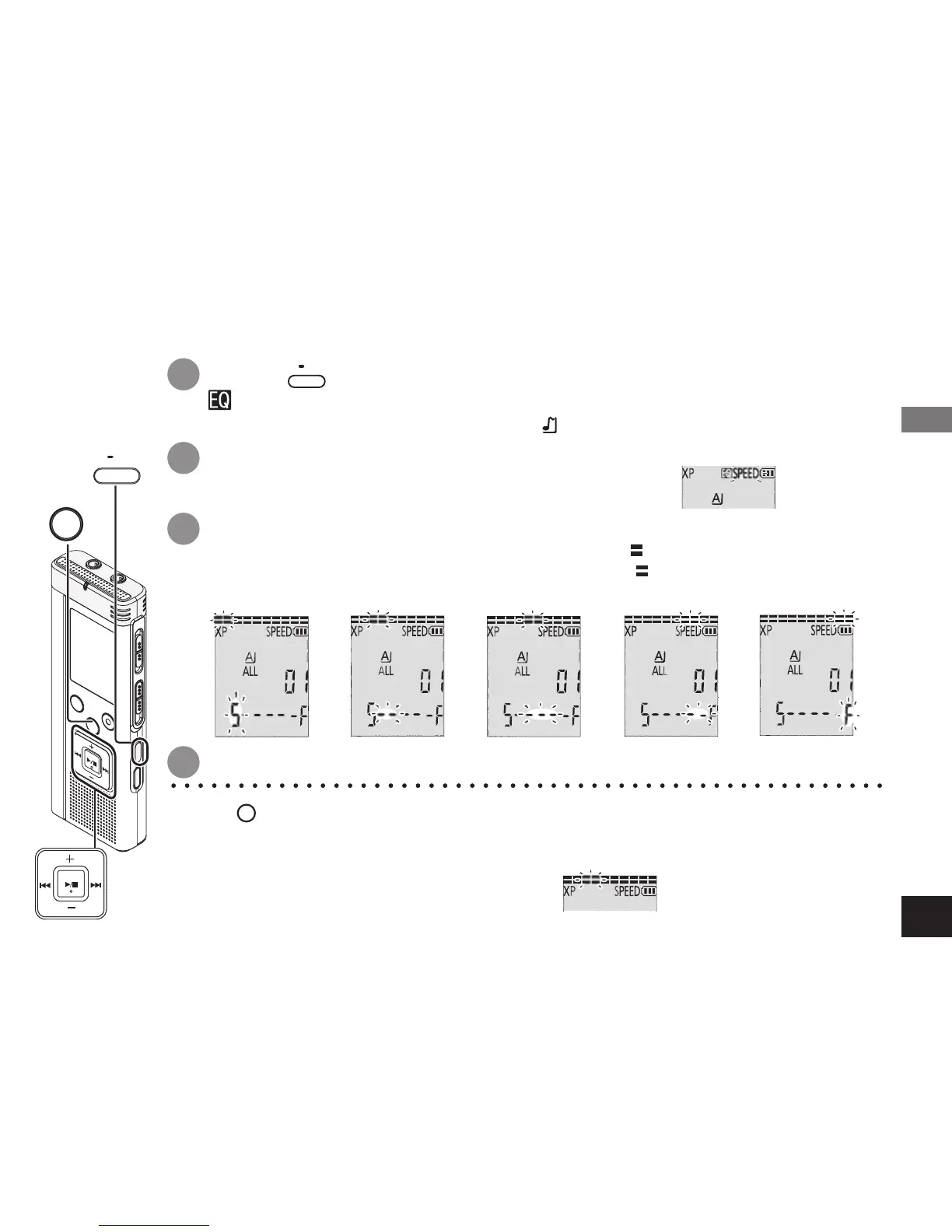
Press
•
MENU/
REPEAT
during playback.
“ ” (blinking) and “
SPEED
” (lighting) are displayed.
(Only
“
SPEED
” (blinking) is
displayed when “ ” is selected.)
Press
u
,
i
to select playback speed.
When pressing
i
, the playback speed becomes faster and “ ” (blinking) moves to the right.
When pressing
u
, the playback speed becomes slower and “ ” (blinking) moves to the left
.
*
Press
STOP
to stop the setting process midway.
* When playing with speed other than × 1 speed, the bar at the top blinks and
“
SPEED
” lights up.
4
Press
q
/
g
to enter.
e.g. When playing back with × 0.75 speed
STOP
•
MENU/
REPEAT
Playback speed can be adjusted at 5 different speeds.
× 0.5
× 0.75 × 1 × 1.5 × 2
Setting the playback speed control function
Advanced Operations


 To Next Page