EasyManua.ls Logo

Panasonic RX-C52 - Page 11

Panasonic RX-C52
20 pages
Print Icon
To Next Page IconTo Next Page
To Previous Page IconTo Previous Page
Loading...
ER
eT
aE
Wee
Ra
LI
NE
Re
ee
UO
RM
are
erent
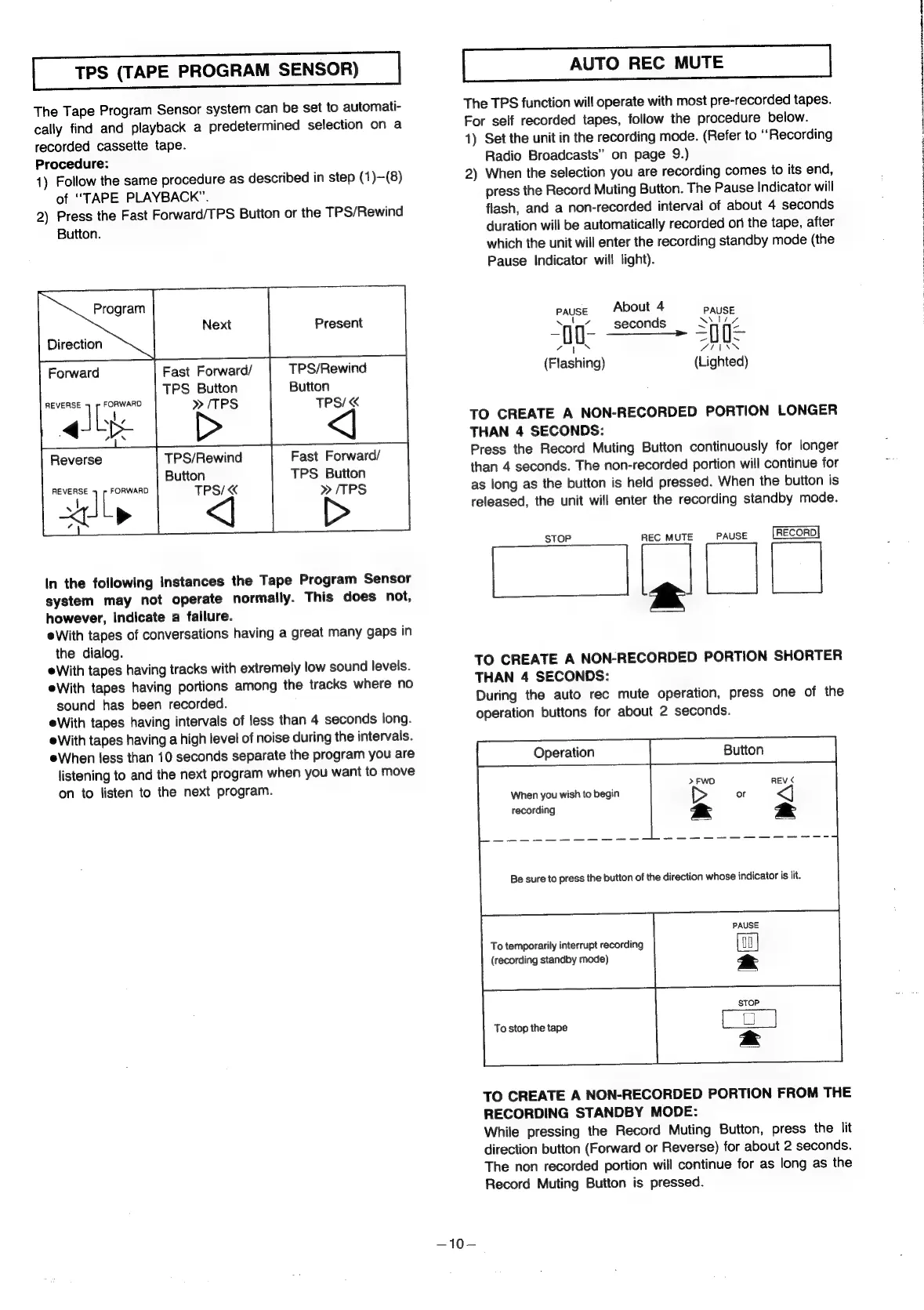
TPS
(TAPE
PROGRAM
SENSOR)
The
Tape
Program
Sensor
system
can
be
set
to
automati-
cally
find
and
playback
a
predetermined
selection
on
a
recorded
cassette
tape.
Procedure:
1)
Follow
the
same
procedure
as
described
in
step
(1)—(8)
of
“TAPE
PLAYBACK”.
2)
Press
the
Fast
Forward/TPS
Button
or
the
TPS/Rewind
Button.
ne
~
Forward
Fast
Forward/
TPS/Rewind
TPS
Button
Button
»
/TPS
TPS/
REVERSE
FORWARD.
“es
Reverse
REVERSE
FORWARD
a<
!
a
L
>
a
TPS/Rewind
Button
TPS/
Fast
Forward/
TPS
Button
»/TPS
In
the
following
instances
the
Tape
Program
Sensor
system
may
not
operate
normally.
This
does
not,
however,
indicate
a
failure.
eWith
tapes
of
conversations
having
a
great
many
gaps
in
the
dialog.
eWith
tapes
having
tracks
with
extremely
low
sound
levels.
eWith
tapes
having
portions
among
the
tracks
where
no
sound
has
been
recorded.
eWith
tapes
having
intervals
of
less
than
4
seconds
long.
eWith
tapes
having
a
high
level
of
noise
during
the
intervals.
eWhen
less
than
10
seconds
separate
the
program
you
are
listening
to
and
the
next
program
when
you
want
to
move
on
to
listen
to
the
next
program.
—10—
The
TPS
function
will
operate
with
most
pre-recorded
tapes.
For
self
recorded
tapes,
follow
the
procedure
below.
1)
Set
the
unit
in
the
recording
mode.
(Refer
to
“Recording
Radio
Broadcasts”
on
page
9.)
2)
When
the
selection
you
are
recording
comes
to
its
end,
press
the
Record
Muting
Button.
The
Pause
Indicator
will
flash,
and
a
non-recorded
interval
of
about
4
seconds
duration
will
be
automatically
recorded
oni
the
tape,
after
which
the
unit
will
enter
the
recording
standby
mode
(the
Pause
Indicator
will
light).
pause
About
4
PAUSE
‘nd
seconds
Sie
np
_Secones
=n
voylN
OTN
(Flashing)
(Lighted)
TO
CREATE
A
NON-RECORDED
PORTION
LONGER
THAN
4
SECONDS:
Press
the
Record
Muting
Button
continuously
for
longer
than
4
seconds.
The
non-recorded
portion
will
continue
for
as
long
as
the
button
is
held
pressed.
When
the
button
is
released,
the
unit
will
enter
the
recording
standby
mode.
STOP
REC
MUTE
PAUSE
RECORD
TO
CREATE
A
NON-RECORDED
PORTION
SHORTER
THAN
4
SECONDS:
During
the
auto
rec
mute
operation,
press
one
of
the
operation
buttons
for
about
2
seconds.
Operation
When
you
wish
to
begin
recording
Be
sure
to
press
the
button
of
the
direction
whose
indicator
is
lit.
To
temporarily
interrupt
recording
(recording
standby
mode)
To
stop
the
tape
TO
CREATE
A
NON-RECORDED
PORTION
FROM
THE
RECORDING
STANDBY
MODE:
While
pressing
the
Record
Muting
Button,
press
the
lit
direction
button
(Forward
or
Reverse)
for
about
2
seconds.
The
non
recorded
portion
will
continue
for
as
long
as
the
Record
Muting
Button
is
pressed.

Related product manuals