EasyManua.ls Logo

Panasonic RX-C52 - Sleep Function

Panasonic RX-C52
20 pages
Print Icon
To Next Page IconTo Next Page
To Previous Page IconTo Previous Page
Loading...
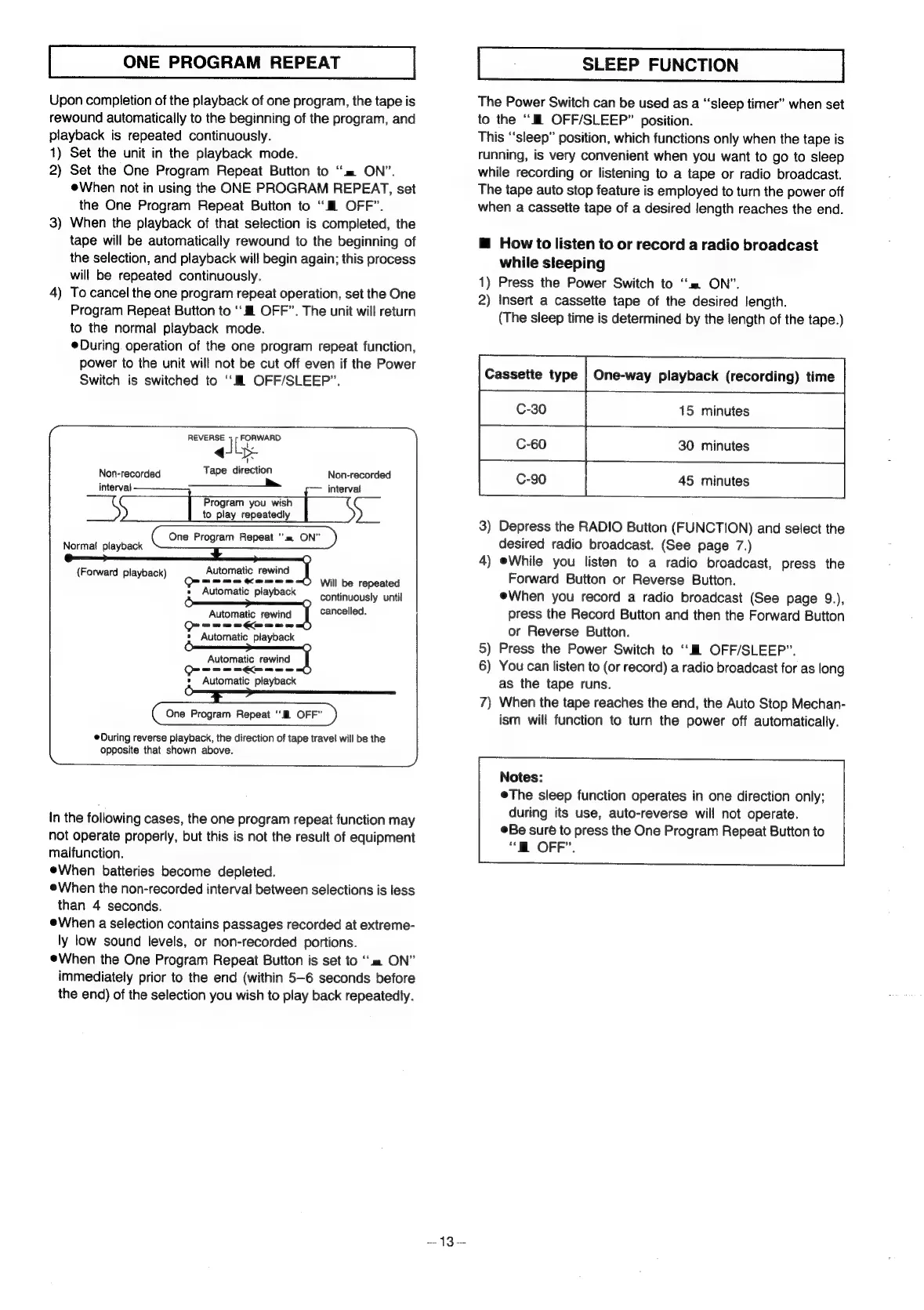
ONE
PROGRAM
REPEAT
Upon
completion
of
the
playback
of
one
program,
the
tape
is
rewound
automatically
to
the
beginning
of
the
program,
and
playback
is
repeated
continuously.
1)
Set
the
unit
in
the
playback
mode.
2)
Set
the
One
Program
Repeat
Button
to
‘m=
ON”.
When
not
in
using
the
ONE
PROGRAM
REPEAT,
set
the
One
Program
Repeat
Button
to
“Ml
OFF”.
When
the
playback
of
that
selection
is
completed,
the
tape
will
be
automatically
rewound
to
the
beginning
of
the
selection,
and
playback
will
begin
again;
this
process
will
be
repeated
continuously.
To
cancel
the
one
program
repeat
operation,
set
the
One
Program
Repeat
Button
to
‘‘#l
OFF”.
The
unit
will
return
to
the
normal
playback
mode.
During
operation
of
the
one
program
repeat
function,
power
to
the
unit
will
not
be
cut
off
even
if
the
Power
Switch
is
switched
to
‘Ml
OFF/SLEEP”.
3)
4)
Pras
ee
Non-recorded
Raa
leds
ey
direction
Non-recorded
4
ms
Raed
you
wish
to
Raed
repeatedly
(One
Program
Repeat
“m=
ON"
)
Program
(One
Program
Repeat
“m=
ON"
)
m
ON"
Norma!
playback
Automatic
rewind
a
me an ae
Go
me
ee
»
Automatic
playback
(Forward
playback)
Will
be
repeated
continuously
until
Automatic
rewind
cancelled.
a
are
*
Automatic
playback
Automatic
rewind
eee
od
*
Automatic
playback
O
One
Program
Repeat
OFF”
During
reverse
playback,
the
direction
of
tape
travel
will
be
the
opposite
that
shown
above.
in
the
following
cases,
the
one
program
repeat
function
may
not
operate
properly,
but
this
is
not
the
result
of
equipment
malfunction.
eWhen
batteries
become
depleted.
When
the
non-recorded
interval
between
selections
is
less
than
4
seconds.
When
a
selection
contains
passages
recorded
at
extreme-
ly
low
sound
levels,
or
non-recorded
portions.
When
the
One
Program
Repeat
Button
is
set
to
“am
ON”
immediately
prior
to
the
end
(within
5-6
seconds
before
the
end)
of
the
selection
you
wish
to
play
back
repeatedly.
—13—
SLEEP
FUNCTION
The
Power
Switch
can
be
used
as
a
“‘sleep
timer”
when
set
to
the
‘““N
OFF/SLEEP”
position.
This
‘‘sleep”
position,
which
functions
only
when
the
tape
is
running,
is
very
convenient
when
you
want
to
go
to
sleep
while
recording
or
listening
to
a
tape
or
radio
broadcast.
The
tape
auto
stop
feature
is
employed
to
turn
the
power
off
when
a
cassette
tape
of
a
desired
length
reaches
the
end.
@
How
to
listen
to
or
record
a
radio
broadcast
while
sleeping
1)
Press
the
Power
Switch
to
‘=
ON”.
2)
Insert
a
cassette
tape
of
the
desired
length.
(The
sleep
time
is
determined
by
the
length
of
the
tape.)
Cassette
type
|
One-way
playback
(recording)
time
C-30
15
minutes
3)
Depress
the
RADIO
Button
(FUNCTION)
and
select
the
desired
radio
broadcast.
(See
page
7.)
4)
eWhile
you
listen
to
a
radio
broadcast,
Forward
Button
or
Reverse
Button.
When
you
record
a
radio
broadcast
(See
page
9.),
press
the
Record
Button
and
then
the
Forward
Button
or
Reverse
Button.
5)
Press
the
Power
Switch
to
‘‘M
OFF/SLEEP”.
6)
You
can
listen
to
(or
record)
a
radio
broadcast
for
as
long
as
the
tape
runs.
7)
When
the
tape
reaches
the
end,
the
Auto
Stop
Mechan-
ism
will
function
to
turn
the
power
off
automatically.
press
the
Notes:
eThe
sleep
function
operates
in
one
direction
only;
during
its
use,
auto-reverse
will
not
operate.
Be
suré
to
press
the
One
Program
Repeat
Button
to
“HOFF”.

Related product manuals