EasyManua.ls Logo

Panasonic RX-C52 - System Connection

Panasonic RX-C52
20 pages
Print Icon
To Next Page IconTo Next Page
To Previous Page IconTo Previous Page
Loading...
SPEAKER
SYSTEM
CONNECTION
This
unit
can
be
used
as
a
one-piece
portable
stereo
radio
cassette
recorder
by
attaching
the
speaker
system
to
the
main
unit,
or
as
a
three-piece
separate
component
system,
with
a
receiver/cassette
deck
and
a
separate
speaker
system,
by
detaching
the
speaker
system
from
the
main
unit.
Be
sure
to
set
the
Power
Switch
to
‘‘H.
OFF”
before
connecting
the
Speaker
Cables.
m
As
A
One-Piece
Portable
Radio/Cassette
Recorder
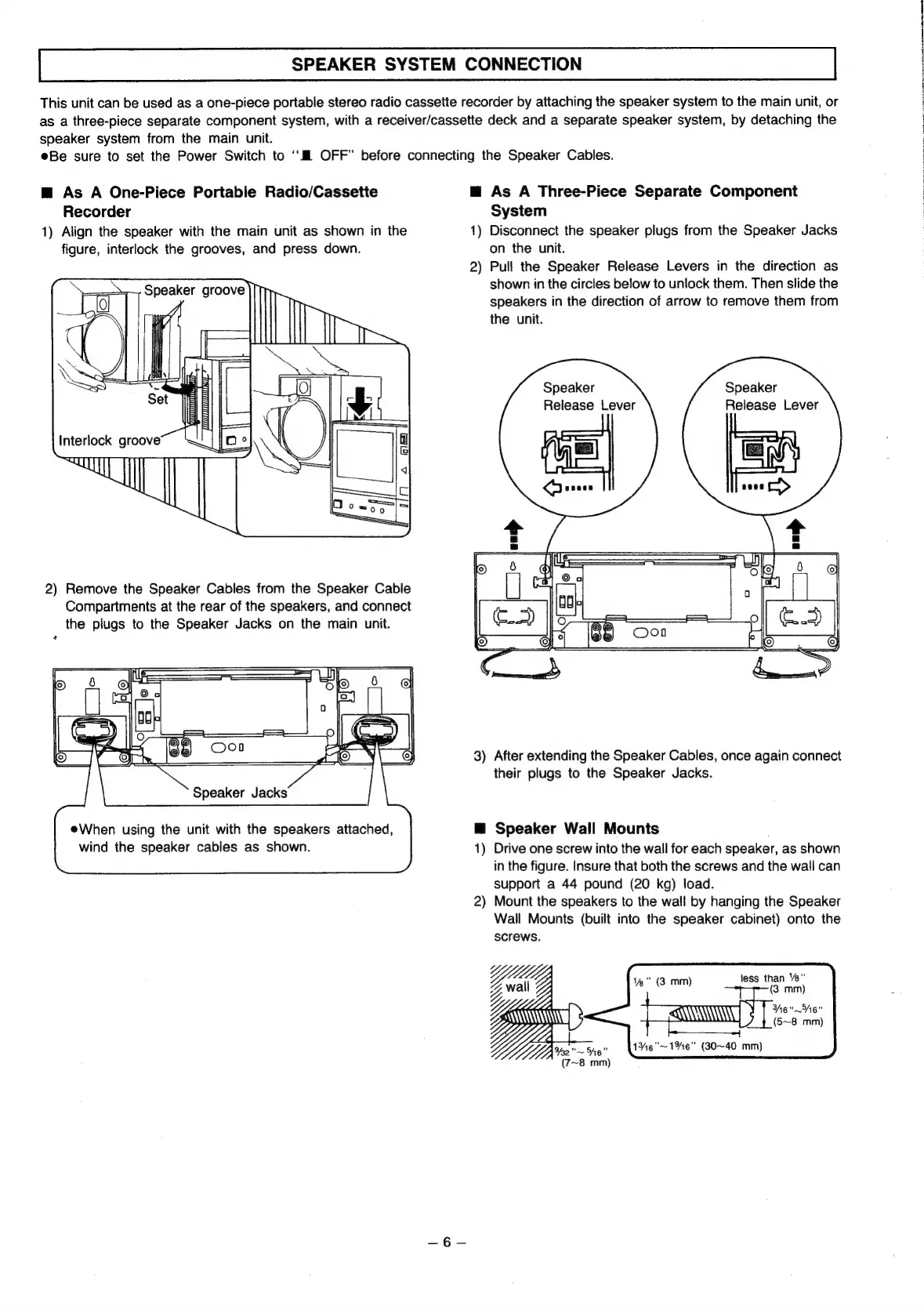
1)
Align
the
speaker
with
the
main
unit
as
shown
in
the
figure,
interlock
the
grooves,
and
press
down.
2)
Remove
the
Speaker
Cables
from
the
Speaker
Cable
Compartments
at
the
rear
of
the
speakers,
and
connect
the
plugs
to
the
Speaker
Jacks
on
the
main
unit.
eWhen
using
the
unit
with
the
speakers
attached,
wind
the
speaker
cables
as
shown.
@
As
A
Three-Piece
Separate
Component
System
1)
Disconnect
the
speaker
plugs
from
the
Speaker
Jacks
on
the
unit.
2)
Pull
the
Speaker
Release
Levers
in
the
direction
as
shown
in
the
circles
below
to
unlock
them.
Then
slide
the
speakers
in
the
direction
of
arrow
to
remove
them
from
the
unit.
Speaker
Release
Lever
Speaker
Release
Lever
3)
After
extending
the
Speaker
Cables,
once
again
connect
their
plugs
to
the
Speaker
Jacks.
@
Speaker
Wall
Mounts
1)
Drive
one
screw
into
the
wall
for
each
speaker,
as
shown
in
the
figure.
Insure
that
both
the
screws
and
the
wall
can
support
a
44
pound
(20
kg)
load.
2)
Mount
the
speakers
to
the
wall
by
hanging
the
Speaker
Wall
Mounts
(built
into
the
speaker
cabinet)
onto
the
screws.
1%"
(3
mm)
less
than
“e"
(3.
mm)
Here"
(5~8
mm)
1%6"~1%6"
(30~40
mm)
wail
Wt;
He
Ue
~\
SY
(7~8
mm)
er
Re
Le
ea
ae
ee
en
eee
OT
Rn

Related product manuals