EasyManua.ls Logo

Panasonic RX-C52 - Tape Playback

Panasonic RX-C52
20 pages
Print Icon
To Next Page IconTo Next Page
To Previous Page IconTo Previous Page
Loading...
TAPE
PLAYBACK
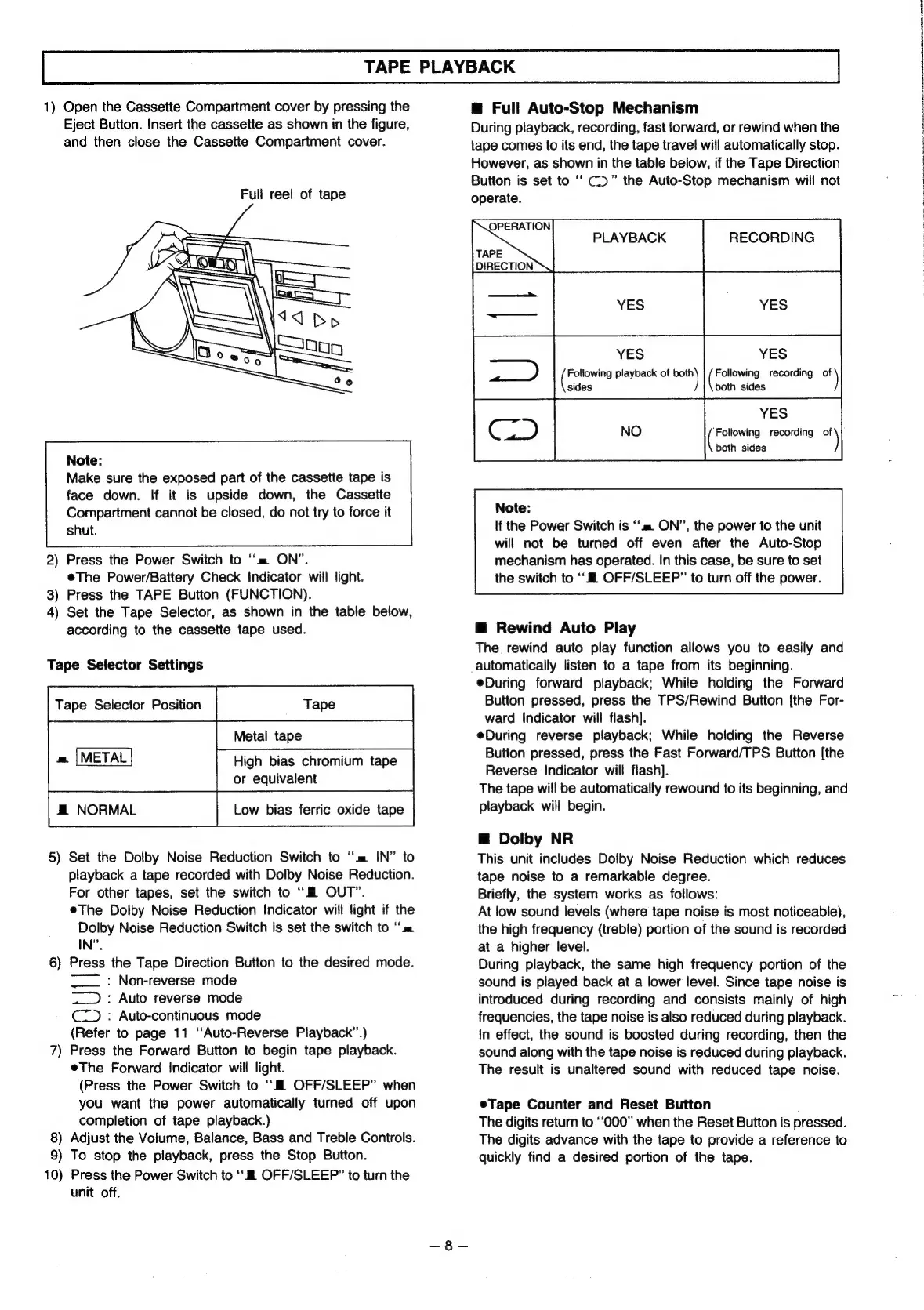
1)
Open
the
Cassette
Compartment
cover
by
pressing
the
Eject
Button.
Insert
the
cassette
as
shown
in
the
figure,
and
then
close
the
Cassette
Compartment
cover.
Full
reel
of
tape
Note:
Make
sure
the
exposed
part
of
the
cassette
tape
is
face
down.
If
it
is
upside
down,
the
Cassette
Compartment
cannot
be
closed,
do
not
try
to
force
it
shut.
2)
Press
the
Power
Switch
to
“=
ON”.
eThe
Power/Battery
Check
Indicator
will
light.
3)
Press
the
TAPE
Button
(FUNCTION).
4)
Set
the
Tape
Selector,
as
shown
in
the
table
below,
according
to
the
cassette
tape
used.
Tape
Selector
Settings
am.
|METAL
High
bias
chromium
tape
or
equivalent
#
NORMAL
Low
bias
ferric
oxide
tape
5)
Set
the
Dolby
Noise
Reduction
Switch
to
“m=
IN”
to
playback
a
tape
recorded
with
Dolby
Noise
Reduction.
For
other
tapes,
set
the
switch
to
“i
OUT”.
eThe
Dolby
Noise
Reduction
Indicator
will
light
if
the
Dolby
Noise
Reduction
Switch
is
set
the
switch
to
‘‘m
IN”.
6)
Press
the
Tape
Direction
Button
to
the
desired
mode.
~~
:
Non-reverse
mode
~_
:
Auto
reverse
mode
C=)
:
Auto-continuous
mode
(Refer
to
page
11
“Auto-Reverse
Playback”.)
7)
Press
the
Forward
Button
to
begin
tape
playback.
eThe
Forward
Indicator
will
light.
(Press
the
Power
Switch
to
“Ml
OFF/SLEEP”
when
you
want
the
power
automatically
turned
off
upon
completion
of
tape
playback.)
8)
Adjust
the
Volume,
Balance,
Bass
and
Treble
Controls.
9)
To
stop
the
playback,
press
the
Stop
Button.
10)
Press
the
Power
Switch
to
‘i
OFF/SLEEP"”
to
turn
the
unit
off.
@
Full
Auto-Stop
Mechanism
During
playback,
recording,
fast
forward,
or
rewind
when
the
tape
comes
to
its
end,
the
tape
travel
wiil
automatically
stop.
However,
as
shown
in
the
table
below,
if
the
Tape
Direction
Button
is
set
to
C)”
the
Auto-Stop
mechanism
will
not
operate.
OPERATION
ise
PLAYBACK
RECORDING
TAPE
DIRECTION
=|
=
|
Note:
If
the
Power
Switch
is
‘m=
ON”,
the
power
to
the
unit
|
U
ao
a
of
al
(eae
recording
of)
sides
both
sides
YES
Berignte
recording
_)
both
sides
will
not
be
turned
off
even
after
the
Auto-Stop
mechanism
has
operated.
In
this
case,
be
sure
to
set
the
switch
to
‘‘
OFF/SLEEP”
to
turn
off
the
power.
@
Rewind
Auto
Play
The
rewind
auto
play
function
allows
you
to
easily
and
automatically
listen
to
a
tape
from
its
beginning.
eDuring
forward
playback;
While
holding
the
Forward
Button
pressed,
press
the
TPS/Rewind
Button
{the
For-
ward
Indicator
will
flash].
eDuring
reverse
playback;
While
holding
the
Reverse
Button
pressed,
press
the
Fast
Forward/TPS
Button
[the
Reverse
Indicator
will
flash).
The
tape
will
be
automatically
rewound
to
its
beginning,
and
playback
will
begin.
@
Dolby
NR
This
unit
includes
Dolby
Noise
Reduction
which
reduces
tape
noise
to
a
remarkable
degree.
Briefly,
the
system
works
as
follows:
At
low
sound
levels
(where
tape
noise
is
most
noticeable),
the
high
frequency
(treble)
portion
of
the
sound
is
recorded
at
a
higher
level.
During
playback,
the
same
high
frequency
portion
of
the
sound
is
played
back
at
a
lower
level.
Since
tape
noise
is
introduced
during
recording
and
consists
mainly
of
high
frequencies,
the
tape
noise
is
also
reduced
during
playback.
In
effect,
the
sound
is
boosted
during
recording,
then
the
sound
along
with
the
tape
noise
is
reduced
during
playback.
The
result
is
unaltered
sound
with
reduced
tape
noise.
eTape
Counter
and
Reset
Button
The
digits
return
to
“000”
when
the
Reset
Button
is
pressed.
The
digits
advance
with
the
tape
to
provide
a
reference
to
quickly
find
a
desired
portion
of
the
tape.
a
RTE
aT
aT
Oa
RPE
TENE
ST
Reh
rE
MP
eT
OP
on
te
RE

Related product manuals