EasyManua.ls Logo

Panasonic RX-C52 - MIX Playback

Panasonic RX-C52
20 pages
Print Icon
To Next Page IconTo Next Page
To Previous Page IconTo Previous Page
Loading...
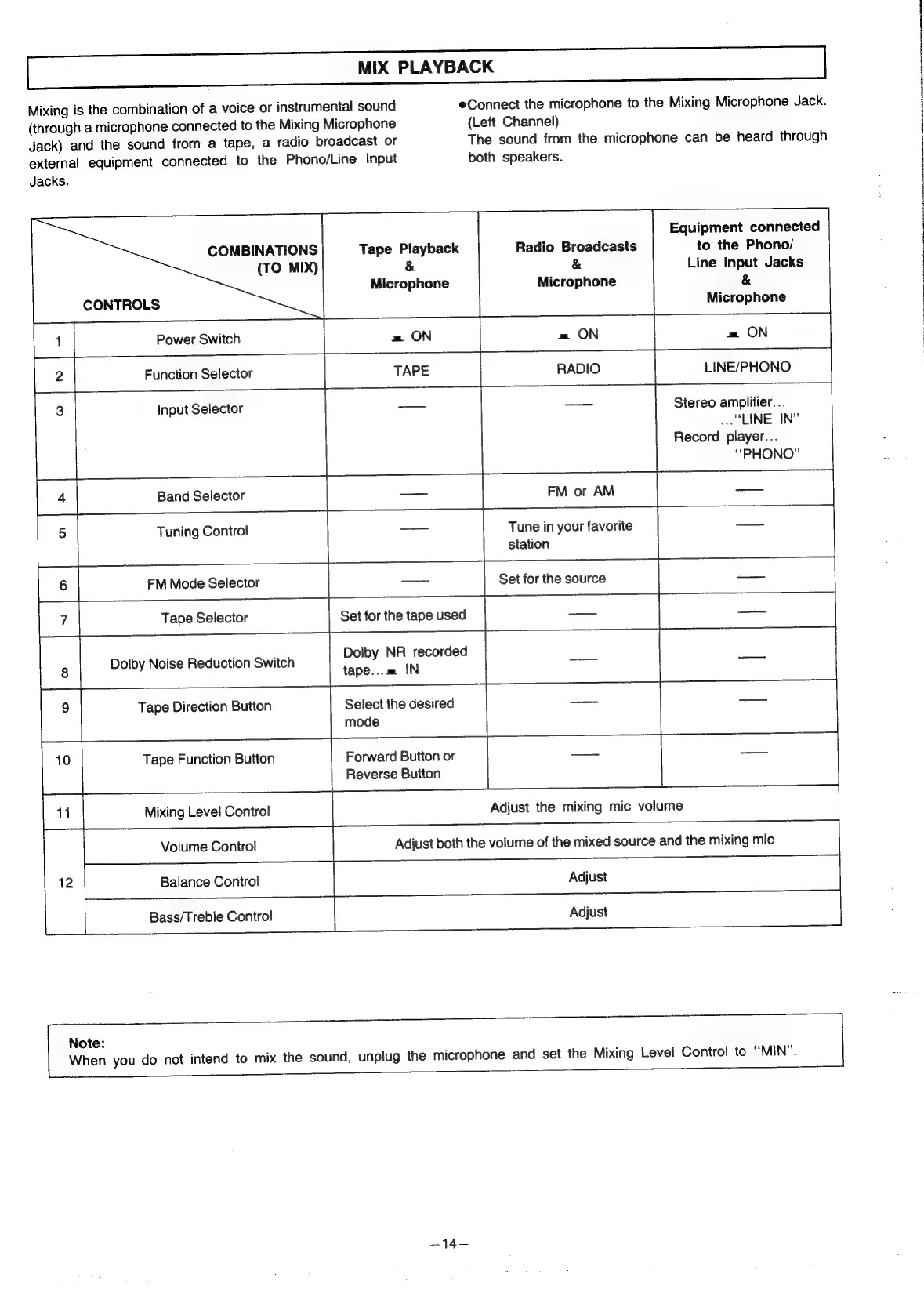
MIX
PLAYBACK
Mixing
is
the
combination
of
a
voice
or
instrumental
sound
eConnect
the
microphone
to
the
Mixing
Microphone
Jack.
(through
a
microphone
connected
to
the
Mixing
Microphone
(Left
Channel)
Jack)
and
the
sound
from
a
tape,
a
radio
broadcast
or
The
sound
from
the
microphone
can
be
heard
through
external
equipment
connected
to
the
Phono/Line
Input
both
speakers.
Jacks.
Equipment
connected
to
the
Phono/
COMBINATIONS
Radio
Broadcasts
Tape
Playback
&
(TO
MIX)
&
Line
Input
Jacks
Microphone
Microphone
&
CONTROLS
Microphone
2
Function
Selector
TAPE
RADIO
LINE/PHONO
3
Input
Selector
Stereo
amplifier...
“LINE
IN”
Record
player...
“PHONO”
4
Band
Selector
[|
FM
or
AM
Tune
in
your
favorite
5
Tuning
Control
station
|
6
FM
Mode
Selector
Set
for
the
source
|
Tape
Selector
Set
for
the
tape
used
Dolby
NR
recorded
tape...m
IN
Select
the
desired
mode
Doiby
Noise
Reduction
Switch
Tape
Direction
Button
Forward
Button
or
Reverse
Button
Tape
Function
Button
11
Mixing
Level
Control
Adjust
the
mixing
mic
volume
Volume
Control
Adjust
both
the
volume
of
the
mixed
source
and
the
mixing
mic
12
Balance
Control
Adjust
Note:
When
you
do
not
intend
to
mix
the
sound,
unplug
the
microphone
and
set
the
Mixing
Level
Control
to
‘‘MIN”.
—14—

Related product manuals