EasyManua.ls Logo

Panasonic RX-C52 - Page 18

Panasonic RX-C52
20 pages
Print Icon
To Next Page IconTo Next Page
To Previous Page IconTo Previous Page
Loading...
The
head
assembly,
capstan,
and
pressure
roller
are
in
constant
contact
with
the
tape.
If
these
parts
are
dirty,
the
sound
quality
will
be
impaired.
Get
into
the
habit
of
cleaning
the
parts
regularly
(after
every
10
hours
or
so
of
use)
in
accordance
with
the
procedure
outlined
below.
1)
Open
the
Cassette
Compartment
cover
by
pressing
the
Eject
Button.
Lift
up
the
cassette
lid
and
remove
it
from
the
cassette
holder
in
order
to
facilitate
cleaning
of
the
head
assembly.
2)
3)
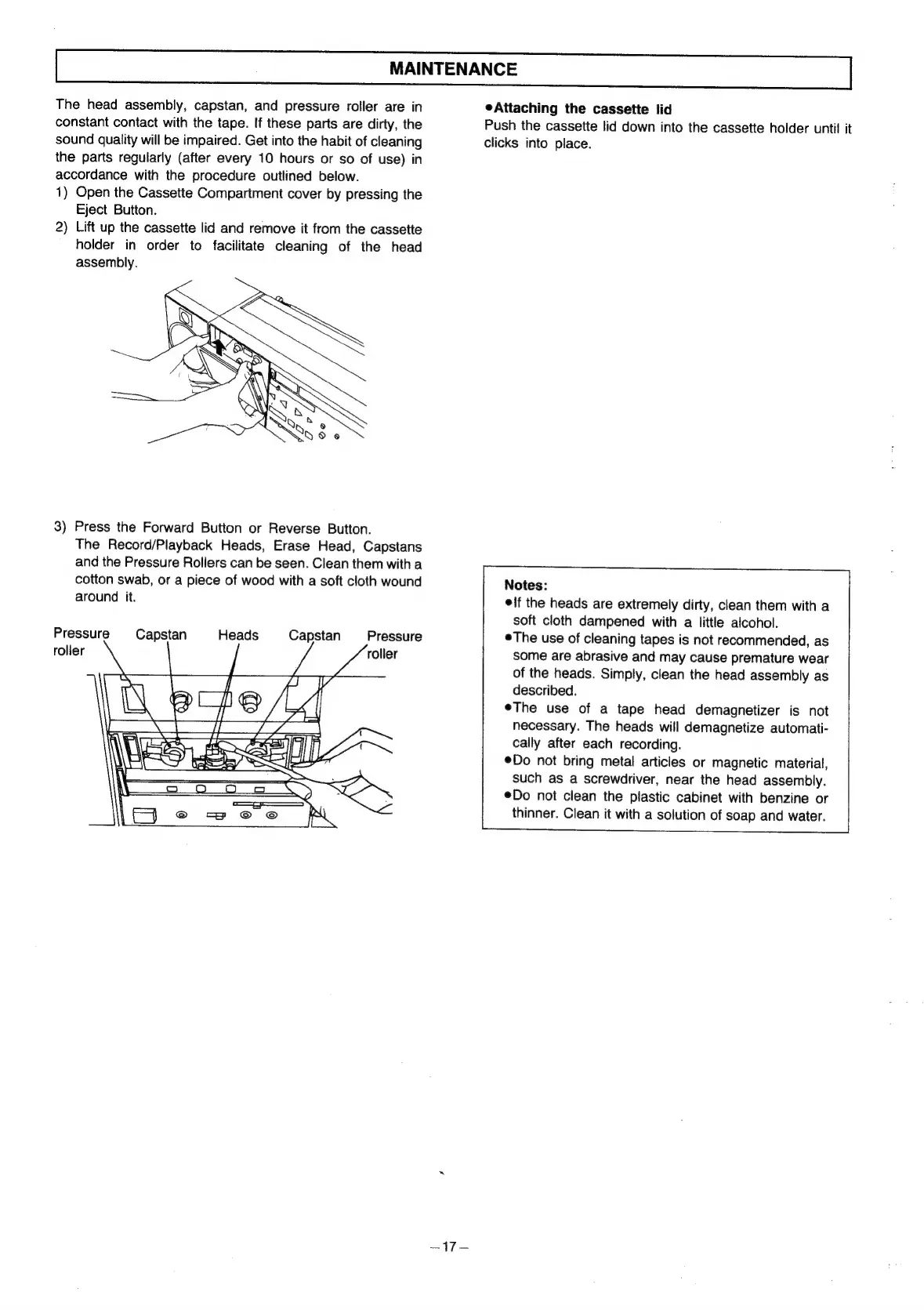
Press
the
Forward
Button
or
Reverse
Button.
The
Record/Playback
Heads,
Erase
Head,
Capstans
and
the
Pressure
Rollers
can
be
seen.
Clean
them
with
a
cotton
swab,
or
a
piece
of
wood
with
a
soft
cloth
wound
around
it.
Pressure
rolier
Heads
Capstan
Capstan
Pressure
roller
~17—
eAttaching
the
cassette
lid
Push
the
cassette
lid
down
into
the
cassette
holder
until
it
clicks
into
place.
Notes:
if
the
heads
are
extremely
dirty,
clean
them
with
a
soft
cloth
dampened
with
a
little
alcohol.
The
use
of
cleaning
tapes
is
not
recommended,
as
some
are
abrasive
and
may
cause
premature
wear
of
the
heads.
Simply,
clean
the
head
assembly
as
described.
eThe
use
of
a
tape
head
demagnetizer
is
not
necessary.
The
heads
will
demagnetize
automati-
cally
after
each
recording.
©Do
not
bring
metal
articles
or
magnetic
material,
such
as
a
screwdriver,
near
the
head
assembly.
®Do
not
clean
the
plastic
cabinet
with
benzine
or
thinner.
Clean
it
with
a
solution
of
soap
and
water.

Related product manuals