17
RQT9445
Enjoying sound from all speakers and
various sound effects
≥
The following sound effects/modes may not be available or have no effect with some sources, or when headphones are used (
>
18).
≥You may experience a reduction in sound quality when these sound effects/modes are used with some sources. If this occurs,
turn the sound effects/modes off.
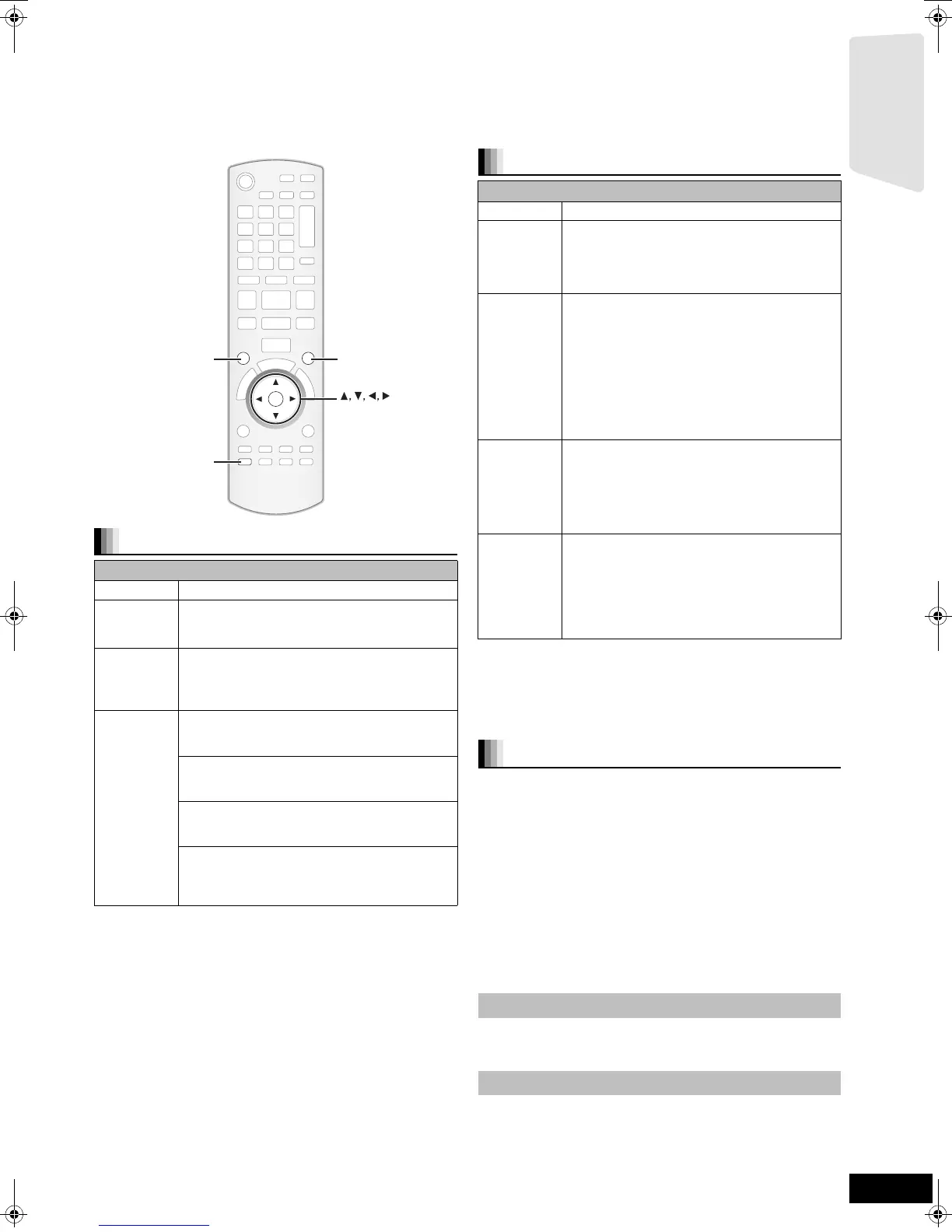
Press [SURROUND] several times to select the effect.
≥You can also press [SURROUND] and then [3, 4] to
select the mode.
≥The selected effect will only be displayed on the main
unit.
When selecting the MANUAL effects.
While “MANUAL” is displayed
Press [2, 1] and select the desired effect.
≥“NOT CONDITIONAL” is displayed on the main unit if the
setting is not active.
≥“DOLBY PL II MOVIE” and “DOLBY PL II MUSIC” do not
work when audio is output from the HDMI AV OUT terminal.
1 Press [SOUND] several times to select the mode.
≥You can also press [SOUND] and then [3, 4] to select
the mode.
≥
The selected effect will only be displayed on the main unit.
2 While the selected mode is displayed
Press [2, 1] and select the desired setting.
1 Press and hold [-CH SELECT] for 3 seconds to
activate the speaker setting mode.
2 Press [-CH SELECT] several times to select the
speaker.
Each time you press the button:
LR—) C_) RS_) LS_) SW
^"""""""""""""""""""b
L R: Front speaker (left and right)
C: Centre speaker
RS: Surround speaker (right)
LS: Surround speaker (left)
SW: Subwoofer
≥The channels not included in the playing audio will not be
displayed (subwoofer is displayed even if it is not
included).
(When “L R” selected)
3 Press [2, 1] to adjust the balance of the front
speakers.
(When other speakers are selected)
4 Press [3] (increase) or [4] (decrease) to adjust
the speaker level for each speaker.
s6 dB to r6 dB
Enjoying surround sound effects
Available surround sound effects
Effect Setting
STANDARD:
Sound is output as it was recorded/encoded.
Speaker output varies depending on the
source.
MULTI-CH: You can enjoy sound from the front speakers,
as well as the surround speakers even when
playing a 2-channel sound or non-surround
sound.
MANUAL: –DOLBY PL II MOVIE:
Suitable for movie software, or the one
recorded in Dolby Surround. (except [DivX])
–DOLBY PL II MUSIC:
Adds 5.1-channel effects to stereo sources.
(except [DivX])
–S.SURROUND:
You can enjoy sound from all speakers with
stereo sources.
–2CH STEREO:
You can play any source in stereo. Sound will
be output to the front speakers and the
subwoofer only.
OK
SOUND
SURROUND
-
CH SELECT
-
CH SELECT
SURROUND
SOUND
Changing the sound modes
Available sound modes
Mode Setting
EQ:
(Equalizer)
You can select sound quality settings.
–FLAT(Flat): Cancel (no effect is added).
–HEAVY(Heavy):Adds punch to rock.
–CLEAR(Clear): Clarifies higher sounds.
–SOFT(Soft): For background music.
SUB W:
(Subwoofer
level)
This unit will change the settings for the amount
of bass depending on the source.
However you can also adjust the amount of
bass for the source being played.
–1 (Weakest effect)
–2
–3
–4 (Strongest effect)
≥The setting you make is retained, and recalled
every time you play the same type of source.
CF:
(Centre
Focus)
(Effective when playing audio containing
centre channel sound.)
You can make the sound of the centre speaker
seem like it is coming from within the TV.
–ON
–OFF
W.S.:
(Whisper-
mode
Surround)
(Effective when playing video with 5.1ch
audio.)
You can enhance the surround effect for low
volume 5.1-channel sound.
(Convenient for late night viewing.)
–ON
–OFF
Adjusting speaker level during play
Adjusting the balance of the front speakers
Adjusting the speaker level
Getting started
SCBT200&205EB_RQT9445-B.book 17 ページ 2009年4月15日 水曜日 午後2時15分






 To Next Page