19
RQT9445
Other operations during play (These functions may not work depending on the media.)
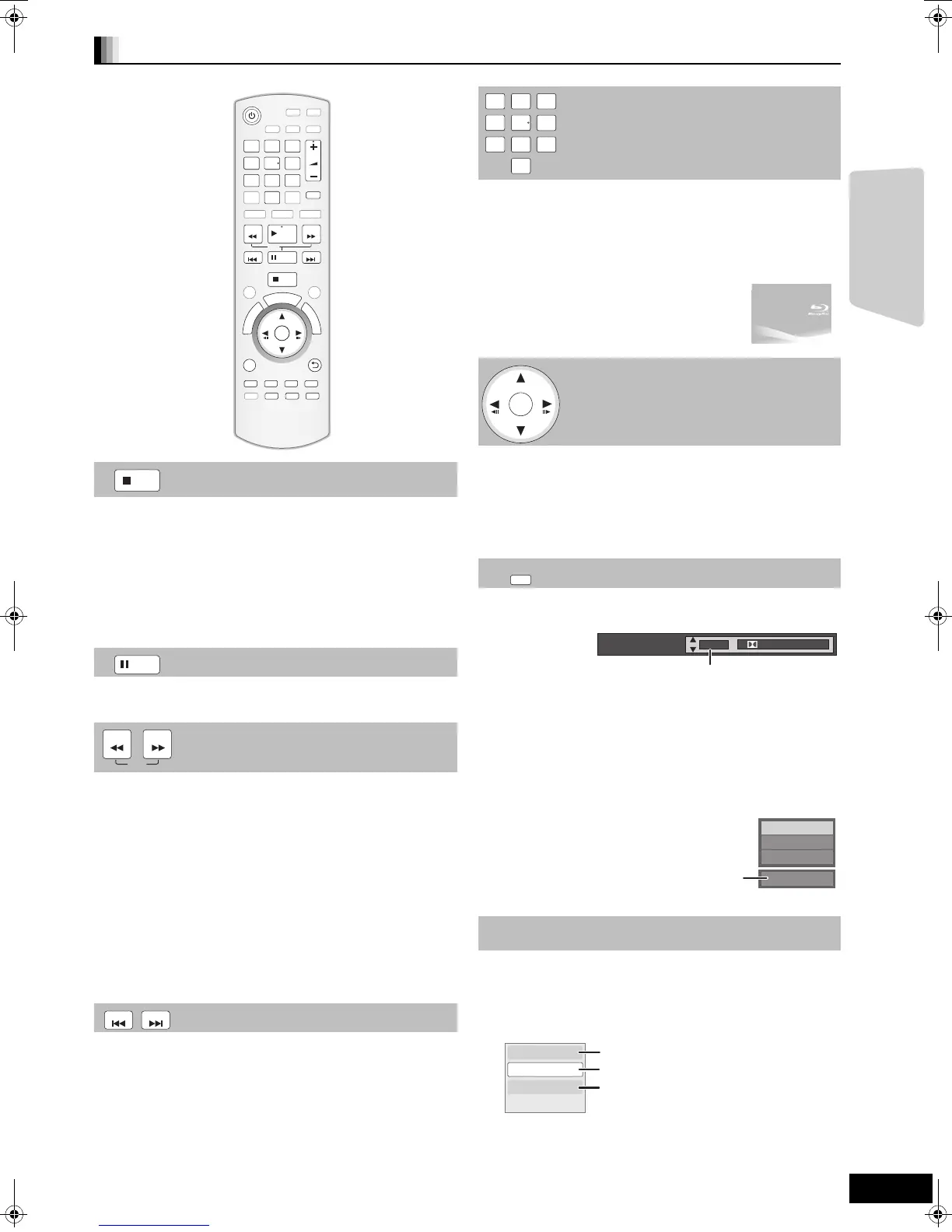
Stop
The stopped position is memorized.
Resume play function
Press [1PLAY] to restart from this position.
≥The position is cleared if the tray is opened or you press
[∫STOP] several times to display “STOP” on unit’s display.
≥[BD-V]: On BD-Video discs including BD-J (> 55), the
resume play function does not work.
≥[CD] [MP3] [DivX] [MPEG2]: The position is cleared if the unit is
turned off.
Pause
Press [;PAUSE] again or [1PLAY] to restart play.
Search/Slow-motion
The speed increases up to 5 steps.
≥Press [1PLAY] to revert to normal playback speed.
≥For some discs, the speed may not change.
Search
While playing, press [SEARCH6] or [SEARCH5].
≥[BD-V] [AVCHD] [DVD-VR] [DVD-V]:
Audio is heard during first level of forward search.
≥[DivX] [MPEG2]: Audio is not heard during all levels of search.
≥[CD] [MP3]: The speed is fixed to a single step.
Slow-motion
While paused, press [SEARCH6] or [SEARCH5].
≥[BD-V] [AVCHD]: Forward direction [SEARCH5] only.
≥[DVD-VR]
:
If continued for approx. 5 minutes, slow-motion
play pauses automatically.
Skip
Skip to the title, chapter or track you want to play.
≥Each press increases the number of skips.
≥[DivX]: Backward direction [SKIP:] only.
OK
AUDIO
VOL
STOP
123
4 56
78
0
9
SEARCH
SKIP
SLOW
SKIP
PLAY
PAUS E
SEARCH
OK
MUTE
P
O
P
-
U
P
M
E
N
U
S
T
A
R
T
T
O
P
M
E
N
U
OPTION
abc
def
jkl
mno
tuv
ghi
qrs
p
xyz
w
D
I
R
E
C
T
N
A
V
I
G
A
T
O
R
-
SLEEP
STATUS
RETURN
R
G
Y
B
STOP
PAUSE
SEARCH
SLOW
SEARCH
SKIP SKIP
Direct Play
During playback, you can access specific recordings or
scenes through direct entry of the numbered buttons.
Play starts from the selected title or chapter.
[BD-V] [AVCHD]
e.g., 5: [0] B [0] B [5]
15: [0] B [1] B [5]
[DVD-V]
e.g., 5: [0] B [5]
15: [1] B [5]
≥While stopped (the image on the right is
displayed on the screen), the title is
designated. While playing, the chapter is
designated.
Frame-by-frame
While paused, press [2] (2;) or [1] (;1).
Each press shows the next frame.
≥Press and hold to change in succession forward or
backward.
≥Press [1PLAY] to revert to normal playback speed.
≥[BD-V] [AVCHD]: Forward direction [1] (;1) only.
Changing audio during play
[BD-V] [AVCHD] [DVD-V]
You can change the audio channel number each time you
press the button. This allows you to change the soundtrack
language (> 35, Soundtrack), etc.
≥[BD-V] When “BD-Video Secondary Audio” (> 38) is set to
“On”, Dolby TrueHD, Dolby Digital Plus, DTS-HD Master
Audio and DTS-HD High Resolution Audio are output as
Dolby Digital or DTS Digital Surround regardless of this
setting.
[DVD-VR] [DivX] [MPEG2]
AudioLR
>
AudioL
>
Audio R
^---------------------------------------}
Chapter playback
[DVD-VR]
1 Insert a disc (> 18).
2
While “Title View” screen is displayed
Press [3, 4] to select the title and press
[OPTION].
3 Press [3, 4] to select “Chapter View” and
press [OK].
4 Press [2, 1] to select the chapter and press
[OK].
123
4 56
78
0
9
abc
def
jkl
mno
tuv
ghi
qrs
p
xyz
w
OK
AUDIO
Soundtrack
1 ENG Digital 3/2.1ch
English is selected.
e.g. [DVD-V]
PLAY
DVD-RAM(VR)
AudioLR
Properties
Chapter View
To Picture
To display the title properties
(recording date, etc.)
Playing still pictures (> 23)
To select the chapter
Playback
SCBT200&205EB_RQT9445-B.book 19 ページ 2009年4月15日 水曜日 午後2時15分






 To Next Page