52
RQT9445
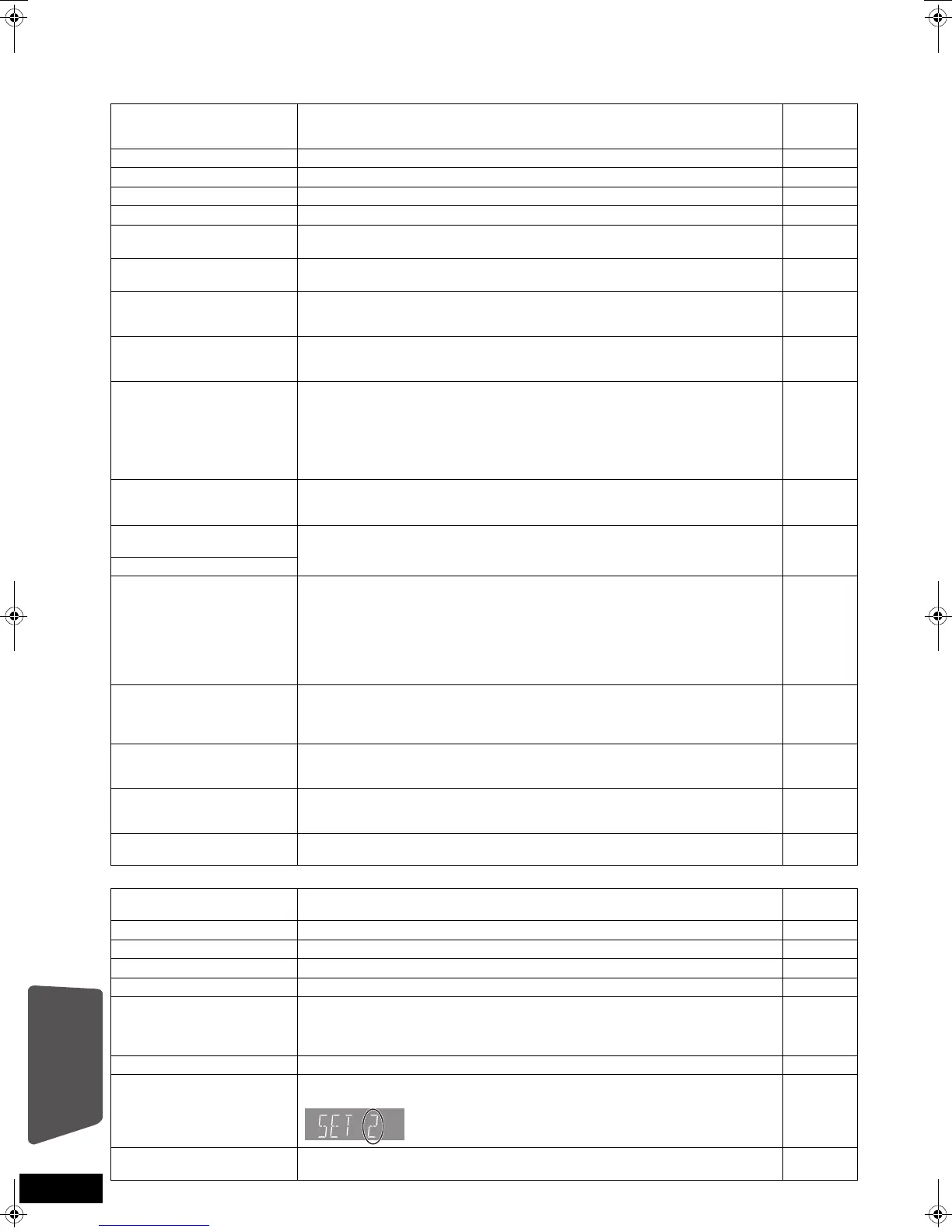
Messages
The following messages or service numbers appear on the television or unit’s display when something unusual is detected during startup and use.
On the television Page
Authorisation Error.
This unit is not authorised
to play this title.
≥
[DivX] You are trying to play the DivX VOD content that was purchased with a
different registration code. You cannot play the content on this unit.
22
Cannot play. ≥You inserted an incompatible disc. 44, 45
Cannot play on this unit. ≥You tried to play a non-compatible image. 45, 46
No disc is inserted. ≥The disc may be upside down. 18
Rental Expired. ≥
[DivX] The DivX VOD content has zero remaining plays. You cannot play it. 22
$ This operation is not
available.
≥Some operations are unsupported by the unit. For example;
–
[BD-V]
:
During play back, reverse slow-motion or reverse frame-by-frame is not possible.
19
$ This operation is
prohibited by this disc.
≥Depending on the disc, you may not be able to perform search or skip when film
previews and warning screens are being played back.
—
Cannot connect.
Please check the connection
of the LAN cable.
≥When a hub is used but its Link lamp does not light up, check the cable
connection, LAN terminal connection, cable itself (a cross cable may be used by
mistake), etc.
13
IP address is not set. ≥The “IP Address” in “IP Address / DNS Settings” is “---. ---. ---. ---“. Set the “IP
Address”, “Subnet Mask”, and “Gateway Address“. (Select the automatic
address acquisition if necessary.)
33
Cannot obtain IP address.
Please check the
connection or setting of the
router.
≥If you use a hub, then check the connection between the hub and the router.
–Use the UPLINK port of the hub to connect to a router.
–Check whether or not the hub’s Link lamp lights up. If it does not light up, then
check the cable connection, LAN terminal connection, cable itself (a cross
cable may be used by mistake), etc.
≥
If the above conditions are OK, then the router may not operate in DHCP mode. Check
the router settings and operation. You may reset the router to restore it to normal.
13
13
This IP address is already
in use.
Please check the setting.
≥This unit’s IP address is used by another device. Check the IP addresses of this
unit, personal computers, and routers, etc. If necessary, reconfigure them to
avoid IP addresses from being duplicated.
—
Connection test could not
be conducted.
≥Turn the unit off. Remove the AC mains lead and reconnect it and try again. If
the same symptom persists, then consult your dealer.
—
IP address is not set correctly.
Connection test was
unsuccessful. No reply
from Gateway. Please check
the connection or setting of
the router.
≥If you use a hub, then check the connection between the hub and the router.
–Use the UPLINK port of the hub to connect to a router.
–If the hub’s Link lamp does not light up, then check the cable connection, LAN
terminal connection, cable itself (a cross cable may be used by mistake), etc.
≥Check the “IP Address”, “Subnet Mask”, and “Gateway Address” in the “IP
Address / DNS Settings”.
≥
If the MAC address information is required, then press [SETUP] to display the “Network
Settings” menu.
13
33
33
Network connection was
rejected.
Please confirm Setup
“BD-Live Internet Access”.
≥When you set “BD-Live Internet Access” to “Limit” and play BD-Live contents
which do not have a content owner certificate, the Internet access of the content
is not allowed. If you allow the content to connect to Internet, set “BD-Live
Internet Access” to “Permit”.
37
Could not check for latest
firmware version.
Please try again later.
≥The firmware download server is currently unavailable. Please try again later. —
High Clarity Sound is effective.
Analog video output is turned
off when playback starts.
≥“High Clarity Sound” in setup menu is set to “Enable”, and “High Clarity Sound”
in on-screen menu is set to “On”.
36, 38
No Video
≥
Depending on the connected iPod, video menu may not be available on the TV. Select
the iPod menu (iPod LCD) mode and operate video playback from your iPod menu.
31
On the unit’s display Page
F99
≥
The unit fails to operate properly. Press [
Í
/I] on the main unit to switch the unit to standby
for 3 seconds. Now press [
Í
/I] on the main unit again to turn the unit on.
—
HDMI ONLY ≥Some BD-Video discs can only be output with HDMI. —
NET ≥Displays while VIERA CAST is starting up. —
No PLAY ≥There is a viewing restriction on a BD-Video or DVD-Video. 37
No READ ≥The media is dirty or badly scratched. The unit cannot play. —
PLEASE WAIT ≥The unit is carrying out internal process.This is not a malfunction. You cannot
operate the unit while “PLEASE WAIT” is displayed.
≥When connected to TV (VIERA) with HDAVI Control 4, and power supply is
turned off by the “Intelligent Auto Standby” function on the TV side.
—
—
REMOVE ≥The USB device is drawing too much power. Remove the USB device. 18
SET
(“ ” stands for a number.)
≥The remote control and main unit are using different codes. Change the code on
the remote control.
Press and hold [OK] and the indicated number button at the
same time for more than 5 seconds.
51
UNFORMAT ≥You inserted an unformatted DVD-RAM, DVD-RW, +RW, an unused +R, +R DL
or DVD-RW (DVD-Video format).
—
Reference
SCBT200&205EB_RQT9445-B.book 52 ページ 2009年4月15日 水曜日 午後2時15分






 To Next Page