15
Getting started
VQT3Z79
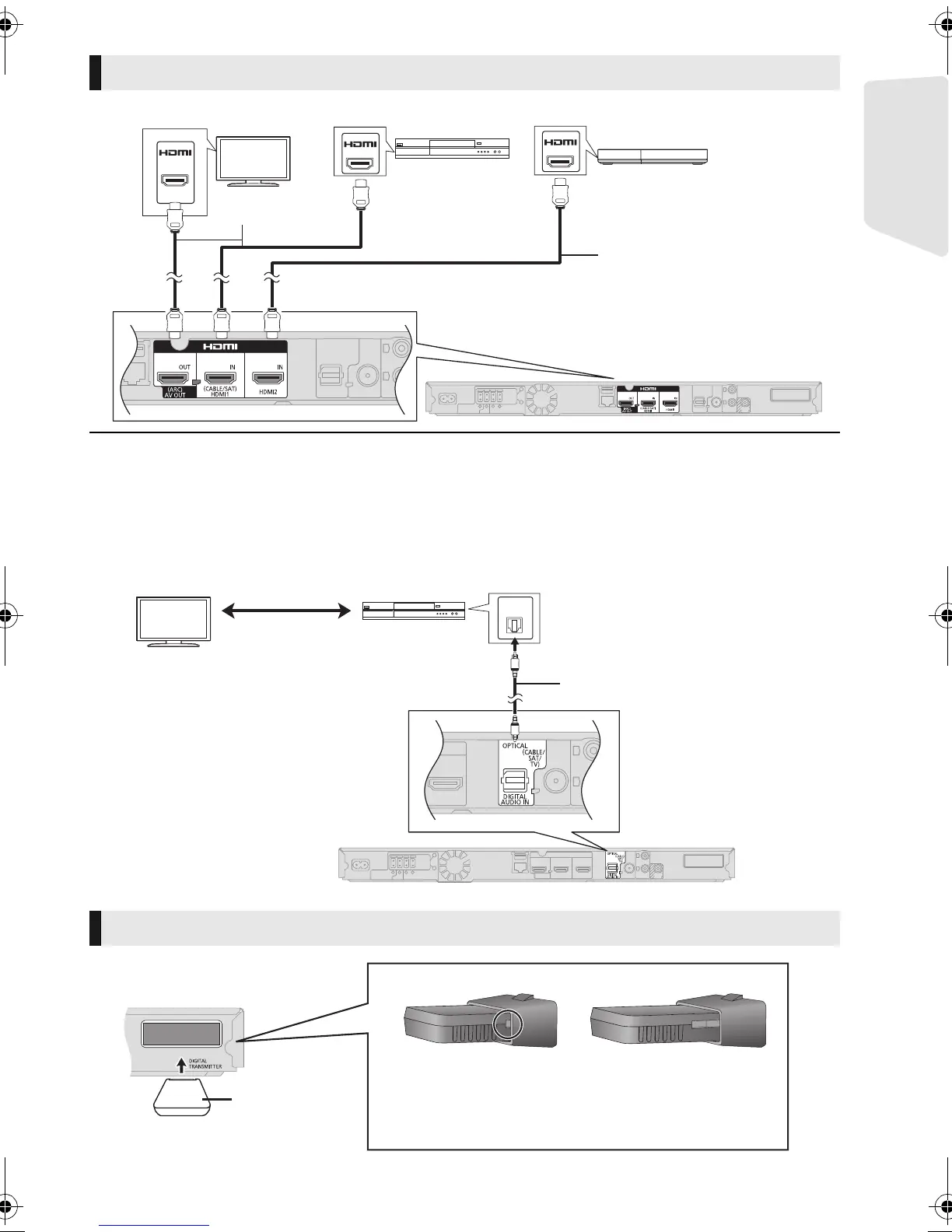
∫ When the connecting devices have an HDMI terminal
HDMI standby pass-through
Even if this system is in standby mode, the audio and/or video signal from the device connected to the HDMI1 IN (CABLE/SAT)
or HDMI2 IN terminal will be sent to the TV connected to the HDMI AV OUT terminal (the sound will not be output from this
system). Even while the unit is in the standby mode, you can change the input signal HDMI1 IN (CABLE/SAT) or HDMI2 IN by
pressing [EXT-IN] on the remote control.
∫ When the connecting devices do not have an HDMI terminal
Other device connection
e.g.,
Set Top Box, etc.
Video game, etc.
HDMI cable
(not supplied)
HDMI cable
(not supplied)
[BT T 790] Digital transmitter connection
e.g.,
Optical digital audio cable (not
supplied)
Set Top Box, etc.
Insert fully until
you hear a click.
Do not insert or remove while the
home theatre unit is on.
Make sure that the digital transmitter is fully inserted.
If the digital transmitter is not fully inserted, the sound
may not be available from the surround speakers.
DO
DO NOT
SC-BTT790&583&490GNGSGA-VQT3Z79_mst.book 15 ページ 2012年1月19日 木曜日 午前10時34分





 To Next Page