17
Getting started
VQT3Z79
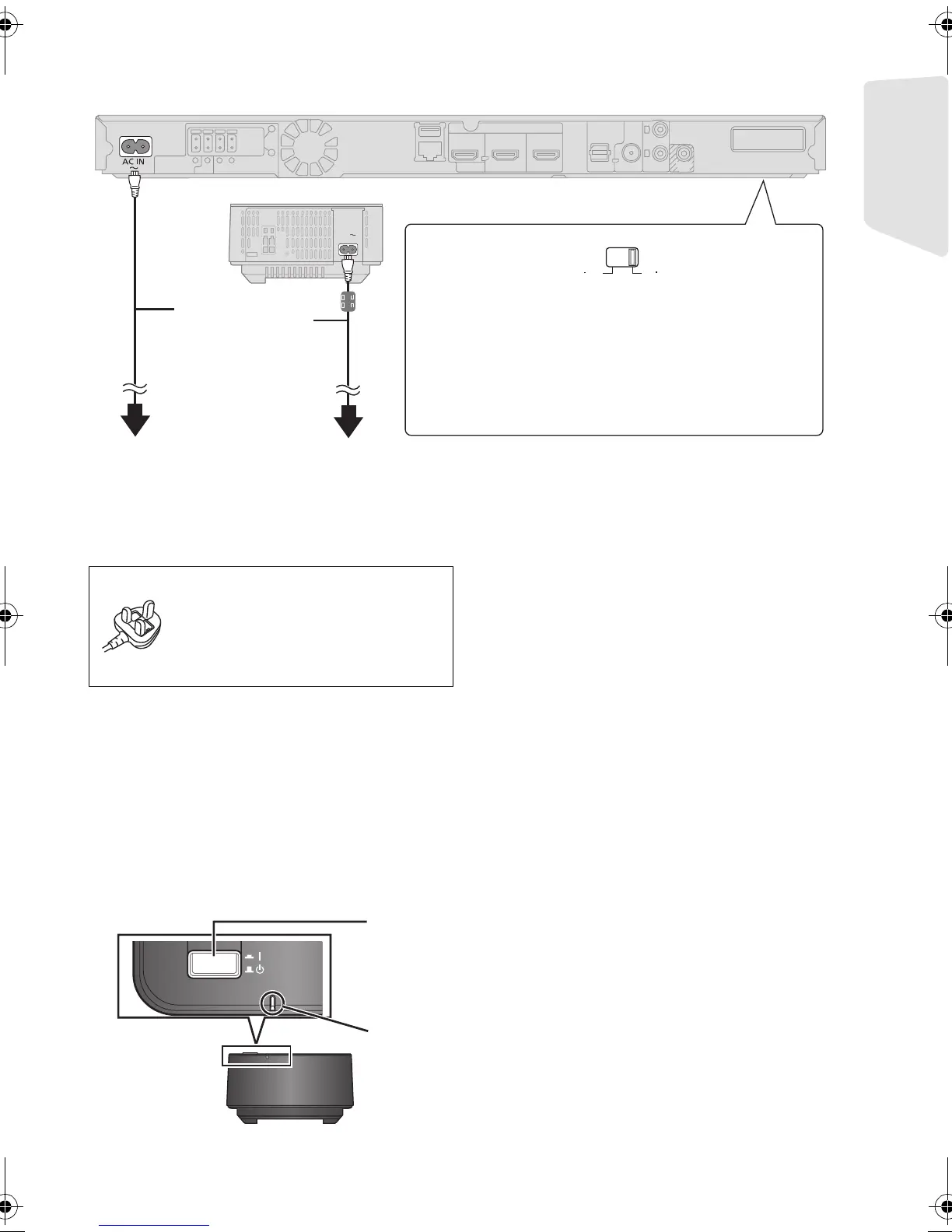
STEP 4: Connecting the AC mains lead
Connect only after all other connections are complete.
[For]the]Middle ]Ea st]
Use the AC mains lead that matches the socket
for the area you live in.
[For]South]East]Asia]
AC mains lead with a label is for Thailand.
AC mains lead without a label is for areas other
than Thailand.
≥ The wireless system ([ B TT790]) and the main unit consume a small amount of AC power (> 50, 51)
even when turned off. In the interest of power conservation, if you will not be using them for an
extended period of time, they can be disconnected.
STEP 5: Preparing the wireless system
[BT T 790]
Turn on the wireless system after all connections are complete.
AC IN
VOLT ADJ
110
127V
220
240V
*
Before connecting the AC mains lead;
Set the voltage at the bottom of the
main unit.
≥ Use a flat-head screwdriver to move the voltage
selector to the appropriate position for the area in
which this system is used.
AC mains lead
(supplied)
* The cord with a ferrite core
is for the wireless system.
To a household mains socket
[Except[Australia[and[ New [Z ealand]
(For Saudi Arabia and Kuwait)
BE SURE TO READ THE
CAUTION FOR THE AC MAINS
LEAD ON PAGE 2 BEFORE
CONNECTION.
Wireless
system
Press [C I, BÍ] on the wireless system.
C I: The wireless system is on.
BÍ: The wireless system is off.
The wireless system consumes a small amount of power, even when it is off
.
WIRELESS LINK indicator
Red:
The wireless system is on and the wireless link is deactivated.
Green:
The wireless system is on and the wireless link is activated.
SC-BTT790&583&490GNGSGA-VQT3Z79_mst.book 17 ページ 2012年1月19日 木曜日 午前10時34分





 To Next Page