EasyManua.ls Logo

Panasonic SC-CH11 - Compact Disc Controls; Cassette Deck Controls

Panasonic SC-CH11
51 pages
Print Icon
To Next Page IconTo Next Page
To Previous Page IconTo Previous Page
Loading...
Remote
Control
Unit
Controls
and
Functions (continued)
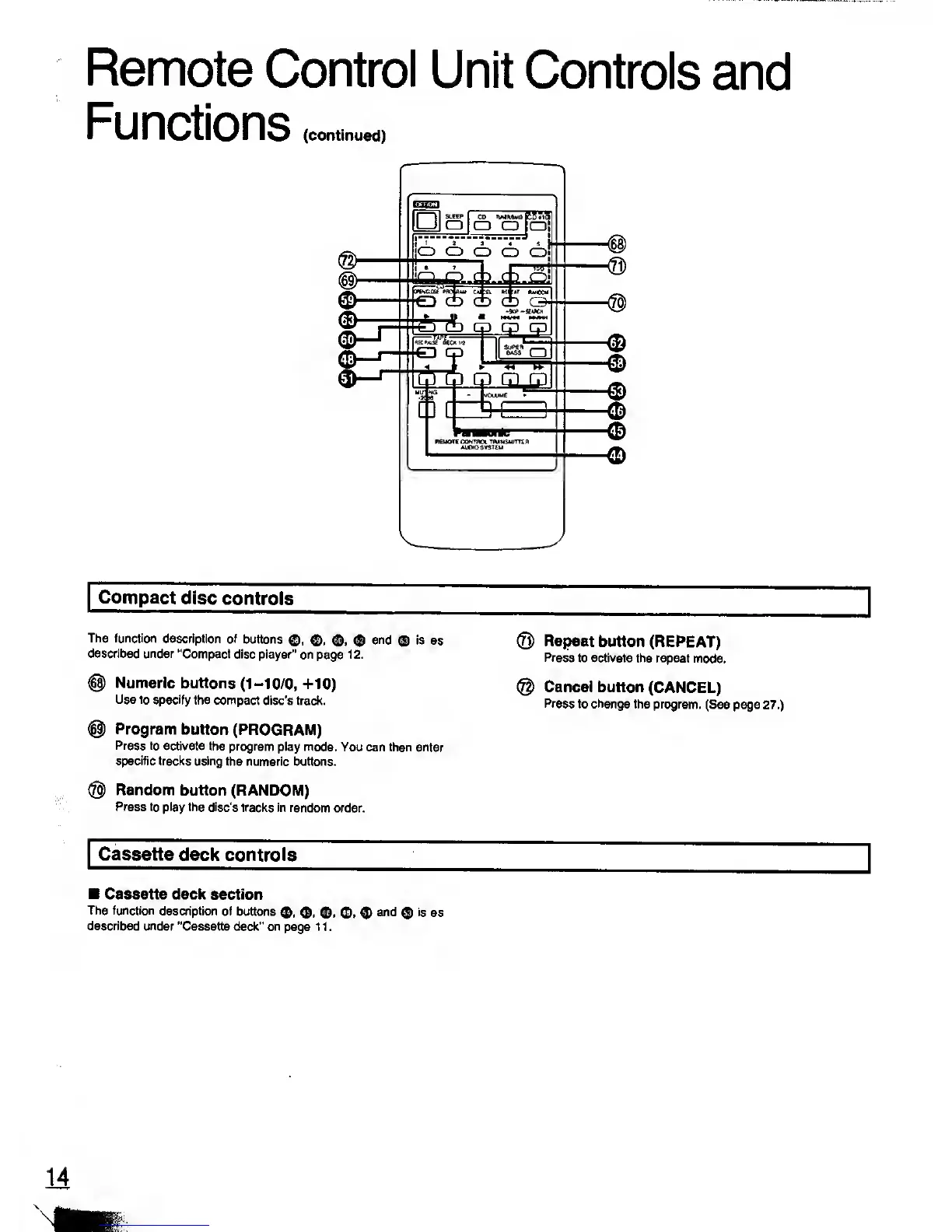
Compact disc
controls
The function
description of
buttons
<J),
©, <$),
<$>
and
©
is
as
described under
"Compact disc
player" on
page
1 2.
@
Numeric
buttons
(1-10/0,
+10)
Use to specify
the compact
disc's track.
©
Program
button
(PROGRAM)
Press to
activate the program
play mode.
You can then enter
specific tracks using
the numeric buttons.
®
Random
button (RANDOM)
Press
to play the disc's
tracks in random
order.
®
Repeat
button (REPEAT)
Press
to activate
the repeat mode.
@
Cancel button
(CANCEL)
Press
to change the program.
(See
page
27.)
Cassette
deck controls
Cassette deck section
The function
description of
buttons
<J>,
©,
<£>,
described under
"Cassette deck" on
page 1 1
.
$
and
®
is
as
14

Related product manuals