Listening to
Tapes
You can use
either deck 1 or deck 2 for tape
playback by
following
the same steps.
To play back prerecorded
cassettes
o o
7
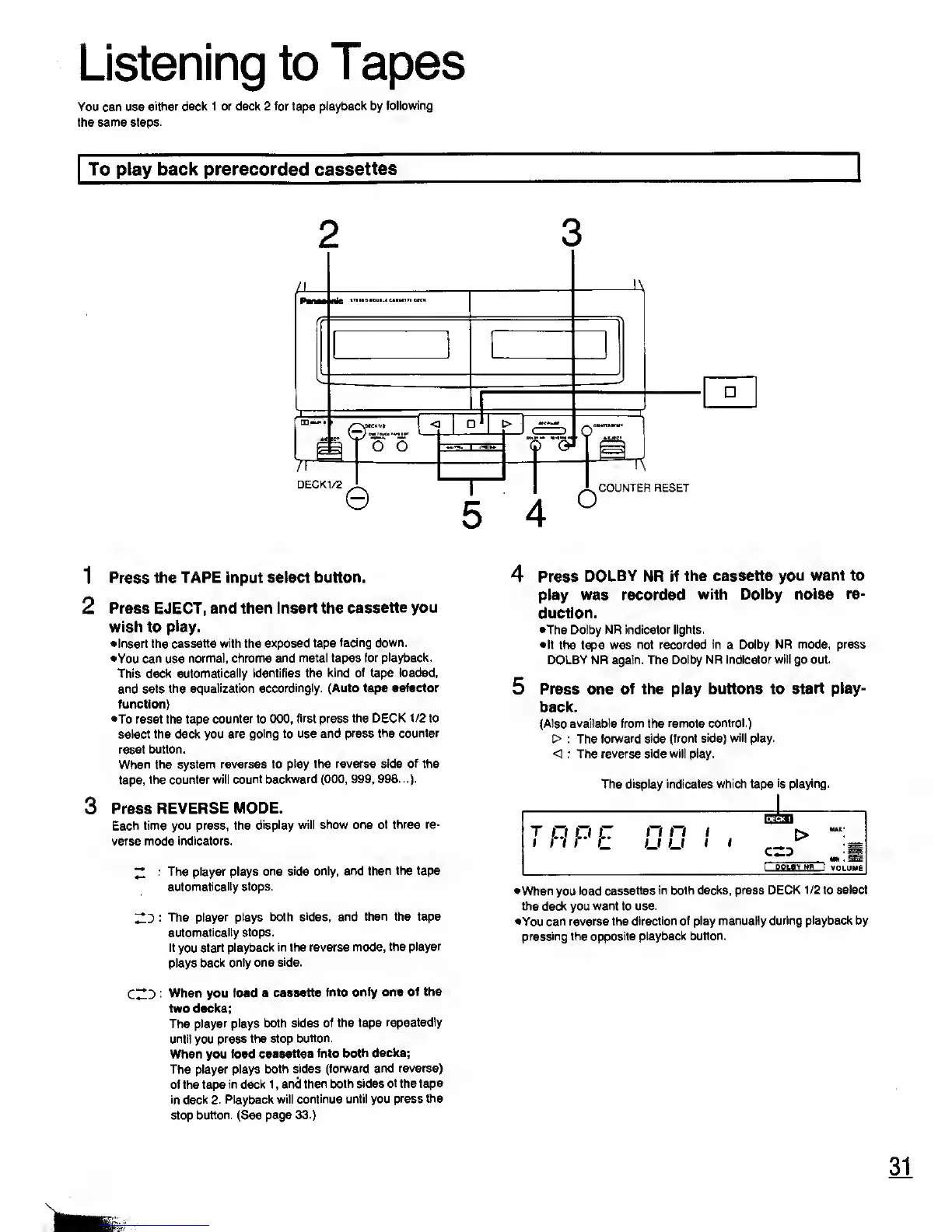
DECK1/2
e
T
5
C=>
Q*
©
0"
o
COUNTER RESET
1
Press the TAPE input
select button.
2 Press
EJECT, and then Insert the
cassette you
wish to
play.
•Insert the cassette
with
the
exposed tape
facing down.
•You
can
use
normal, chrome
and metal tapes for
playback.
This deck
automatically identifies the
kind of tape loaded,
and sets the equalization
accordingly. (Auto tape selector
function)
•To reset the tape
counter to 000, first press
the DECK 1/2 to
select the deck you
are going to use and press
the counter
reset button.
When the system reverses to
play the reverse side of the
tape,
the counter will
count backward
(000, 999,
998...).
3
Press
REVERSE MODE.
Each time you press, the
display will show one
of three re-
verse mode indicators.
^
: The player plays
one side only, and
then the tape
automatically stops.
: The
player plays both
sides, and then the tape
automatically stops.
If
you
start
playback in the reverse mode,
the
player
plays
back only one
side.
CZD
When you load
a cassette
into only one
of the
two decks;
The
player plays both
sides of the tape
repeatedly
until
you
press the stop
button.
When you load
cassettes Into
both decks;
The player plays
both sides (forward
and reverse)
of the tape
in
deck 1 ,
and then
both sides of the tape
in
deck
2. Playback will
continue until
you
press
the
stop button. (See
page
33.)
Press
DOLBY NR if the cassette you
want to
play was recorded
with Dolby noise
re-
duction.
•The Dolby NR indicator
lights.
•If
the tape was
not recorded
in
a Dolby
NR mode, press
DOLBY NR again. The
Dolby NR indicator will go out.
Press one
of the play buttons to
start play-
back.
(Also available from the
remote control.)
> : The
forward side (front side)
will
play.
< : The reverse side will play.
The display indicates which tape
is playing.
t
o O jLT
n
n i
m -M
I QOLflV NR I
VOLUME
•When
you
load cassettes
in both decks, press
DECK 1/2 to select
the deck you want to use.
•You can reverse the
direction of play manually
during playback by
pressing the opposite
playback button.
31
warn










 To Next Page