9
VQT5F34
ENGLISH
Note:
• You cannot use programme playback together with
“PLAYMODE” function.
• The programme memory is cleared when you open the
disc tray.
Note on disc
• This system can play CD-R/RW with CD-DA or MP3 format
content.
• Some CD-R/RW cannot be played because of the
condition of the recording.
• MP3 files are defined as tracks and folders are defined as
albums.
• This system can access up to:
- CD-DA: 99 tracks
- MP3: 999 tracks, 255 albums
• Disc must conform to ISO9660 level 1 or 2 (except for
extended formats).
• Recordings will not necessarily be played in the order you
recorded them.
USB and internal memory
You can connect and play music tracks from your USB
device.
You can also record sound or music tracks into the
internal memory in “.mp3” format.
This system can play or record up to 800 folders
(maximum 999 tracks in an album) or a total of
8000 tracks, depending on the available storage
capacity.
Preparation
Before you connect a USB device to the system, make
sure you do a backup of the data.
Do not use a USB extension cable. The system cannot
recognise USB device connected through a cable.
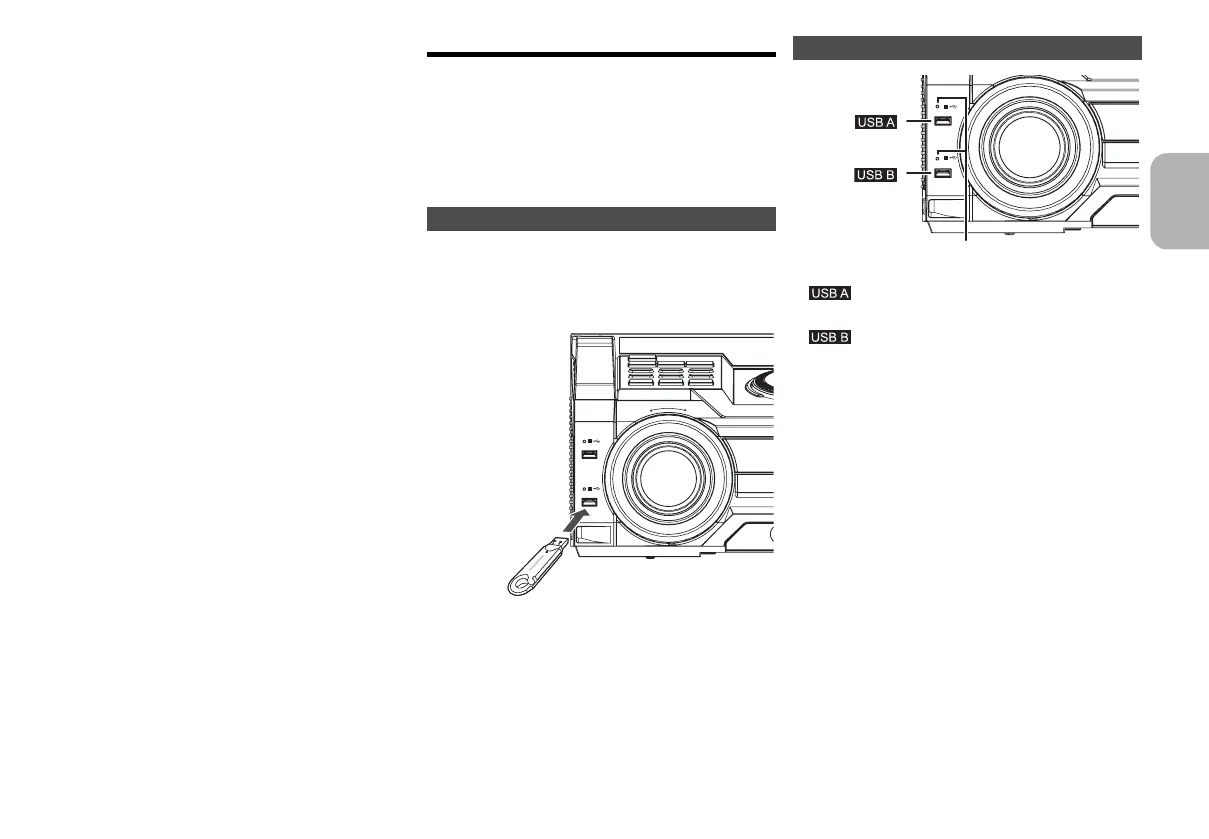
Decrease the volume and connect the USB device to
the USB port.
Hold the main unit when connecting or disconnecting the
USB device.
Note:
USB status indicator lights up when selected.
Connecting a USB device
ILLUMINATION
PLAY
A
B
REC/PLAY
USB at a glance
•
• Play MP3 tracks.
•
• Record/play MP3 tracks.
Note:
USB status indicator blinks during USB recording.
PLAY
A
B
REC/PLAY
9
SC-MAX370GS_eng_sch_rus_ukr.book 9 ページ 2014年3月12日 水曜日 午後6時49分




 To Next Page