17
RQT5717
Recording operations
1
2
3
A
C
B
2
TAPE
TAPE
STOP
TUNE MODE
12
3
456
790
10
CANCEL
AUTO OFF
SLEEP
8
PROGRAMTUNE MODE PLAY MODE
REV MODE
SELECTOR
TAPETUNER CD
CLOCK
TIMER
PLAY
REC
REW
CLEAR
FF
BASS
TREBLE
REV MODE
1
3
2
FWD
PLAY
FWD
FWD
RANDOM
1 -
PRGM
AUTO
1-REC
REC
REV
PLAY
PLAY
RANDOM
1 -
ST
kHz
MONO
REV
PRGM
AUTO
1-REC
TUNED
dB
REC
MHz
FWD
PLAY
RANDOM
1 -
ST
kHz
MONO
REV
PRGM
AUTO
1-REC
TUNED
dB
REC
FWD
side to be recorded
facing up
Before recording
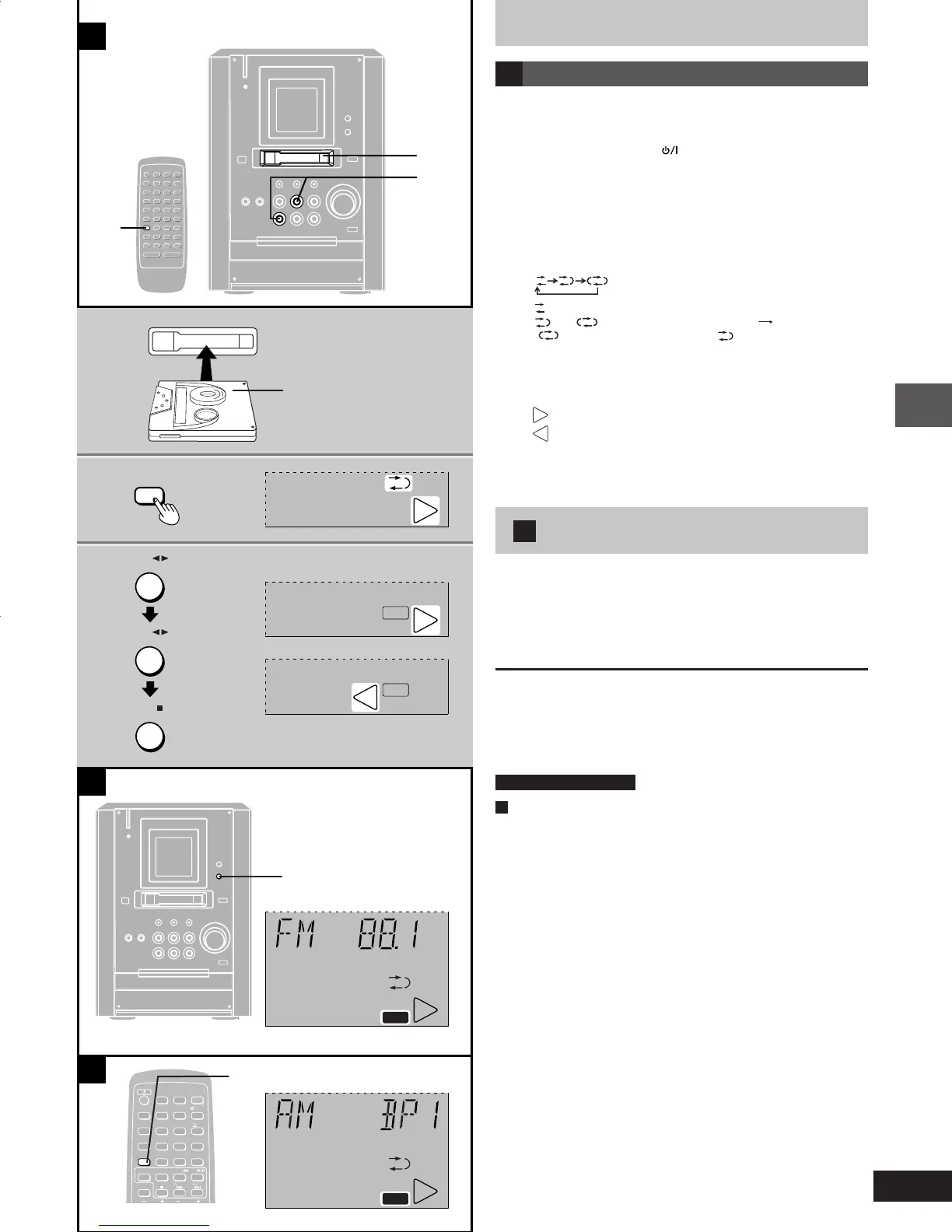
A Preparatory steps
Do these steps before each recording.
Wind up the leader tape so recording can begin immediately.
(unneccessary if auto CD editing)
Preparation: Press [POWER
] to turn the unit on.
1 Insert the tape to be recorded on.
Insert with the exposed tape facing left.
2 Press [REV MODE] on the remote
control to select the reverse mode.
Every time you press the button:
:
One side only records.
and : Both sides record (forward reverse).
" "
automatically changes to " " when ([REC/ J)
is pressed.
3 (unneccessary with auto editing recording, \ Page 19)
Set the tape direction.
FWD
: To record on the forward side.
REV
: To record on the reverse side.
To change the direction
Press [TAPE 2 3] twice and then [STOP L].
B Recording the radio
Preparation: Do the preparatory steps above.
1 Tune to the required station.
(\ page 10 or 11)
2 Press [[REC/ J] to start recording.
To stop recording.
Press [STOP L].
To stop recording temporarily
Press [[REC/ J].
To resume recording, press [[REC/ J].
by remote control only
C To reduce noise while recording an AM broadcast
(Beat proof function)
Press and hold [TUNE MODE] while recording.
Every time you press and hold the button:
BP 1 ↔ BP 2
Select the position where there is less noise.
e17-19 1/17/01, 6:31 PM17











 To Next Page