19
RQT5717
Recording operations
1
2
3
4
1
2
3
4
A
B
1
3
2
4
REC
REC
CD EDIT
CD EDIT
SELECTOR
SELECTOR
FF
REW
2
4
3
1
AUTO
PLAY
REC
REV FWD
TUNED
RANDOM
1 -
PRGM
MHz
ST
kHz
MONO
dB
1-REC
side to be recorded
facing up
PRGM
MHz
dB
ST
kHz
MONO
TUNED
AUTO
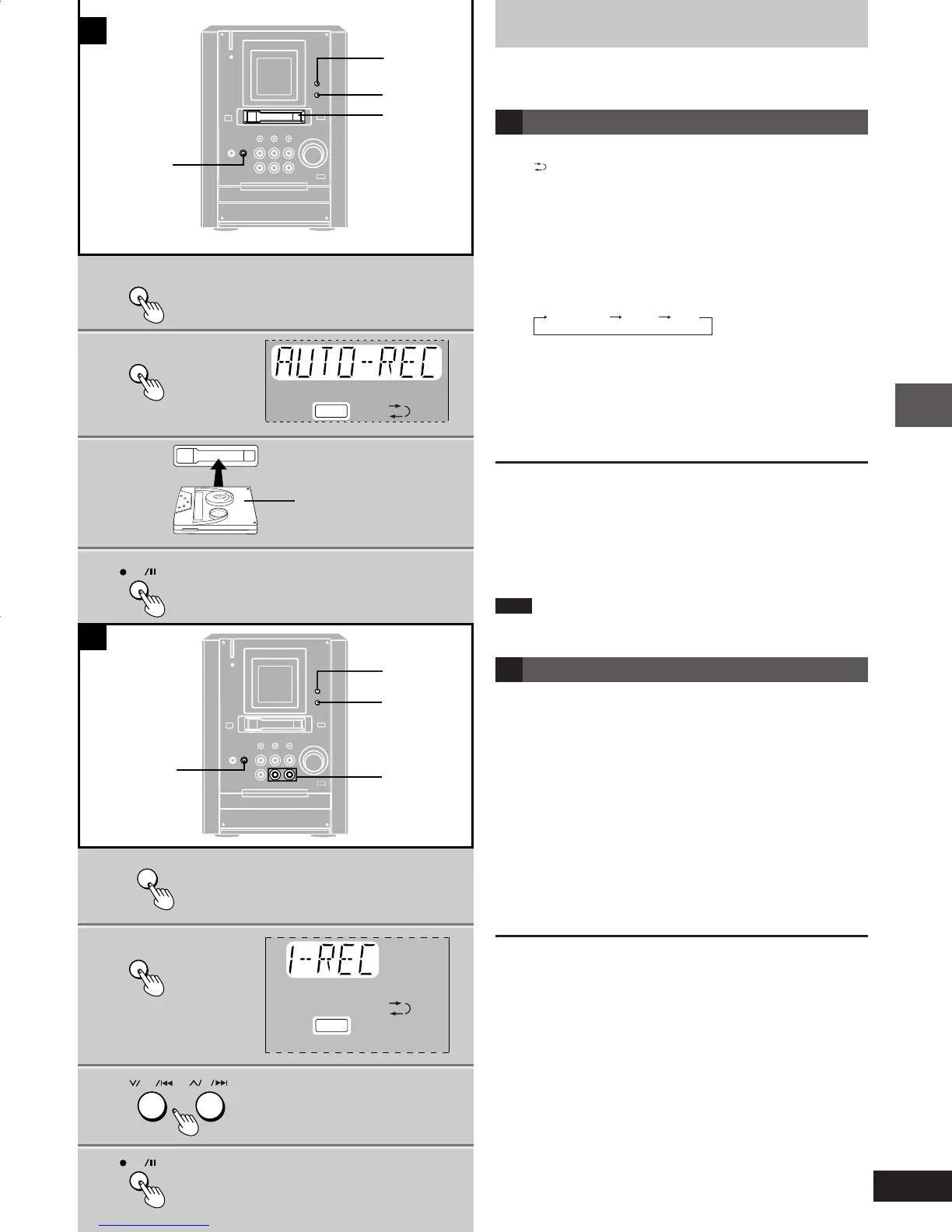
Recording CDs
You can record the whole CD (AUTO-REC) or a selected track (1-
REC). If a track is interrupted at the end of the side facing up, it is
recorded again on the side facing down.
A Auto editing recording (AUTO-REC)
Recording begins from the side facing up and the reverse mode is
set to “
”.
Preparation: Insert a CD (\ page 12)
1 Press [SELECTOR] to switch to CD
mode.
2 Press [CD EDIT] so “AUTO-REC” is
displayed.
Every time you press the button:
AUTO-REC
1-REC
OFF
3 Insert the tape with the exposed tape
facing left.
4 Press [[REC/ J ] to start recording.
The unit rewinds the tape, records 10 seconds of silence, and
then starts recording.
To stop recording
Press [STOP L]. The CD also stops.
To record selected tracks.
11
11
1 Program tracks (\steps 1 to 3 on page 14).
22
22
2 Do steps 2 to 4 above.
Note
Auto edit recording cannot be used with random and repeat play. (\
page 13).
B One track edit recording (1-REC)
Preparation:
Insert a CD (\ page 12) and a cassette.
Wind the tape to where you want to start recording.
1 Press [SELECTOR] to switch to CD
mode.
2 Press [CD EDIT] so “1-REC” is dis-
played.
3 Press [
44
44
4/REW/ g ] or [
33
33
3/FF/ f ] to
select the track you want to record.
4 Press [[REC/ J ] to start recording.
CD play and recording start at the same time.
To stop recording
Press [STOP L]. The CD also stops.
To continue recording from another CD
11
11
1 Press [OPEN/CLOSE c] and insert the other CD.
22
22
2 Do steps 3 and 4.
To record a track while it is being played.
11
11
1 Press [CD EDIT] so “1-REC” is displayed.
22
22
2 Press [[REC/ J].
Recording starts from the beginning of the track and stops when
the track finishes.
e17-19 1/17/01, 6:32 PM19











 To Next Page