21
TQBM0933
D:\A_Job\PSG\_FY22\SC-PM270\Source\woi\PM272EB.EG_TQBM0933_EN.fm
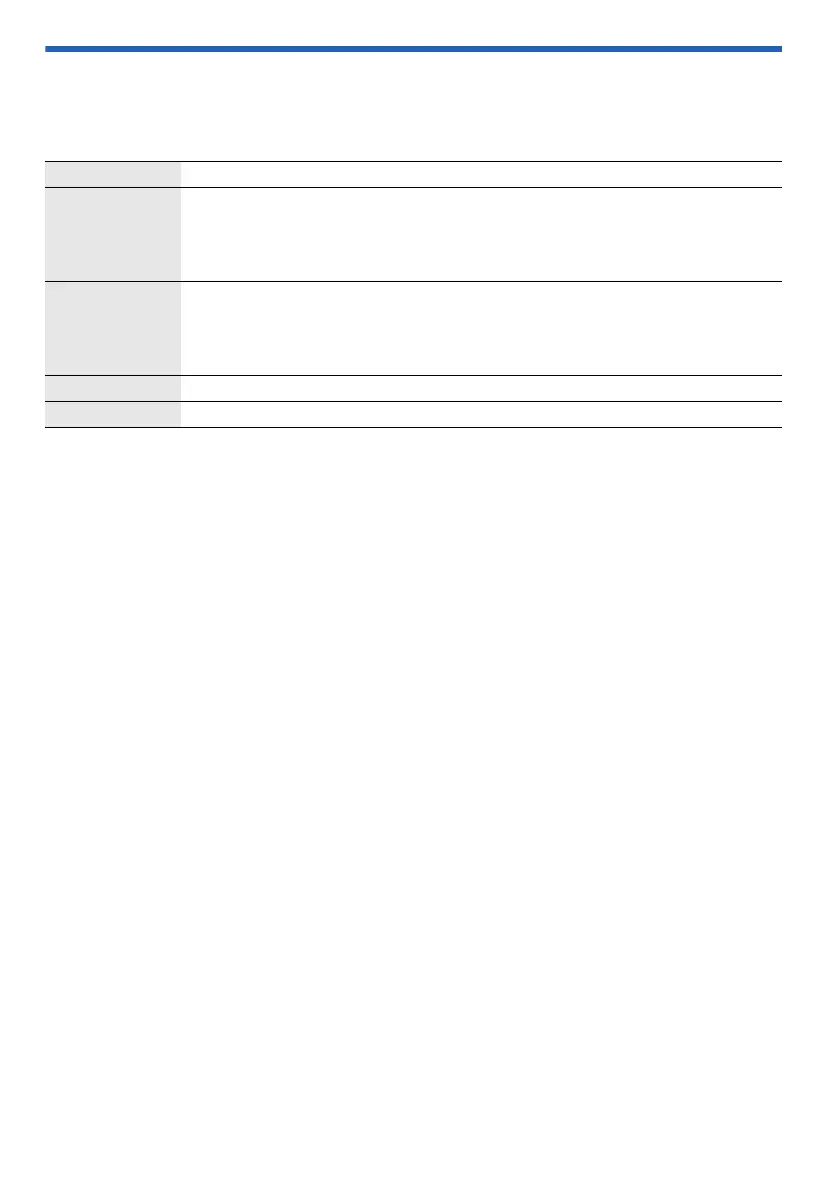
Sound effects
1 Press [SOUND] repeatedly to select the effect.
2 Press [R, T] to select the setting and then press [OK].
PRESET EQ “HEAVY” (default), “SOFT”, “CLEAR”, “VOCAL” or “FLAT”
BASS –4 to +4 (default: 0)
Using the main unit
1. Press [BASS].
2. Press [2/3] or [5/6].
TREBLE –4 to +4 (default: 0)
Using the main unit
1. Press [TREBLE].
2. Press [2/3] or [5/6].
D.BASS “ON D.BASS” (default) or “OFF D.BASS”
SURROUND “ON SURROUND” or “OFF SURROUND” (default)
PM272EB.EG_TQBM0933_EN.fm Page 21 Wednesday, August 30, 2023 4:20 PM











 To Next Page