RQT8092
22
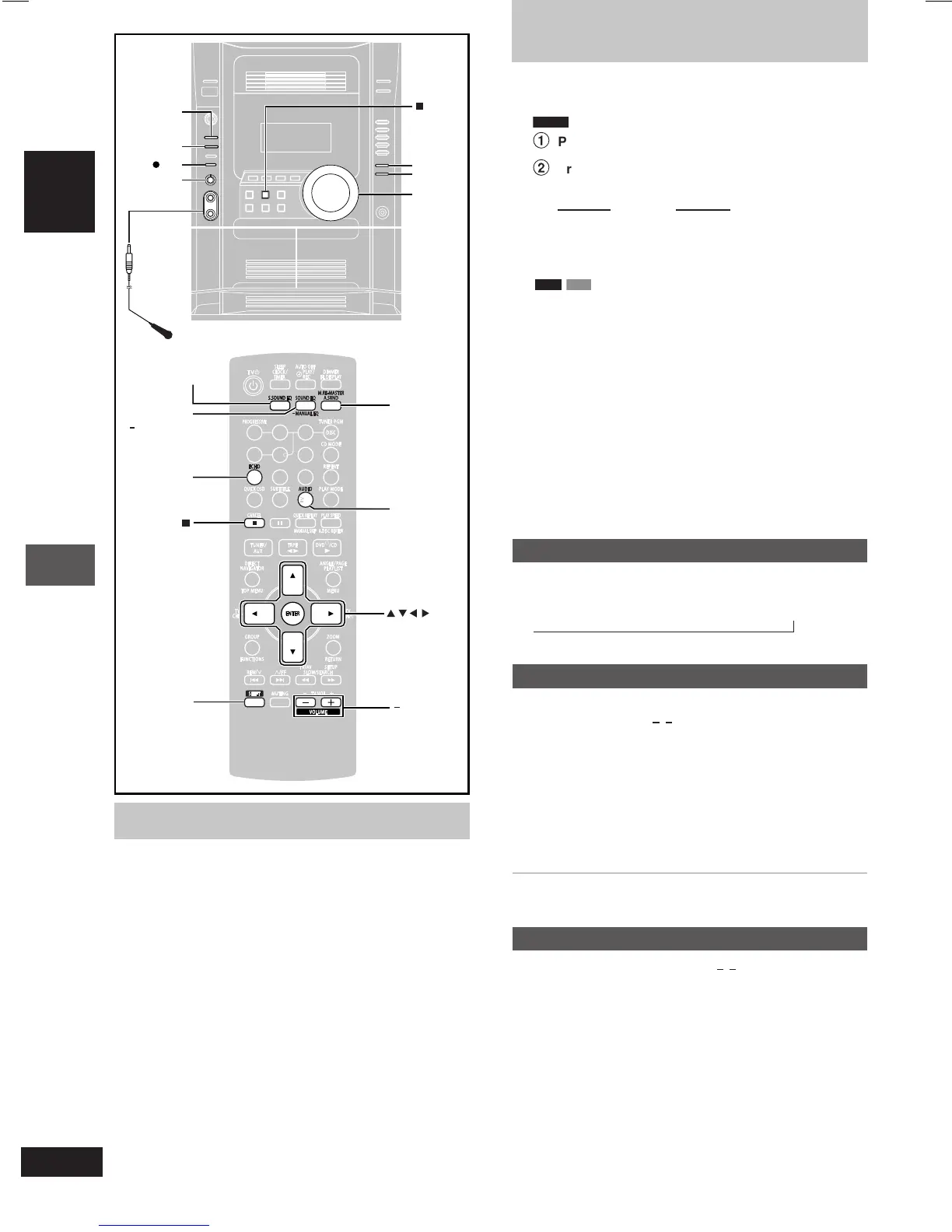
Enjoying karaoke
ENGLISH
, STOP
VOLUME
DOWN, UP
MIC VOL
MIN, MAX
REC
ADVANCED
SURROUND
SUPER
SOUND EQ
SOUND EQ
Microphone(s)
(not included)
MULTI
RE-MASTER
, +,
VOLUME
SHIFT
A.SRND,
M.RE-MASTER
AUDIO
ECHO
S.SOUND EQ
SOUND EQ,
MANUAL EQ
7 8
0
9
10
456
1
23
,, , ,
ENTER
1 Insert the disc and start play (A page 10).
2
DVD-V
1
Press [SHIFT] + [AUDIO] during play.
2
Press [8] or [9] then [ENTER], or [;, :] to select
the mode.
Solo discs Duet discs
Off: Vocals off Off: Vocals off
On: Vocals on V1+V2: Both parts
V1: Part 1 only
V2: Part 2 only
RAM
VCD
Press [SHIFT] + [AUDIO].
Every time you press the button:
AUDIO L R (LR) : Left channel sound is heard from the left
speaker and right channel sound is heard from
the right speaker (Vocal and accompaniment).
AUDIO L (L) : Only left channel sound (No vocal).
AUDIO R (R) : Only right channel sound (Vocal).
• Select no vocal for karaoke.
• Vocal and no vocal may be reversed.
• Actual operations depend on the disc. Read the disc’s instructions
for details.
3 Start singing and adjust volume with [–, + VOLUME]
(main unit: [VOLUME DOWN, UP]) and [MIC VOL MIN,
MAX] on the main unit.
Adjusting the echo effect
Press [SHIFT] + [ECHO].
Every time you press the button:
ECHO 1 → ECHO 2 → ECHO 3 → ECHO 4 → ECHO OFF (off)
↑
The effect increases with the level.
To record your karaoke performance
Preparation:
• Do the preparatory steps 1–2 on page 21.
• Insert the disc and start play (A page 10).
1 Press [SHIFT] + [AUDIO] to select the voice mode.
2 Adjust volume with [–, + VOLUME] (main unit: [VOLUME
DOWN, UP]) and [MIC VOL MIN, MAX] on the main
unit.
3 Press [[ REC] on the main unit and start karaoke
performance.
To stop recording
Press [L] (main unit: [L, STOP]).
To record your voice
Preparation: Do the preparatory steps 1–2 on page 21. Ensure that
there is no tape in deck 1.
1 Press [[
REC] on the main unit to start recording.
2 Speak through the microphone and adjust volume with
[–, + VOLUME] (main unit: [VOLUME DOWN, UP]) and
[MIC VOL MIN, MAX] on the main unit.
Preparation:
•
Lower the microphone volume with [MIC VOL MIN, MAX] on the
main unit, then connect the microphone(s) to the microphone jack(s).
Use a dynamic microphone.
Plug type: 6.3 mm monaural.
•
If a strange noise (howling) is emitted during use, move the
microphone away from the speakers, or turn down the microphone
volume.
•
When you are not using the microphone, disconnect it from the
microphone jack, and turn down the microphone volume level to
“MIN”.
22
Enjoying karaoke
Enjoying karaoke



 To Next Page