9
RQT8092
Control reference guide
ENGLISH
Remote control
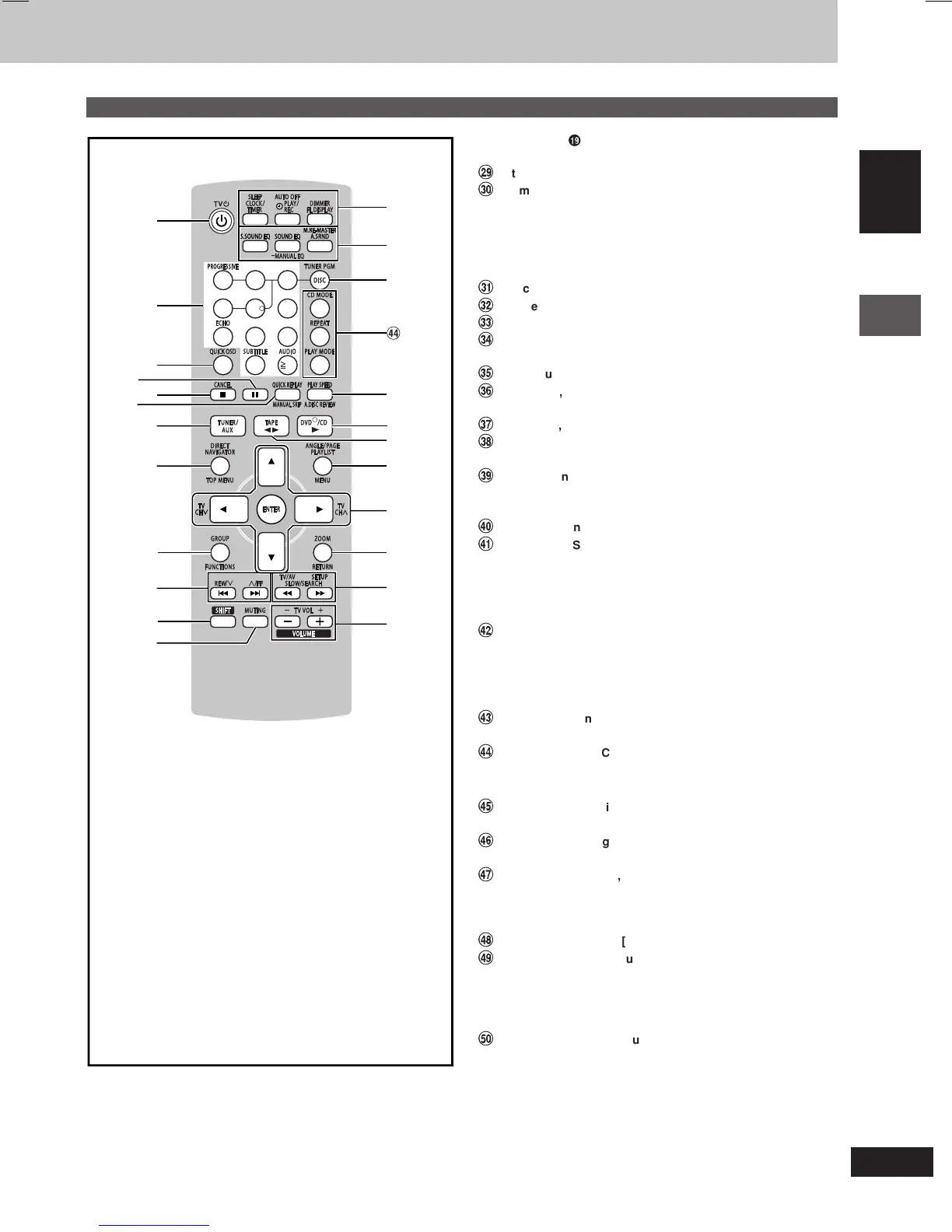
Buttons such as
â
function in exactly the same way as the buttons
on the main unit.
ì
Standby/on, TV power on/off button [
ff
ff
f, TV
ff
ff
f] ............... 24, 25
î
Numbered buttons [0 – 9,
XX
XX
X
10] ............................................. 11
These buttons have the following functions.
[1] : Progressive video button [PROGRESSIVE] .................. 11
[7] : Echo button [ECHO] ..................................................... 22
[0] : Subtitle button [SUBTITLE] ........................................... 11
[
X
10] : Audio button [AUDIO] ................................................... 13
ï
Quick OSD button [QUICK OSD] .......................................... 12
ñ
Pause button [J] .................................................................... 11
ó
Stop, Cancel button [L, CANCEL] ........................ 6, 11, 15, 16
ò
Manual skip, Quick replay button
[MANUAL SKIP, QUICK REPLAY] ......................................... 12
ô
Tuner/aux button [TUNER/AUX] ...................................... 20, 25
ö
Top menu, Direct navigator button
[TOP MENU, DIRECT NAVIGATOR] .......................... 11, 14, 15
õ
Functions, Group button [FUNCTIONS, GROUP] .... 11, 14, 17
ú
Disc skip, tape fast-forward/rewind, preset channel select,
time adjust buttons [g, REW/
44
44
4, f ,
33
33
3/FF] ......... 6, 20, 21
ù
Shift button [SHIFT]
To use functions labeled in orange:
While pressing [SHIFT], press the corresponding button.
û
Muting button [MUTING] ....................................................... 25
ü
Clock/timer, Sleep timer button
[CLOCK/TIMER, SLEEP] .................................................... 6, 24
Play/record timer, Auto off button
[
˚˚
˚˚
˚PLAY/REC, AUTO OFF] ............................................... 24, 25
FL display, Dimmer button [FL DISPLAY, DIMMER] ..... 11, 25
†
Super Sound EQ button [S.SOUND EQ] .............................. 23
Sound EQ, Manual EQ button
[SOUND EQ, –MANUAL EQ] ................................................. 23
Advanced surround, Multi Re-master button
[A.SRND, M.RE-MASTER] ...................................................... 23
°
Disc select, Tuner program button
[DISC, TUNER PGM] ........................................................ 12, 20
¢
CD mode button [CD MODE] ................................................ 12
Repeat button [REPEAT] ....................................................... 13
Play mode button [PLAY MODE] .............................. 16, 20, 21
£
Advanced disc review, Play speed button
[A.DISC REVIEW, PLAY SPEED] ..................................... 12, 13
§
Menu, Playlist, Angle/Page button
[MENU, PLAYLIST, ANGLE/PAGE] ........................... 11, 13, 14
•
Cursor buttons [8,9,/, -],
Enter button [ENTER] ................................ 6, 11, 13, 14, 15, 23
These buttons have the following functions.
[/, -] : TV channel select buttons [TV CH 4, TV CH3] ....... 25
¶
Return, Zoom button [RETURN, ZOOM] .......................... 6, 13
ß
Slow/search, Tuning buttons
[//, --, SLOW/SEARCH] ..................................... 11, 14, 20
These buttons have the following functions.
[//] : TV/AV input mode select button [TV/AV] ..................... 25
[--] : Setup button [SETUP] ................................................... 6
®
Volume buttons, TV volume buttons
[–, +, VOLUME, – TV VOL +] ........................................... 22, 25
78
0
9
10
456
1
23
1
3
2
0
8
9
!
6
5
7
[
_
]
\
@
?
^
V
}
|
{
,
+
9







 To Next Page