Discs — Basic play
13
RQT8169
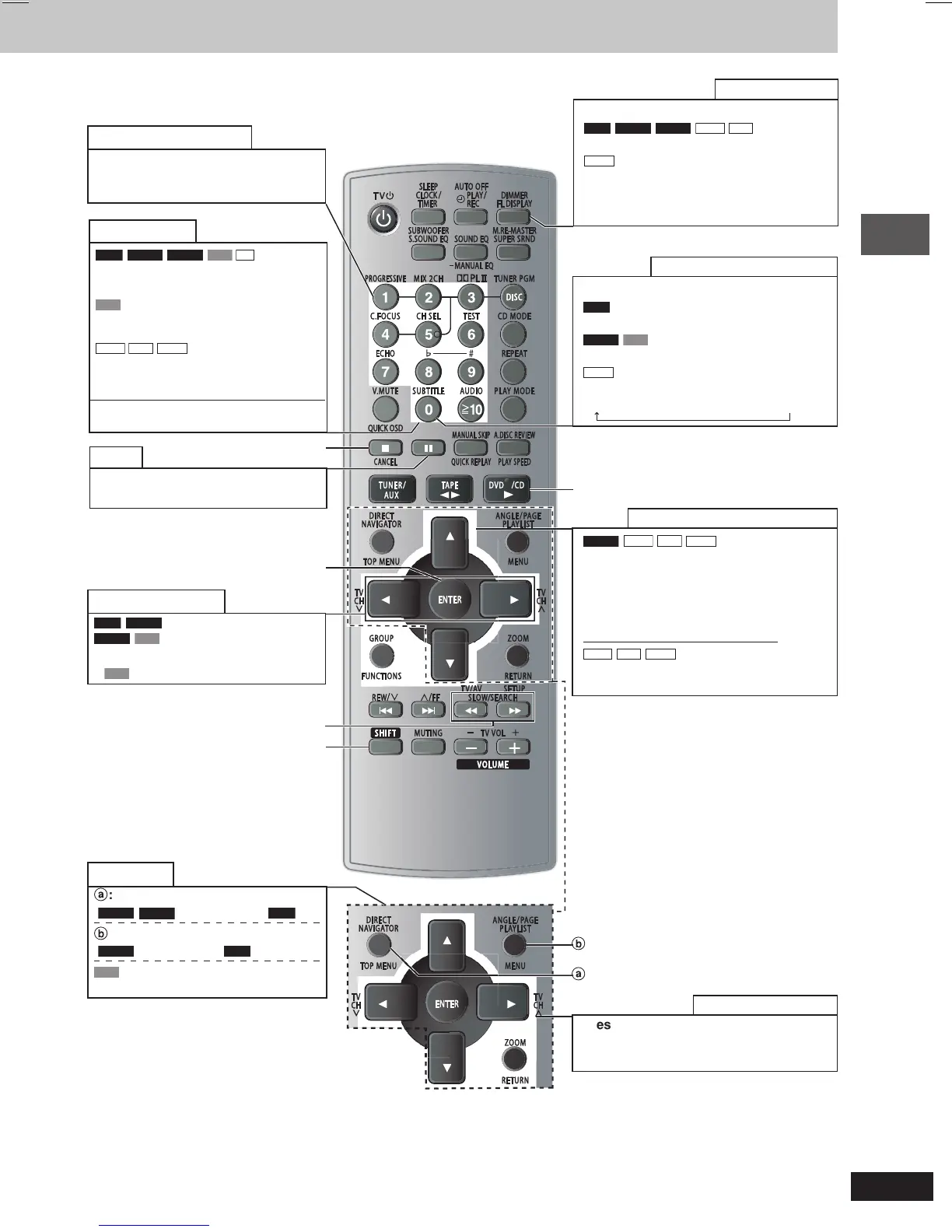
Press [FL DISPLAY] to change display.
RAM
DVD-A
DVD-V
WMA
MP3
Time display
↔↔
↔↔
↔ Information display
JPEG
When Slideshow (A page 19) is on:
SLIDE
↔↔
↔↔
↔ Information display
When Slideshow (A page 19) is off:
PLAY
↔↔
↔↔
↔ Information display
Main unit display
Press [SHIFT] + [SUBTITLE].
RAM
Selects subtitles on/off (A page 15).
DVD-V
VCD
(SVCD only)
Selects a subtitle language (A page 15).
JPEG
Selects the information displayed.
Date → Details of the picture → No information
Subtitles/Information screen
DVD-A
WMA
MP3
JPEG
Press [SHIFT] + [GROUP], then press
[8, 9] to select, then press [ENTER] to
start play.
•
A folder on WMA/MP3 and JPEG discs is
treated as a “Group”.
Group/Content skip during play
WMA
MP3
JPEG
Group skip: Press [8, 9].
Content skip: Press [;, :].
Start play from a selected group
:, DVD/CD
Enjoy progressive video
Press [SHIFT] + [PROGRESSIVE].
You can enjoy progressive video
(A page 7).
Enter numbers
RAM
DVD-A
DVD-V
VCD
CD
Press the numbered buttons.
E.g. to select 12: [h10] A [1] A [2]
VCD
with Playback control (PBC)
Press [L] to cancel the PBC functions, then
press the numbered buttons.
WMA
MP3
JPEG
Press the numbered buttons, then
press [ENTER].
E.g. to select 123: [1] A [2] A [3] A [ENTER]
•
Press [SHIFT]+[CANCEL] to cancel the
number(s).
L, CANCEL
Pause
Press [J] during play.
•
Press [:, DVD/CD] to restart play.
ENTER
Skip frame-by-frame
RAM
DVD-A
(Motion picture part)
DVD-V
VCD
Press [;, :] during pause.
•
VCD
Forward direction only.
(, ), SLOW/SEARCH
SHIFT
Disc menus
a
: Press to show a disc top menu
(
DVD-V
DVD-A
) or programs (
RAM
).
b
: Press to show a disc menu
(
DVD-V
) or a playlist (
RAM
).
VCD
with Playback control (PBC)
Press [RETURN] to show disc menu.
a
b
Press [8, 9, ;, :] to select, then press
[ENTER] to make the settings.
•
Press [RETURN] to return to previous screen.
On-screen item select
RQT8169(12_13)new1 4/21/05, 10:36 AM13








 To Next Page