28
LSQT1346
Setup
4
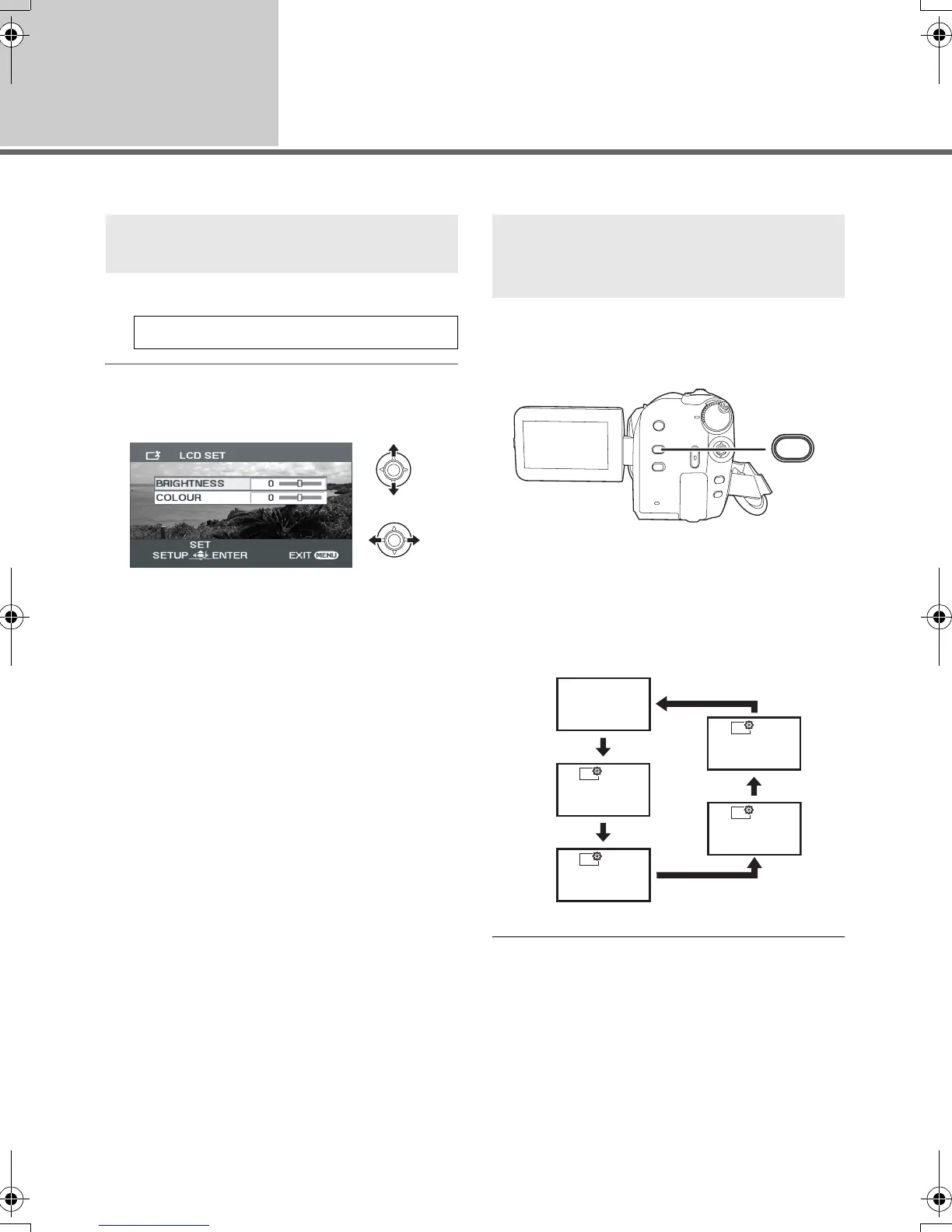
Adjusting LCD monitor
≥ These settings will not affect the images actually recorded.
1 Select the menu. (l 24)
2 Select the item and then adjust
the settings with the joystick.
[BRIGHTNESS]:
Brightness of the LCD monitor
[COLOUR]:
Colour level of the LCD monitor
Press the POWER LCD PLUS
button.
Each time you press the button:
1 Original brightness
2 Bright
3 Brighter
4 Darker
5 Dark
≥ If you turn on the unit when the AC adaptor is
used, this function will automatically be
“Bright”.
Adjusting the brightness and
colour level
[SETUP] # [LCD SET] # [YES]
Increasing and decreasing the
brightness of the entire LCD
monitor
POWER
LCD PLUS
1
2
3
5
4
-
1
-
2
+1
+2
SDR-H60&40EP-LSQT1346_eng.book 28 ページ 2008年2月25日 月曜日 午後3時33分





 To Next Page