40
LSQT1346
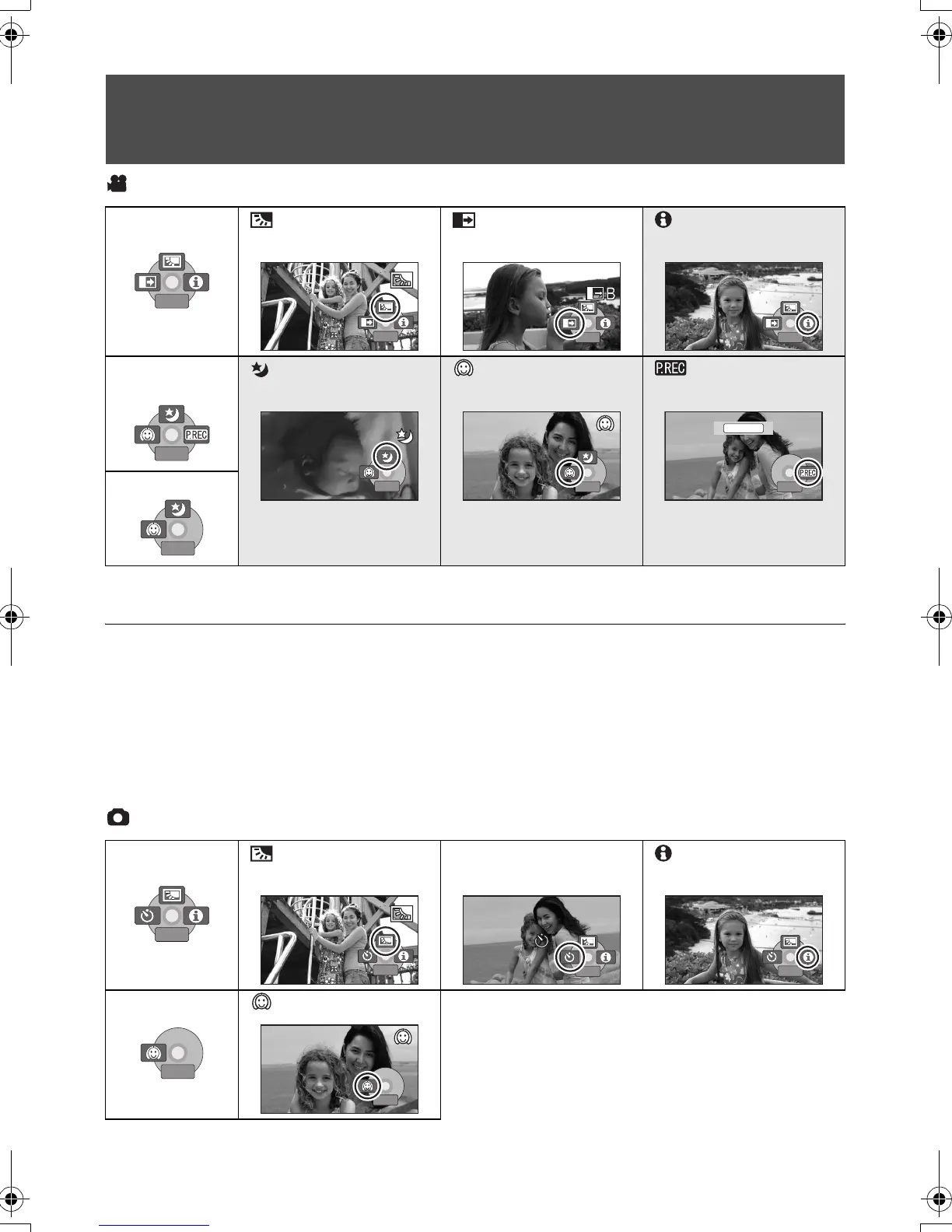
Video recording mode
* PRE-REC is displayed only when [MEDIA SELECT] is set to [SD CARD].
≥ The shaded operation icons are not displayed while recording.
≥ If you turn off the power or operate the mode
dial, the backlight compensation and the colour
night view functions are cancelled.
≥ If you turn off the power, the fade function is
cancelled.
≥ PRE-REC is cancelled if
jthe power is turned off
jthe mode dial is operated
jthe SD card slot cover is opened
jthe battery is removed or the AC adaptor is
disconnected
jthe MENU button is pressed
jabout 3 hours elapsed
Picture recording mode
Operation icons
Backlight compensation/Fade/Help mode/Colour night view/Soft skin mode/PRE-
REC (SDR-H60/SDR-H50)/Self-timer
Backlight
compensation
Fade Help mode
SDR-H60
SDR-H50
Colour night view Soft skin mode PRE-REC
*
(SDR-H60/SDR-H50)
SDR-H40
1/2
NEXT
1/2
NEXT
1/2
NEXT
1/2
NEXT
1/2
NEXT
1/2
NEXT
1/2
NEXT
1/2
NEXT
2/2
NEXT
2/2
NEXT
2/2
NEXT
2/2
NEXT
2/2
NEXT
2/2
NEXT 2/2
NEXT
2/2
NEXT
PRE-REC
2/2
NEXT
2/2
NEXT
Backlight
compensation
Ø Self-timer Help mode
Soft skin mode
1/2
NEXT
1/2
NEXT
1/2
NEXT
1/2
NEXT
1/2
NEXT
1/2
NEXT
1/2
NEXT
1/2
NEXT
2/2
NEXT
2/2
NEXT
2/2
NEXT
2/2
NEXT
SDR-H60&40EP-LSQT1346_eng.book 40 ページ 2008年2月25日 月曜日 午後3時33分









 To Next Page