22 VQT1R13
Setup
6
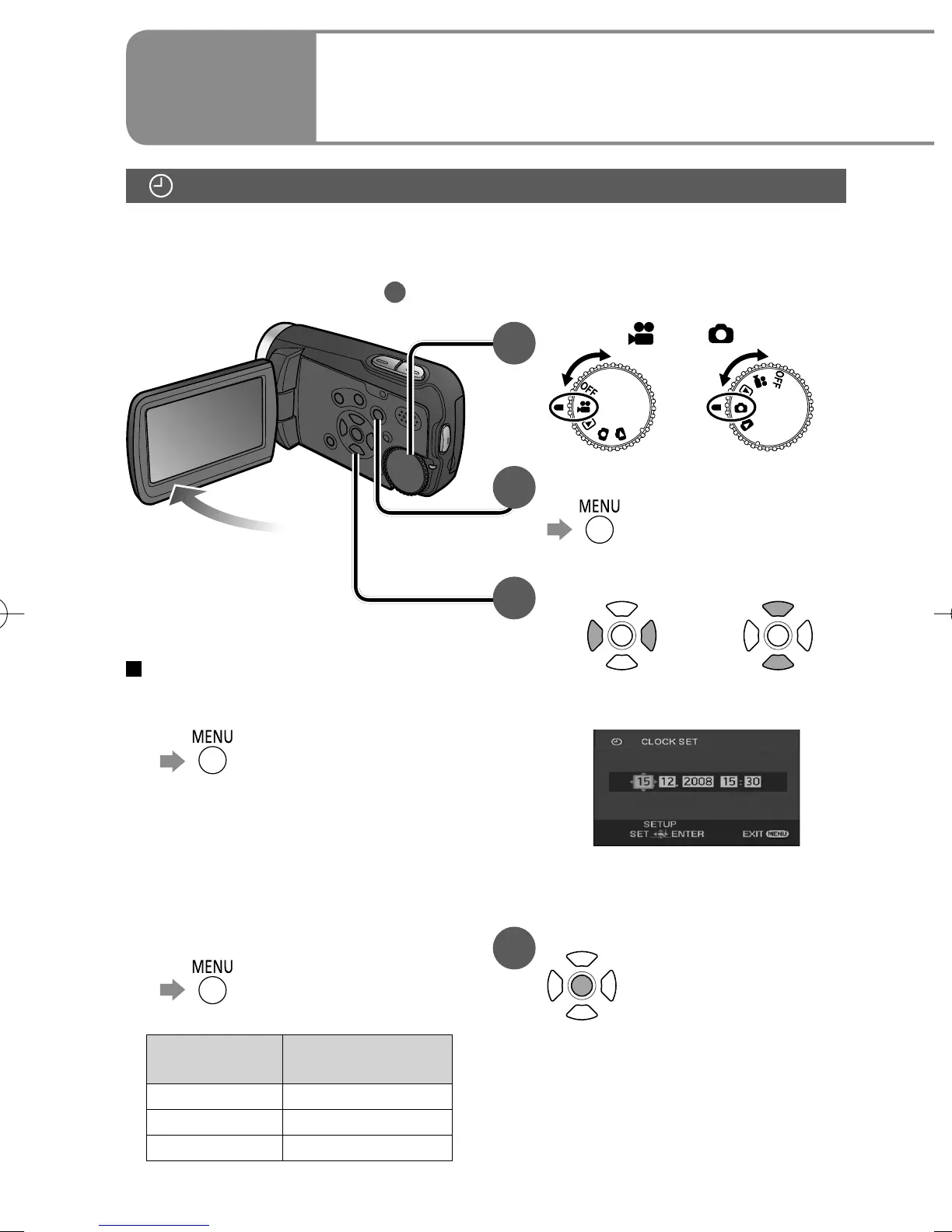
Setting the date and time
1
Set to [ ] or [ ].
2
Select the desired menu.
→[BASIC]→
[CLOCK SET]→[YES]
3
Set the date and time.
To select settings To change
numerical values
The year is displayed up to 2099
and the 24-hour system is used
to display the time.
4
Enter the date and time.
• The clock function starts at [00]
seconds.
• After pressing the [MENU]
button and closing the menu,
check the date and time
displays.
To change the date and time
display
● To change an item
→[SETUP]→
[DATE/TIME]
[OFF] : Date and time are not
displayed.
[D/T] : Date and time are
displayed.
[DATE] : Only the date is displayed.
● To change the date format
→[SETUP]→
[DATE FORMAT]
Format
indication
Appearance on
LCD monitor
[Y/M/D] 2008.12.15
[M/D/Y] 12.15.2008
[D/M/Y] 15.12.2008
Setting the date and time
Before recording, check that the date and time have been set.
The very first time that power is turned ON, a message appears prompting
you to set the date and time. Select [YES (ใช่)], press the centre of the cursor
buttons and proceed to step
3
.












 To Next Page