32 VQT1R13
Recording
5
Other recording options
While recording is paused
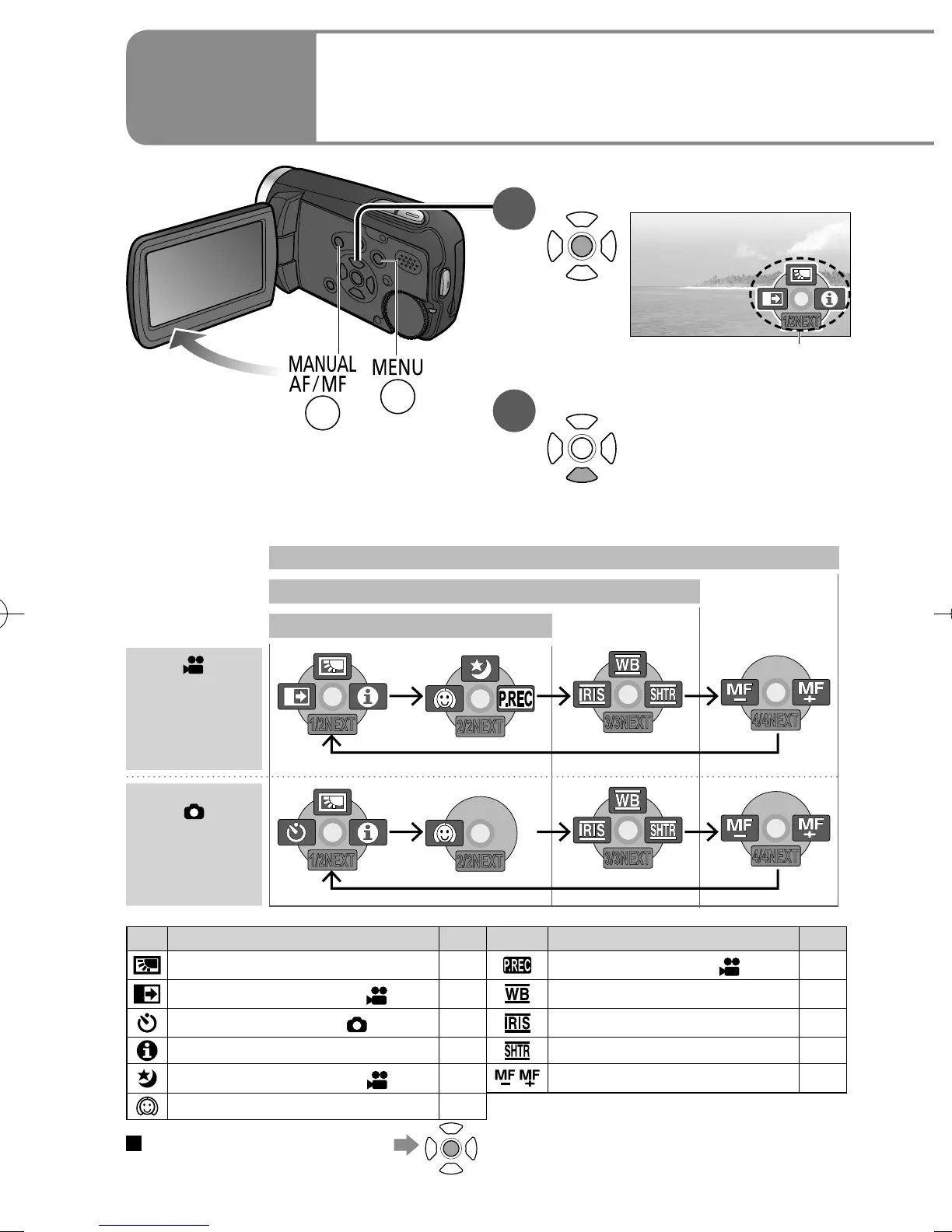
1
Display operation icons.
1/2NEXT
Operation icons
2
Change operation icons.
Icons change with each
press, as displayed
below.
Icon Function Page Icon Function Page
Backlight compensation function 34
PRE-REC function ([ ] only)
36
Fade in/fade out function ([ ] only)
33 White balance 40
Self-timer recording ([ ] only)
34 Brightness (iris/gain) 43
Help mode 33 Shutter speed 42
Colour night view function ([ ] only)
35
Manual focus adjustment 38
Soft skin mode 35
To hide operation icons
During
motion
picture
recording
1/2NEXT
2/2NEXT
3/3NEXT
4/4NEXT
During still
picture
recording
1/2NEXT
2/2NEXT
3/3NEXT
4/4NEXT
In automatic recording
For manual mode (Press [MANUAL AF/MF] one time).
For manual focus mode (Press [MANUAL AF/MF] two times).










 To Next Page