Trouble Mode
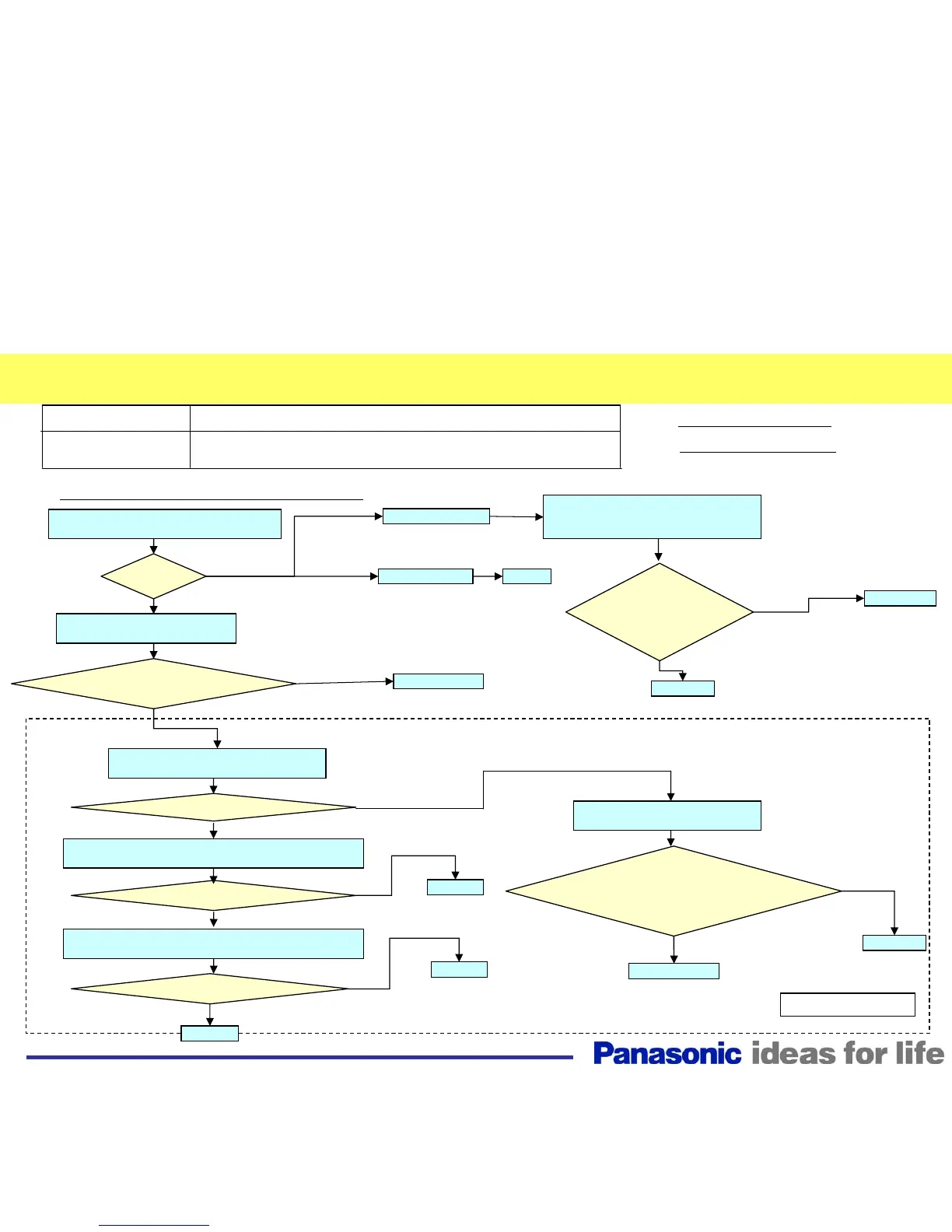
SCAN Driver SOS
Defective Board
SC, SC2, SU, SM, SD D,
P(SUS/SC),P(Multi/SC) Board
Panel SOS - Power LED Blinks 6 Times (2/2)
Power Supply / Protect Circuit
How to find the
defective board
* SC Floating Volt. SOS
Yes
Yes
Is there VSUS
voltage at pin 1 of CN P2
and 15V at pin 1 of CN P23
before shutdown?
Does it power up?
Does it power up?
Yes (SU,SM,SD NG)
No
SU Board
Yes (SM,SD NG)
No
SD Board
No
(VBK,VSCN,VAD,16V,
VSET,SC PULSE NG)
Yes (SC PULSE NG)
SC (or D) Board
Does it power up?
Are the following
voltages present before shutdown?
TPVSCN, TPVAD, TPVSET,
TPF16V, TPF16V2, and TPVBK
on the SC2 Board (*)
No
SC2 Board
Yes (SM NG)
P(SC) Board
SM Board
D Board
SC2 Board
No
Does it
power up?
No
4 times blink
7 or 8 times blink
Yes (SC Floating Volt NG)
Does the SC board LED
light before shutdown ?
SC (or D) Board
No
=SC, SU, SM, SD, SC2, D
=SC, SC2, D
No
36
Disconnect CN SC2, SC23, SC81, and
SC80 of the SC Board. Turn the unit on.
Disconnect CN P11, P12. Place a
jumper across pins 8 and 10 of CN P12.
Turn the unit on.
Connect CN SC2, SC23, SC81,
and SC80. Turn the unit on.
Disconnect the SM, SU, and SD boards
from the SC board. Turn the unit on.
Connect the SU board to the SC board. Disconnect the
SD and SM boards from the SC board. Turn the unit on.
Connect the SD board to the SC board. Disconnect the
SU and SM boards from the SC board. Turn the unit on.
Disconnect CN SC84 and SC83.
Turn the unit on.






 To Next Page