28
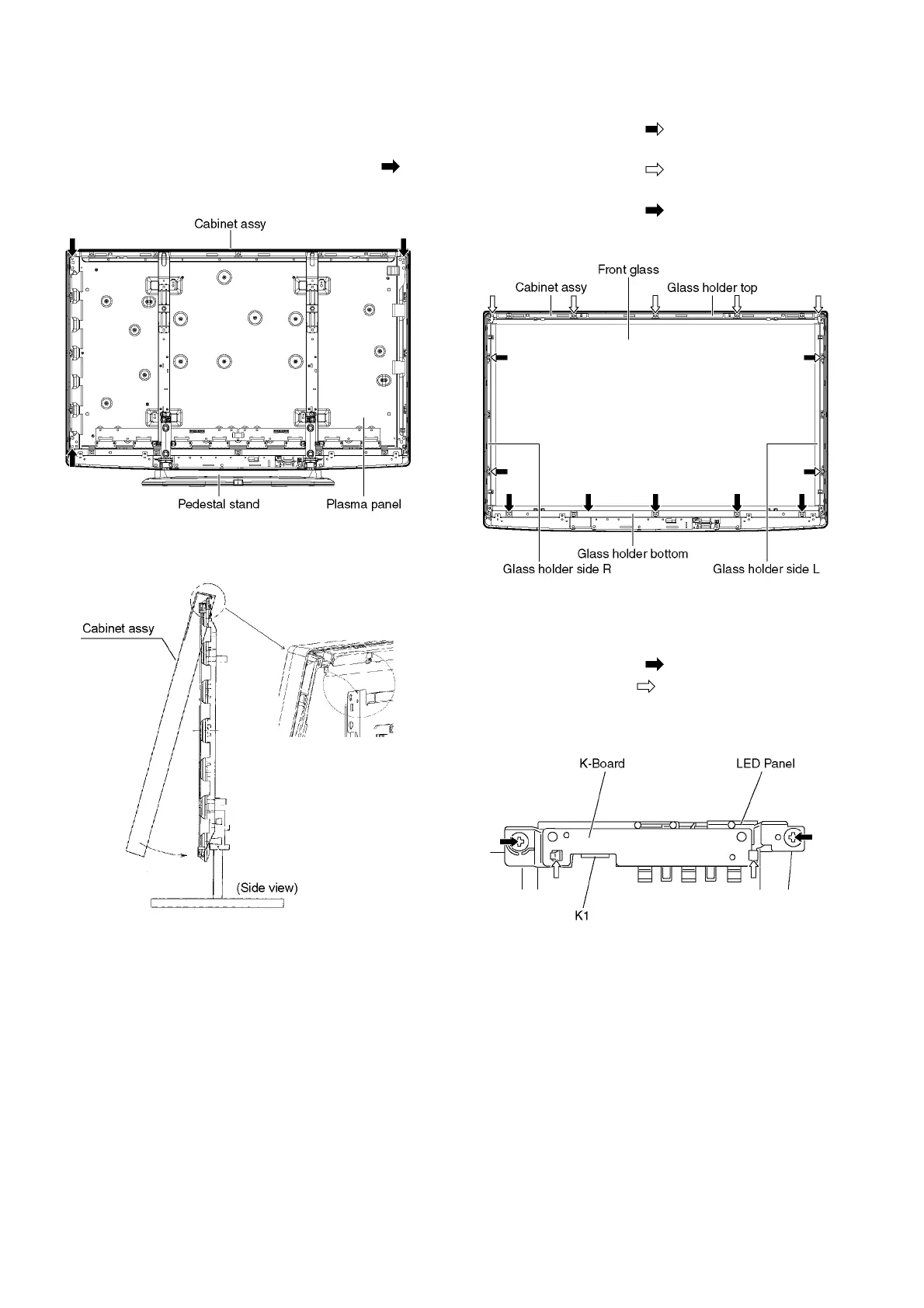
9.15. Remove the Plasma panel sec-
tion from the Cabinet assy
(glass)
1. Remove the plasma panel fastening screws (×3 ) and
remove the cabinet assy.
2. For leaving the cabinet assy from the plasma panel, pull
the bottom of the cabinet assy forward, lift, and remove.
9.16. Remove the Glass holders
1. Remove the Cabinet assy. (See section 9.15.)
2. Remove the screws (×4 ).
3. Remove the Glass holder side (L, R).
4. Remove the screws (×5 ).
5. Remove the Glass holder top.
6. Remove the screws (×5 ).
7. Remove the Glass holder bottom.
9.17. Remove the K-Board
1. Remove the Glass holders. (See section 9.16.)
2. Remove the screws (×2 ).
3. Remove the claws (×2 ).
4. Disconnect the connector (K1) and Remove the K-Board
from LED Panel.







 To Next Page