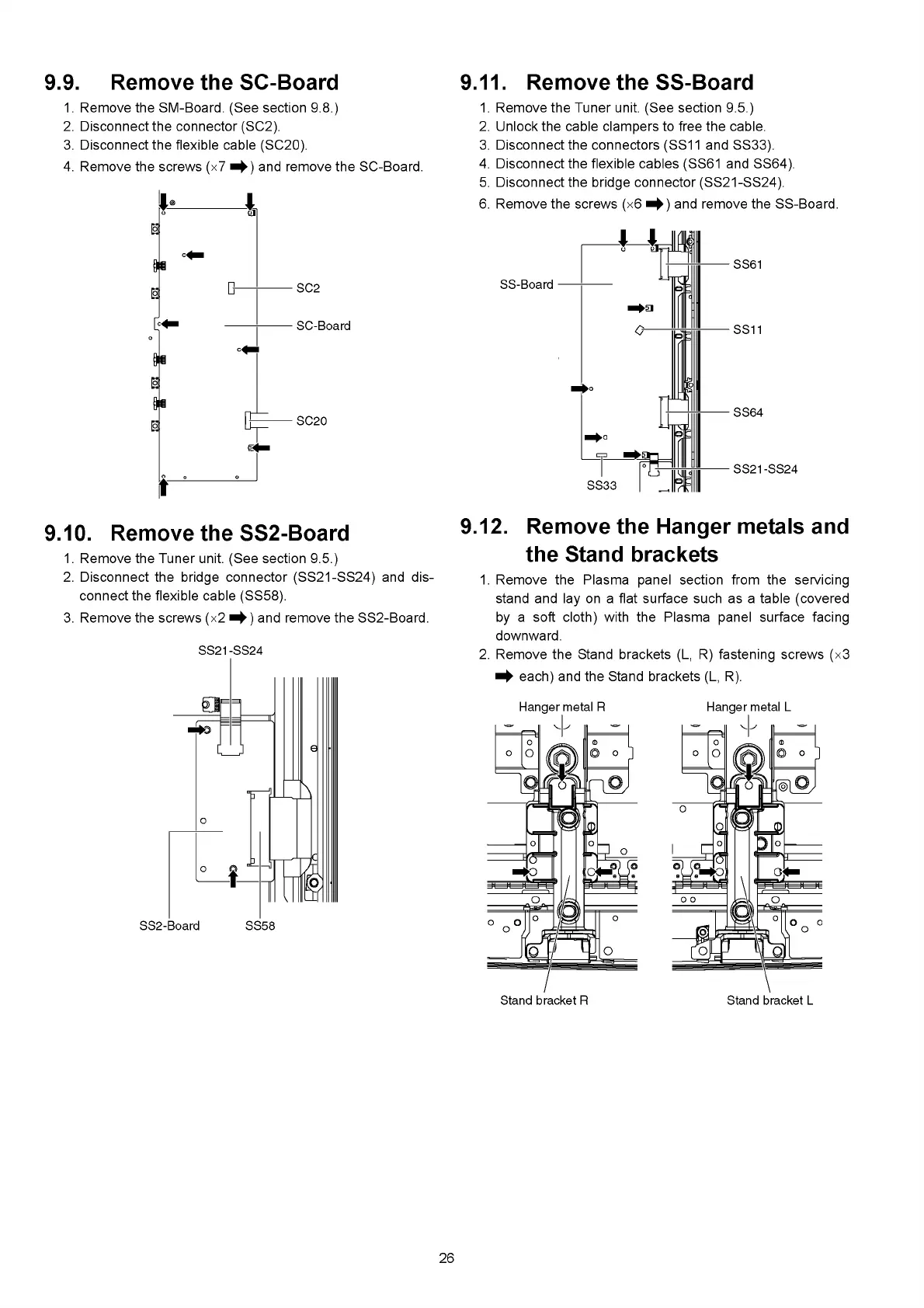
9.9. Remove the SC-Board
1. Remove the SM-Board. (See section 9.8.)
2. Disconnect the connector (SC2).
3. Disconnect the flexible cable (SC20).
4. Remove the screws (x7 and remove the SC-Board.
9.11. Remove the SS-Board
9.10. Remove the SS2-Board
1. Remove the Tuner unit. (See section 9.5.)
2. Disconnect the bridge connector (SS21-SS24) and dis
connect the flexible cable (SS58).
3. Remove the screws (x2 and remove the SS2-Board.
1. Remove the Tuner unit. (See section 9.5.)
2. Unlock the cable clampers to free the cable.
Disconnect the connectors (SS11 and SS33).
Disconnect the flexible cables (SS61 and SS64).
Disconnect the bridge connector (SS21-SS24).
Remove the screws (x6 and remove the SS-Board.
9.12.
Remove the Hanger metals and
the Stand brackets
1. Remove the Plasma panel section from the servicing
stand and lay on a flat surface such as a table (covered
by a soft cloth) with the Plasma panel surface facing
downward.
2. Remove the Stand brackets (L, R) fastening screws (x 3
^ each) and the Stand brackets (L, R).
26





 To Next Page