26
9 Disassembly and Assembly Instructions
9.1. Remove the Rear cover
1. See PCB Layout (Section 3)
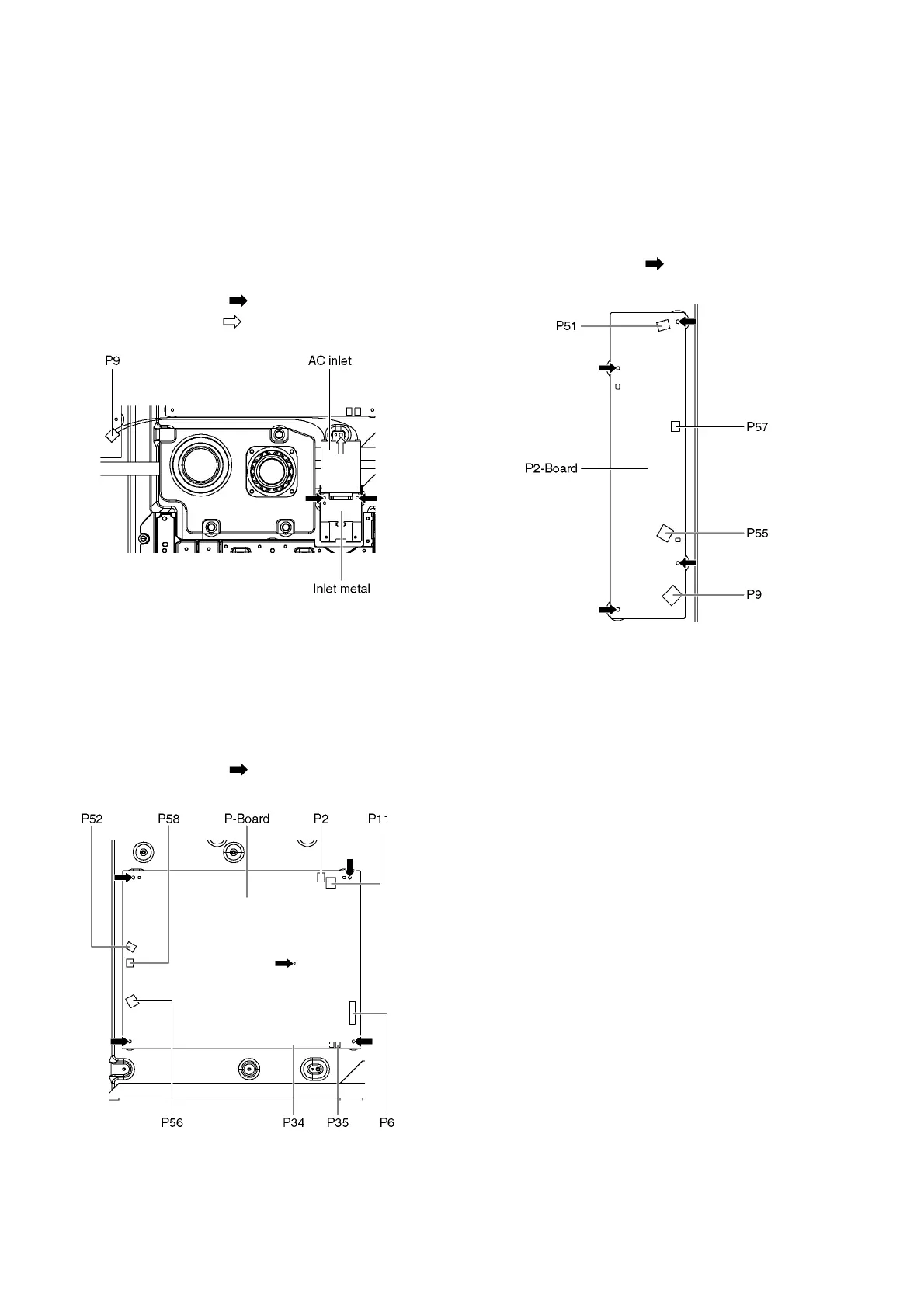
9.2. Remove the AC inlet
Caution:
To remove P.C.B. wait 1 minute after power was off for dis-
charge from electrolysis capacitors.
1. Unlock the cable clampers to free the cable.
2. Disconnect the connector (P9).
3. Remove the screws (×2 ) and remove the Inlet metal.
4. Remove the screw (×1 ) and remove the AC inlet.
9.3. Remove the P-Board
Caution:
To remove P.C.B. wait 1 minute after power was off for dis-
charge from electrolysis capacitors.
1. Unlock the cable clampers to free the cable
2. Disconnect the connectors (P52, P56 and P58).
3. Disconnect the connectors (P2, P6, P11, P34 and P35).
4. Remove the screws (×5 ) and remove the P-Board.
9.4. Remove the P2-Board
Caution:
To remove P.C.B. wait 1 minute after power was off for dis-
charge from electrolysis capacitors.
1. Unlock the cable clampers to free the cable.
2. Disconnect the connectors (P51, P55 and P57).
3. Disconnect the connector (P9).
4. Remove the screws (×4 ) and remove the P2-Board.











 To Next Page