29
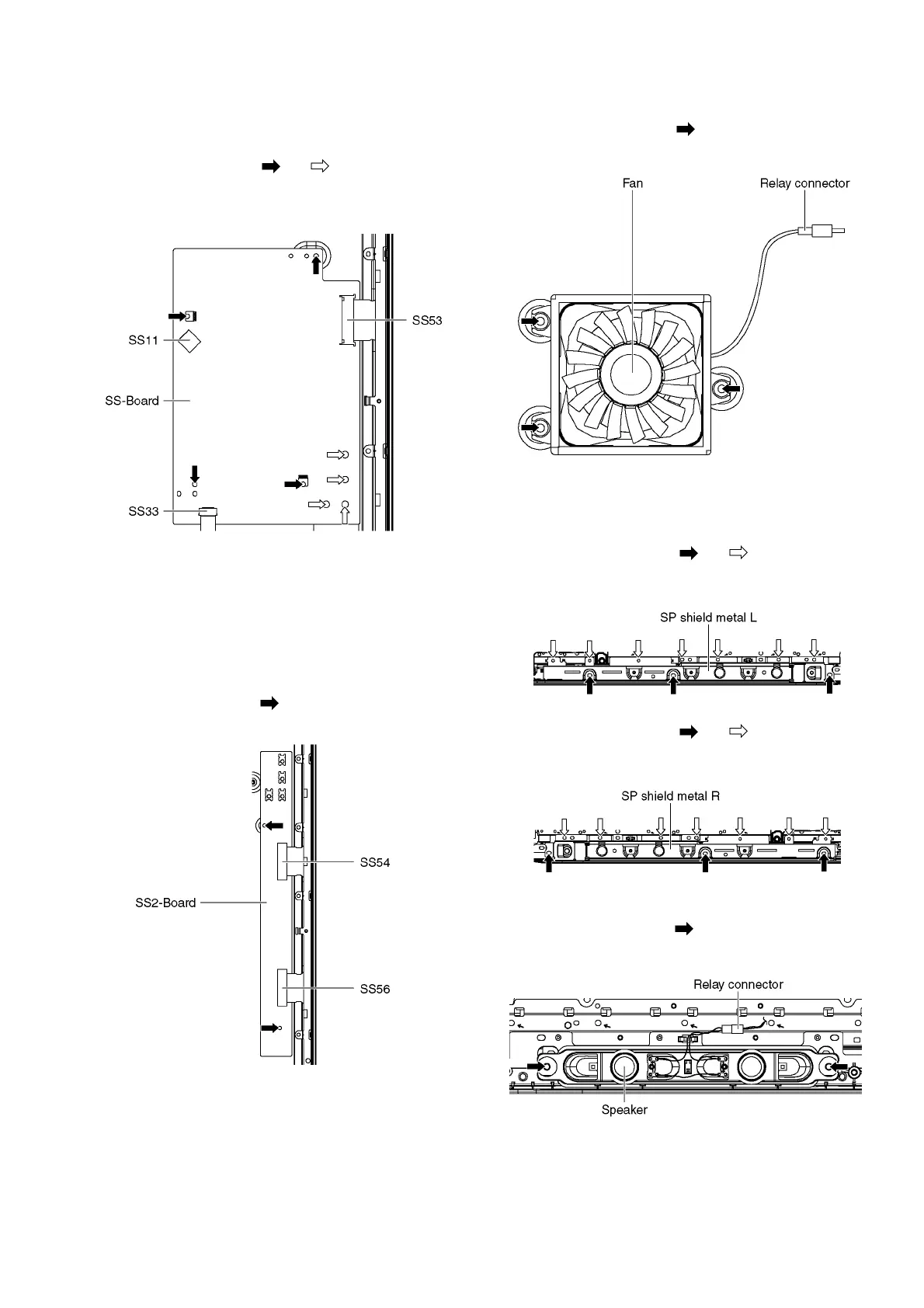
9.11. Remove the SS-Board
1. Disconnect the connector (SS11).
2. Disconnect the flexible cable (SS33).
3. Disconnect the flexible cable (SS53).
4. Remove the screws (×4 , ×4 ) and remove the SS-
Board.
9.12. Remove the SS2-Board
1. Disconnect the Terminal covers and the Shield metals
(See section 9.5.).
2. Remove the SS-Board (See section 9.11.).
3. Disconnect the flexible cables (SS54 and SS56).
4. Remove the screws (×2 ) and remove the SS2-Board.
9.13. Remove the Fan
1. Unlock the cable clampers to free the cable.
2. Remove the screws (×3 ).
3. Remove the Relay connector and remove the Fan.
9.14. Remove the Speakers
1. Unlock the cable clampers to free the cable.
2. Remove the screws (×3 , ×7 ) and remove the SP
shield metal L.
3. Remove the screws (×3 , ×7 ) and remove the SP
shield metal R.
4. Disconnect the Relay connector.
5. Remove the screws (×2 each) and remove the Speak-
ers (L, R).











 To Next Page