31
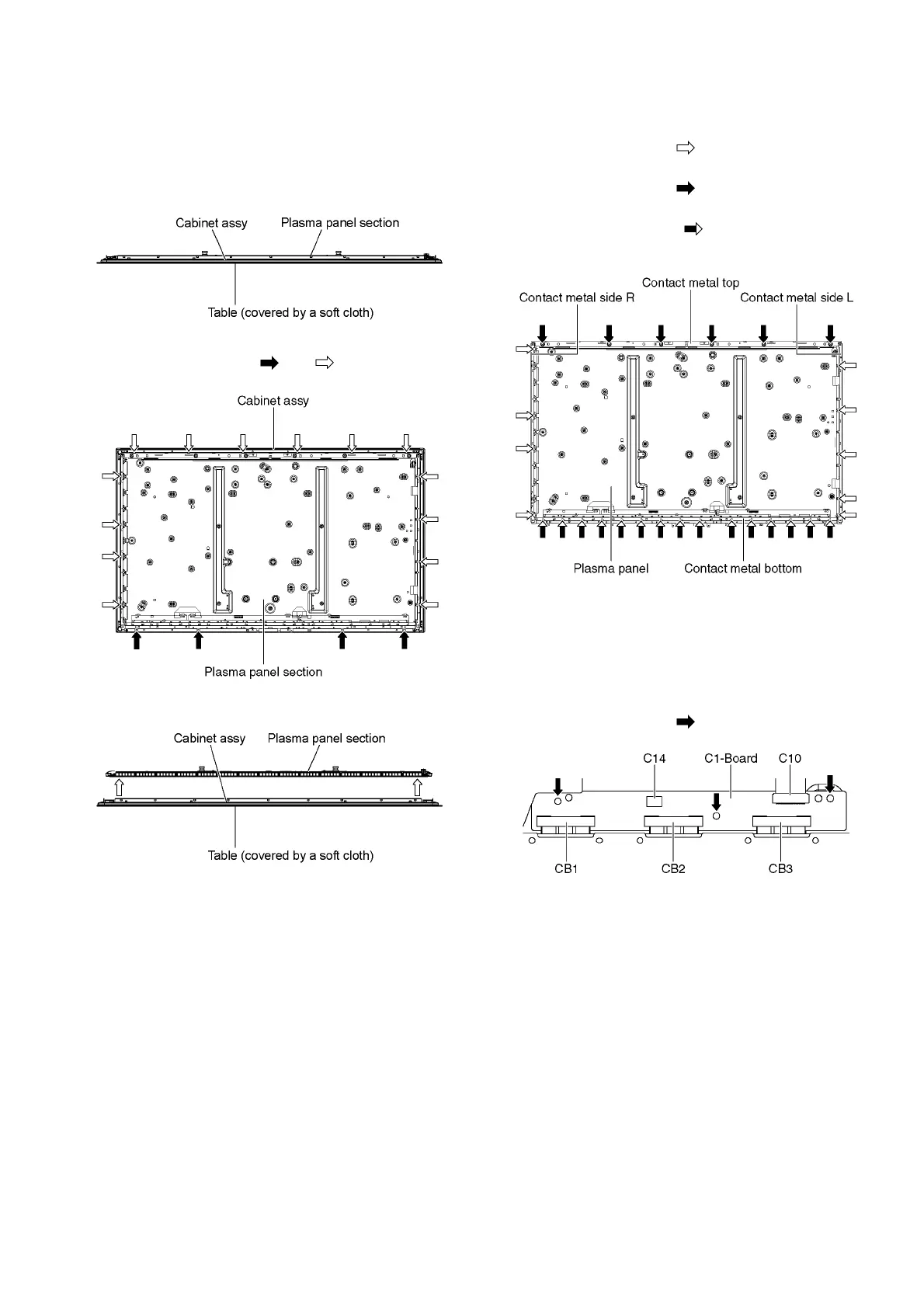
9.21. Remove the Plasma panel sec-
tion from the Cabinet assy
1. Remove the Plasma panel section from the servicing
stand and lay on a flat surface such as a table (covered
by a soft cloth) with the Plasma panel surface facing
downward.
2. Remove the Bottom cabinet assy. (See section 9.20.)
3. Remove the screws (×4 , ×14 ).
4. Remove the Plasma panel section from the Cabinet assy.
9.22. Remove the Contact metals
1. Remove the Cabinet assy. (See section 9.21.)
2. Remove the Tape from the Contact metals.
3. Remove the screws (×9 ).
4. Remove the Contact metal side (L, R).
5. Remove the screws (×6 ).
6. Remove the Contact metal top.
7. Remove the screws (×15 ).
8. Remove the Contact metal bottom.
9.23. Remove the C1-Board
1. Remove the Contact metal bottom. (See section 9.22.)
2. Disconnect the flexible cables (CB1, CB2 and CB3).
3. Disconnect the flexible cable (C10).
4. Disconnect the connector (C14).
5. Remove the screws (×3 ) and remove the C1-Board.











 To Next Page