EasyManua.ls Logo

Panasonic TX-P65VT60E - Picture Mirroring Display Options

Panasonic TX-P65VT60E
95 pages
Print Icon
To Next Page IconTo Next Page
To Previous Page IconTo Previous Page
Loading...
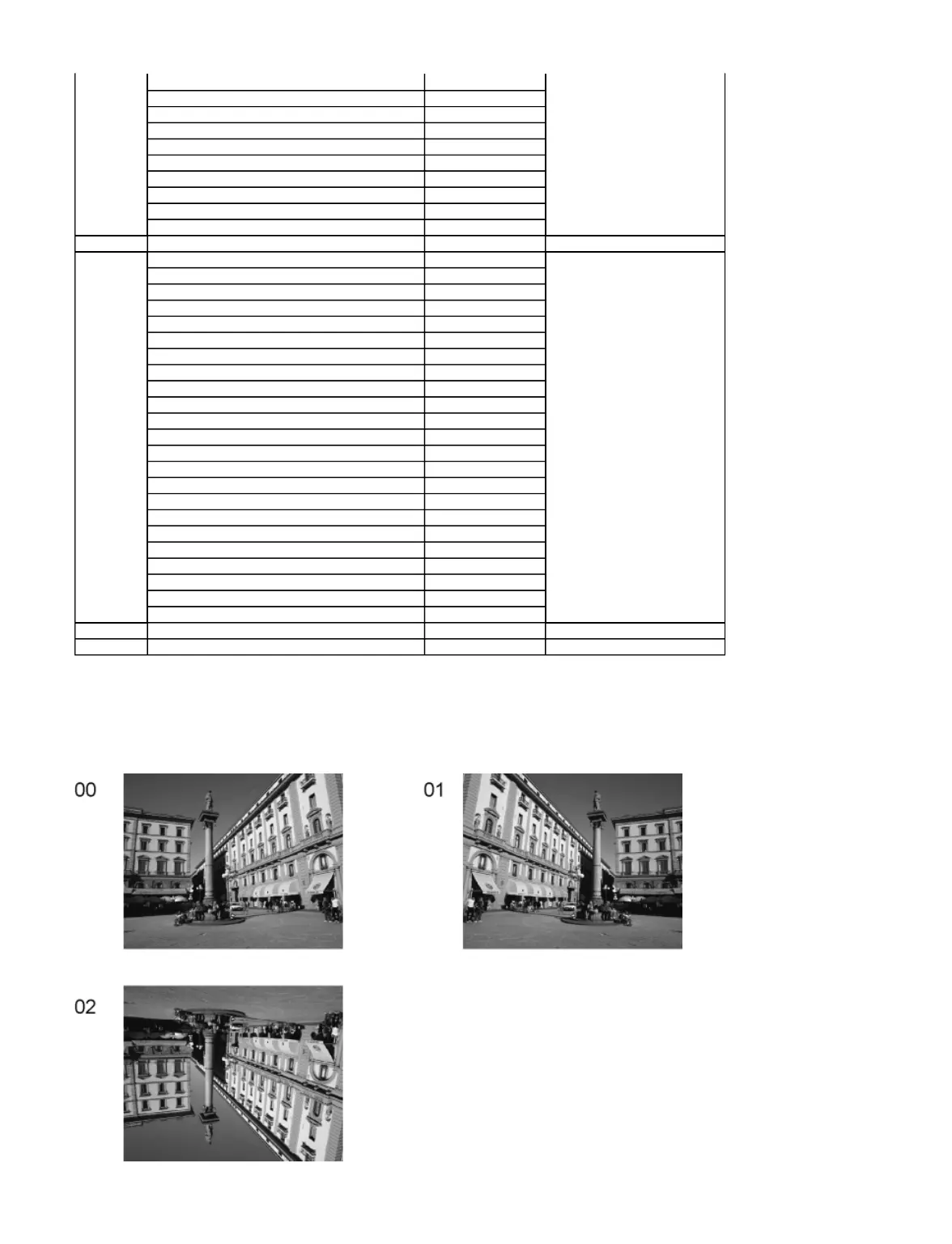
6.2 Option - Mirror
Picture can be reversed left and right or up and down.
00 : Default (Normal picture is displayed)
01 : Picture is reversed left and right.
02 : Picture is reversed up and down.
CLK MODE
00
CLOCK
000
Y/C Delay
0
OPT 1
00110100
OPT 2
11101110
OPT 3
00000001
OPT 4
01010010
EDID-CLK
MID
MIRROR
00 (See Option-Mirror)
AMR-SELECT
OFF
VSUS
LOW
See Vsus selection
AGING
ALL WHITE
Built-in test patterns can be
displayed.
MIDDLE BLUE WITH MAGENTA OUTSIDE FRAME
MIDDLE STEP GREEN
MIDDLE STEP RED
LOW STEP WHITE
ALL BLUE
ALL GREEN
ALL RED
WHITE DIAGONAL STRIPE
RED DIAGONAL STRIPE
GREEN DIAGONAL STRIPE
BLUE DIAGONAL STRIPE
A-ZONE & B-ZONE
1% WINDOW
COLOR BAR
9 POINTS BRIGHT MEASURE
2 DOT OUTSIDE FRAME
DOUBLE FIXED 1% WINDOW
VERTICAL LINE SCROLL
ON/OFF
R/G/B/W ROTATION WITH COUNT DISPLAY
HALF FIXED ALL WHITE
ALL WHITE WITH COUNT DISPLAY
SRV-TOOL
00
See Service tool mode
DRV CHECK
USBHDD CHECK
00
See DRV Check-USBHDD Check
Page 2 of 7
1/3/2017
file://C:\Users\sh.dehghani\Desktop\New folder\TX-P65VT60EALLSVC_PCZ1304099CE\
...

Related product manuals