Using Call Waiting
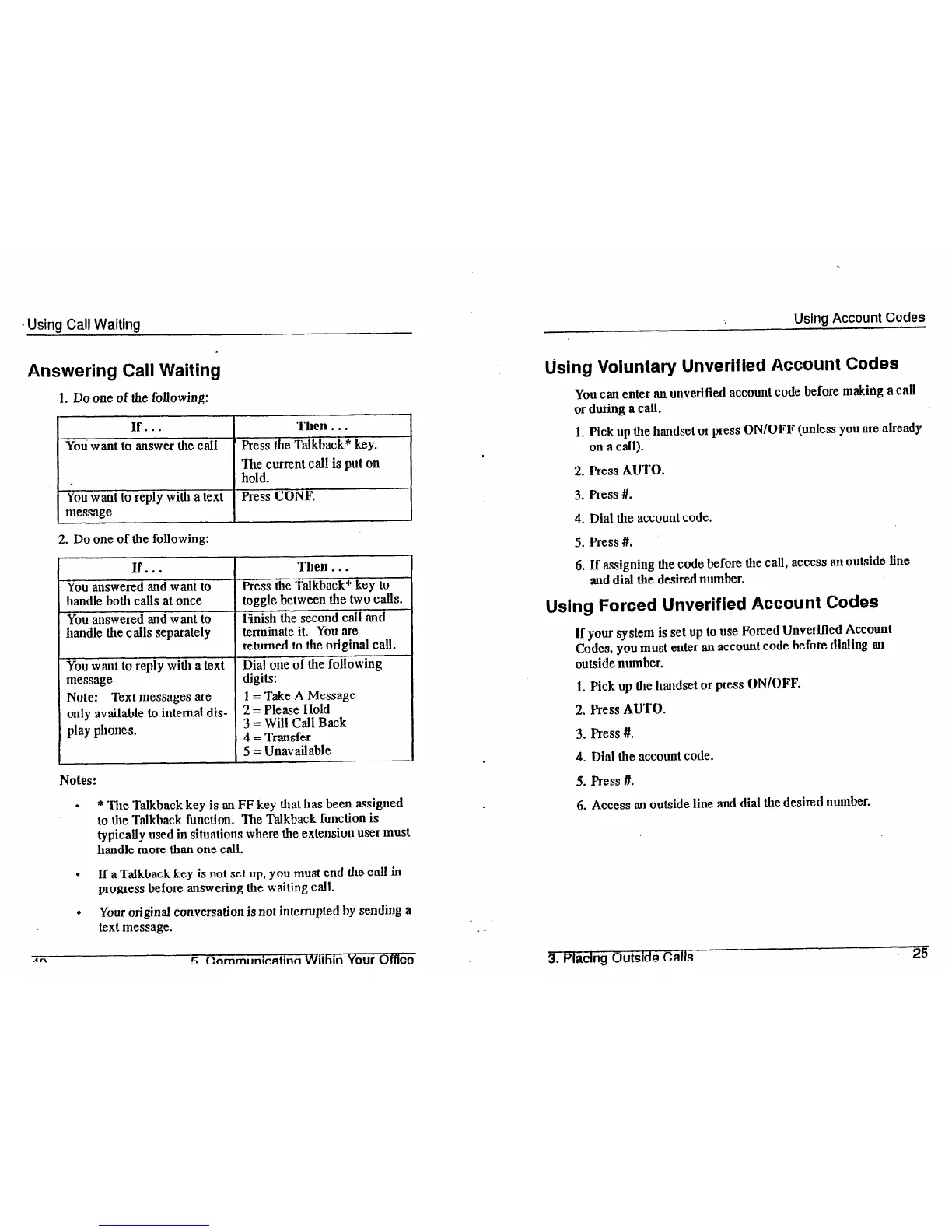
Answering Call Waiting
1. Do one of the following:
I
IF...
YOU want to answer the call
The current call is put on
hold.
You want to reply with a text
Press CONF.
message
2. Do one of the following:
If... Then.. .
You answered and want to
handle both calls at once
You answered and want to
handle the calls separately
You want to reply with a text
message
Note: Text messages are
only available to internal dis-
play phones.
Press the Talkback* key to
toggle between the two calls.
Finish the second call and
terminate it. You ate
returned to the original call.
Dial one of the following
digits:
1 = Take A Message
2 = Please Hold
3 = Will Call Back
4 = Transfer
5 = Unavailable
Notes:
.
* The Talkback key is an FF key that has been assigned
to the Talkback function. The Talkback function is
typically used in situations where the extension user must
handle more than one call.
.
If a Talkback key is not set up, you must end the call in
progress before answering
the waiting call.
l
Your
original conversation is not interrupted by sending a
text message.
An
r; ~nmmldcatinn
Wlthm Your
Offs
Using Account Codes
using Voluntary Unverified Account Codes
You can enter an unverified account code before making a call
or during a call.
1. Pick up the handset or press ON/OFF (unless you are already
on a call).
2. Press AUTO.
3. Press #.
4. Dial the account code.
5. Press #.
6. If assignhlg the code before the call, access an outside line
and dial the desired number.
Using Forced Unverified Account Codes
If your system is set up to use Forced Unverified Account
Codes, you must enter an account code before dialing an
outside number.
1. Pick up the handset or press ON/OFF.
2. Press AUTO.
3. Press #.
4. Dial the account code.
5. Press #.
6. Access au outside line and dial
the
desired number.
3. Placing Outside Calls
25













 To Next Page