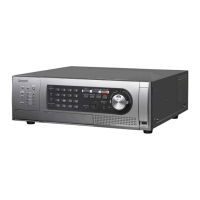
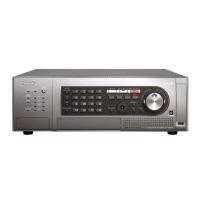
This document serves as an installation guide for the Panasonic Digital Disk Recorders, Model No. WJ-HD616K and WJ-HD716K. These devices are designed for surveillance systems, capable of recording images from up to 16 cameras onto hard disk drives.
Function Description
The WJ-HD616K and WJ-HD716K are digital disk recorders primarily used in surveillance systems. They record images from up to 16 cameras onto hard disk drives. A key feature is their support for HDMI (High-Definition Multimedia Interface) standard, enabling the display of playback and live images with superior quality on a high-definition monitor (1920 x 1080) using an optional HDMI cable. The recorders allow for camera operation directly from the unit, including displaying images from multiple cameras or switching between camera feeds.
The devices offer easy operation via a directly connected PC mouse, allowing users to monitor screens while controlling the recorder. They also feature easy hard disk drive replacement, with HDD slots accessible by opening the front cover. When two or more hard disk drives are installed, replacement can occur without stopping current recording. Optional HDD canisters (WJ-HDU40K) are required for locally procured hard disk drives.
A significant feature is the HDD fault-tolerance system, which utilizes RAID functionality when an optional RAID board (WJ-HD601) is installed. This system supports RAID 5 mode (data recovery with one faulty HDD) and RAID 6 mode (data recovery with two faulty HDDs), providing robust data protection for large storage volumes.
Coordination with Panasonic SD5 cameras via coaxial cables enables several advanced functions:
- Alarm recording/Search and play: Initiates recording upon camera-issued alarms (e.g., intruder detection) and allows searching/playback of alarm-recorded images based on alarm type.
- i-VMD area setting: Allows editing of VMD (Video Motion Detection) areas and depth compensation settings from the camera, enhancing motion detection sensitivity.
- Save and load of camera setup data: Camera settings can be saved on the recorder and loaded to new cameras, simplifying replacement.
The recorders also include an SDHC/SD memory card slot, enabling automatic saving of images during alarm occurrences or network errors. Images can also be directly saved to the card and later played or downloaded via a web browser.
Important Technical Specifications
General:
- Power source: 120 V AC, 60 Hz
- Power consumption: 130 W
- Ambient operating temperature: +5 °C to +45 °C {+41 °F to +113 °F} (recommended +20 °C to +30 °C {+68 °F to +86 °F} for optimal HDD performance and lifetime).
- Ambient operating humidity: 5 % to 90 % (non-condensing); 10 % to 80 % (non-condensing) when WJ-HDB611 is installed.
- Maximum operating altitude: 2,000 m {6,562 feet} or less
- Dimensions (excluding rubber feet and projections): 430 mm (W) x 132 mm (H) x 400 mm (D) {16-15/16" (W) x 5-3/16" (H) x 15-3/4" (D)}
- Weight: 14 kg {30.91 lbs.} without HDDs; 17 kg {37.53 lbs.} with 4 HDDs.
- Finish: Front cover: Solid metallic coating; Top cover: Solid metallic coating; Rear panel: Galvanized steel.
Hard Disk Drive (HDD):
- Type: 3.5" hard disk drive (up to 4 can be installed).
- RAID Modes: RAID 5 (requires 3+ HDDs), RAID 6 (requires 4+ HDDs) with optional RAID board (WJ-HDB601).
Input/Output:
- Video input connector: 1 V [p-p]/75 Ω, x16 (1ch to 16ch) (BNC). Vertical timing pulse multiplexed, HD616K: x8 (1ch to 8ch), HD716K: x16.
- Cascade input connector: 1 V [p-p]/75 Ω (BNC), HDMI x2.
- Video output connector: 1 V [p-p]/75 Ω, active loop-thru output, x16 (1ch to 16ch) (BNC)*1.
- Monitor output connector: 1 V [p-p]/75 Ω, x2 (BNC).
- Monitor (HDMI) connector: HDMI, x2*8.
- Video output connector (front): 1 V [p-p]/75 Ω, x1 (RCA pin).
- Audio input connector: –10 dBv, 10 kΩ, unbalanced, x4 (RCA pin).
- Cascade input connector (audio): –10 dBv, 10 kΩ, unbalanced x 1 (RCA pin).
- Audio output connector: –10 dBv, 600 Ω, unbalanced, x1 (RCA pin).
- Audio output connector (front): –10 dBv, 600 Ω, unbalanced, x1 (RCA pin).
- External storage connector: x3.
- Mouse connection port: x1.
- Alarm/control terminal: 8 to 16ch alarm output3, alarm reset input2, emergency recording input2, available space warning output3, HDD trouble output3, camera trouble output3, trouble output3, electricity failure recovery completion output4, time adjust input/output5, sequence switching input/output5, alarm suspension input2, electricity failure detection input2, external recording mode switching2, +5 V output6 (25-pin D-sub).
- Alarm terminal: 1ch - 16ch alarm input2, 1 - 7ch alarm output3 (25-pin D-sub).
- RS485 port: RS485 (full duplex/half duplex*7), x2 (RJ-11).
- DATA port: RS485, x2 (RJ-11).
- Network port: 10BASE-T/100BASE-TX (RJ-45).
- Maintenance port: 10BASE-T (RJ-45).
- SDHC/SD memory card slot: SDHC/SD memory cards applicable (miniSD cards and microSD cards not applicable).
*1 Video output signal not sent when power is off.
*2 Non-voltage make contact input, 50 kΩ +5 V DC pull-up.
*3 Open Collector output, 24 V DC, –100 mA maximum.
*4 High (+12 V, 12 mA).
*5 Either of *2 or *3 above (depending on settings).
*6 200 mA maximum.
*7 Changeable with mode switch.
*8 No audio from MONITOR OUT 1.
Usage Features
- User/Host Management: Supports registration of up to 32 users and 8 hosts (PCs) for network access, with configurable priority levels and camera partitioning.
- Setup Menu: Comprehensive setup menu accessible via front panel buttons, mouse, or web browser for configuring various settings including basic operation, time & date, recording, audio, events, schedules, display, communication, server, network, user management, and SD5Link camera settings.
- Quick Setup: Allows for rapid configuration of minimum required settings like language, time & date, recording resolution, image quality, and schedule.
- Recording Programs: Up to 4 recording programs can be created, defining recording rate, image quality, and event actions for specific days and time zones. Special days can also be configured with unique schedules.
- Monitor Display Settings: Configurable display settings for Monitor 1 and Monitor 2, including time & date position, camera title display, alarm display, login screen, secret view, and multi-screen display patterns (4-split, 7-split, 8-split, 9-split, 12-split, 16-split).
- Sequential Display: Settings for sequential display of camera images on monitors and PC monitors, including dwell time and camera selection for up to 16 steps.
- Cascade Connection: Up to 5 recorders can be connected in a cascading setup, allowing synchronized display and time adjustment.
- PS·Data Compatible Devices: Supports connection to PS·Data compatible system controllers for operating devices connected to the recorder.
- RS485 Cameras: Up to 8 RS485 cameras can be connected, with configurable communication settings (protocol, baud rate, data bit, parity, stop bit).
- NTP Server Integration: Automatic time adjustment via NTP server, with configurable server address and time adjustment settings.
- FTP Server Integration: Transmits alarm images to an FTP server, with configurable server address, user name, password, and transmission duration.
- Mail Notification: Sends alarm and error report mails, with configurable SMTP/POP server settings, sender's address, and destination addresses.
- Network Transmission: Configurable settings for live video resolution, rate, quality, and bandwidth control for PC monitoring via network.
- On-screen Keyboard: For character entry in setup menus.
Maintenance Features
- Built-in Backup Battery: A lithium battery provides backup for internal clock and settings. It has an approximate life of 5 years and requires 48 hours of initial charging.
- HDD Installation/Removal: Easy installation and removal of HDD units by opening the front cover. HDD units should be handled with care to avoid vibration and impact.
- HDD Fault-Tolerance (RAID): In RAID 5/6 modes, faulty HDDs can be replaced without stopping recording, and data recovery is possible.
- HDD Recognition: Automatic recognition of newly installed HDDs, with formatting for unformatted drives.
- HDD Configuration Menu: Allows management of hard disk drives, including assigning recording areas (normal, event, pre-event) and formatting.
- System Check: Performs a system check during startup, displaying status on Monitor 2.
- Error Log: Displays logs of errors, access, events, and network activity for troubleshooting.
- Product Information: Displays software and hardware versions, extension unit information, MAC address, and internal temperature.
- Disk Information: Shows total and remaining capacities of hard disk drives and recording areas, as well as HDD operating time (hour meter).
- Settings Management: Allows saving and loading of setup data to/from an SD memory card, and restoring default settings.
- Firmware Update: Supports firmware upgrades via SD memory card.
- Power Cord Brace: Secures the power cord plug.
- Periodic Checks: Recommends periodic checks of power cord, connectors, and plugs for damage or wear.
- Condensation Prevention: Advises switching off the unit for 2 hours in humid or temperature-fluctuating environments to prevent condensation.
- Regular Operation: Recommends turning on the power and performing recording/playback approximately once a week to prevent functional interferences if the product is unused for a certain period.

 Need help?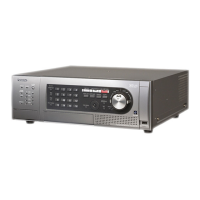








 To Next Page
 General