EasyManua.ls Logo

Panasonic WJ-RT416 - User Manual

Panasonic WJ-RT416
88 pages
Print Icon
To Next Page IconTo Next Page
Loading...
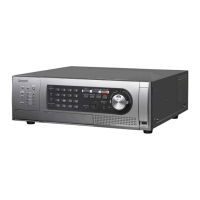
Digital Disk Recorder
Network Operating Instructions
Model No. WJ-RT416 Series
E
R
R
O
R
SEQ
U
EN
C
E
S
E
T
UP
ESC
SEARCH
CO
P
Y
ST
O
P
PLA
Y
PA
U
S
E
RE
C
R
EC STOP
S
E
T
H
D
D
1
2
3
1
2
3
4
5
6
7
8
9
1
0/0
11
1
2
1
3
1
4
15
16
4
5
6
A
LAR
M
M
U
L
T
I
S
C
R
E
E
N
T
IME
R
A
LA
R
M
R
E
S
E
T
O
PER
A
TE
REV
FWD
SK
I
P
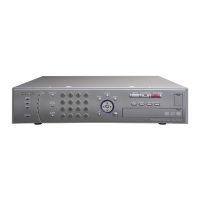
Digital Disk Recorder
WJ-
RT
4
16
Before attempting to connect or operate this product,
please read these instructions carefully and save this manual for future use.
The model number is abbreviated in some descriptions in this manual.
WJ-RT416 is shown above.
This manual covers the models: WJ-RT416K, WJ-RT416V, WJ-RT416VK, WJ-RT416/G, WJ-RT416K/G, WJ-RT416V/G
and WJ-RT416VK/G.

Table of Contents

Other manuals for Panasonic WJ-RT416

Questions and Answers

  • R
    Renee PerezAug 10, 2025
    What to do if no live image is displayed on Panasonic WJ-RT416 DVR?
    • S
      Sandra JohnsonAug 10, 2025
      If you are not seeing a live image, begin by confirming that all cables are correctly and firmly connected. Then, check the settings. Finally, verify the user level of the current login user.
  • J
    James JimenezAug 17, 2025
    Why can't I play recorded images on my Panasonic DVR?
    • K
      Katelyn WarnerAug 17, 2025
      If you are unable to play recorded images, first check the user level setting of the user who is currently logged in. Also, check the connection of the camera to be operated.
  • C
    Christopher HollandAug 22, 2025
    Why does my Panasonic WJ-RT416 take so long to start up?
    • R
      riceashleyAug 22, 2025
      If your recorder takes a long time to start, it may be due to an increased image data volume on the hard disk, which prolongs the startup and search time.
  • T
    theresa86Aug 28, 2025
    Why can't I select setup items on the Panasonic WJ-RT416 setup menu?
    • G
      gallowaynicholasAug 28, 2025
      If you are unable to select a setup item, confirm the user level of the current login user.
  • S
    Scott MyersSep 3, 2025
    What to do if Panasonic WJ-RT416 DVR (WJ-RT416V) cannot copy images to disk?
    • J
      John SimonSep 3, 2025
      If you're having trouble copying recorded images to a disk, first verify that the inserted disk is compatible with the internal CD/DVD drive. Next, ensure the disk is placed correctly on the disk tray. Finally, check if any external recording device is connected to the COPY1 or COPY2 port.

Panasonic WJ-RT416 Specifications

General IconGeneral
ModelWJ-RT416
TypeDigital Video Recorder
Video Inputs16 channels
Alarm Input16
Alarm Output4
Remote ControlYes
Recording Resolution720x480 (NTSC)
Storage CapacityUp to 4 HDDs
Hard Disk DriveSATA
Network InterfaceEthernet
Recording ModeContinuous, Event
Recording SpeedNTSC: 30 fps, PAL: 25 fps
CompressionMPEG-4

Related product manuals