40
Entering text
Enter text by using the virtual keypad on your touch screen and
using the QWERTY keypad.
This chapter explains how to enter text in case you send a new
text message, to see detailed information on “Sending a new text
message,” see page 42.
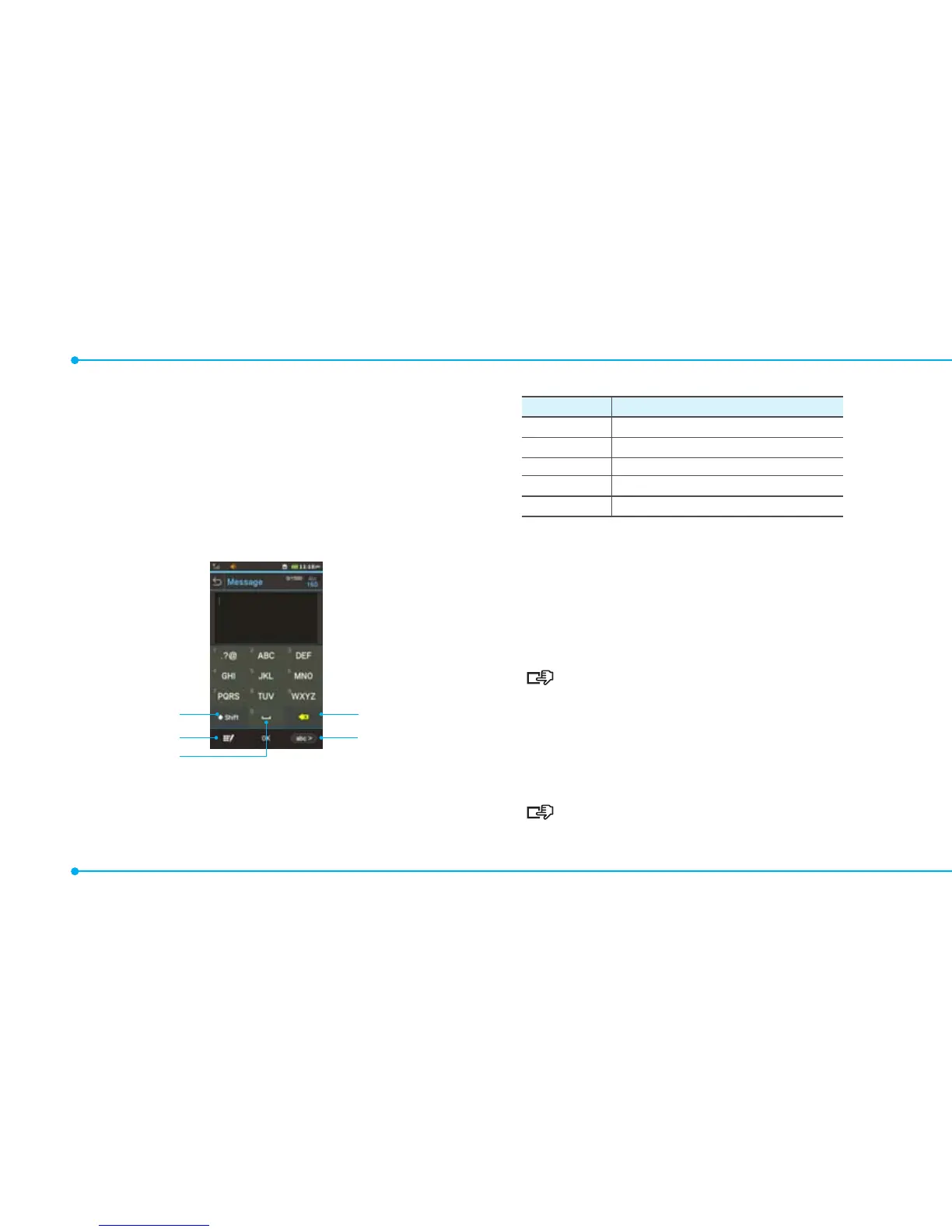
Using the virtual keypad on your touch screen
1 4
2 5
3
Number
Function
1 Makes a change to capitalization
2 Changes typing option
3 Inserts a space
4 Deletes a letter
5 Changes the text input mode.
Predictive mode
Predictive mode automatically compares your keystrokes with an
internal linguistic dictionary to determine the correct word. It will
display the most commonly used word first. To save a word not
listed in phone’s dictionary,
1. Tap abc > to change the mode to T9Ab.
2. [ ] Tap
4
to
5
to input text. To enter ‘Hello’ in the
touch keypad, tap
6
7
8
8
[
.
Alphabet input mode
Tap the key labeled with the target letter once for the first letter
tap it twice for the second letter, and so on.
1. Tap abc > to change the mode to abc.
2. [ ] Tap
4
to
5
to input text. To enter the letter “c”,
tap
4
3 times. To enter number 2, tap
4
4 times.



 To Next Page