EN-15
Your Soundscape is capable of detecting and automatically
decoding multichannel audio formats, such as those found
on DVD and Blu-ray movies.
DIGITAL INPUTS (Optical and Coaxial)
When utilizing a digital connection, your Soundscape can
process the following formats:
V Dolby Digital
V DTS™ Digital Surround
V Digital PCM
V Digital Stereo
ANALOG INPUTS (Left/Right RCA)
Digitally encoded sound information cannot be transmitted
to an analog input. This connection method is adequate for
most devices that only offer two channels of audio output
(i.e. VCRs, CD players, older game consoles or portable media
player doc
ks). Although most surround-sound-capable
devices such as DVD and Blu-ray players offer analog and
digital connections, the digital connection should always be
employed. If a source device is connected via an analog left/
right RCA connection, the 5
.1-channel encoded audio
content will not correctly send to the Soundscape.
SURROUND SOUND DECODING
TOPPANEL CONTROLS
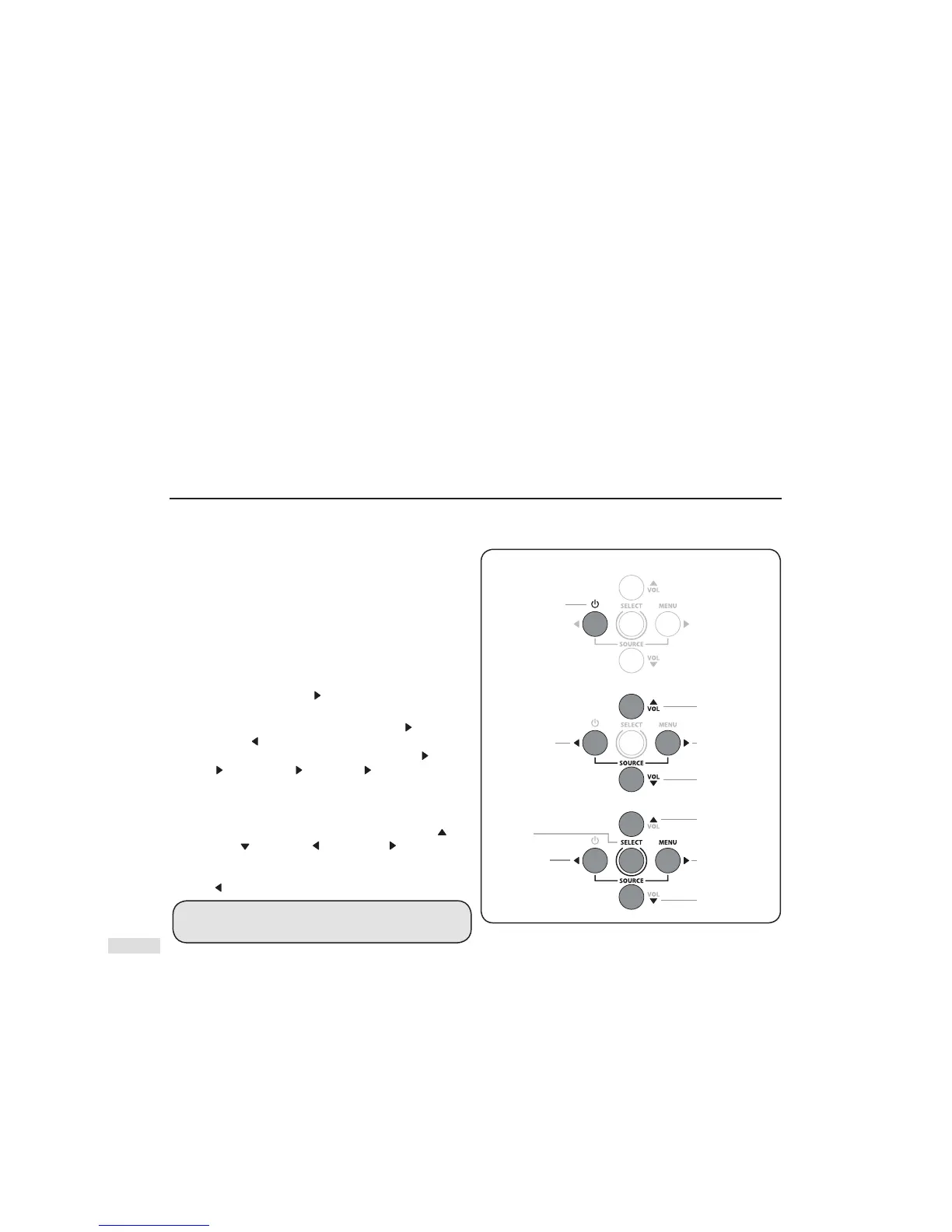
POWER ON/OFF & PREVIOUS SOURCE: Press and hold the
‘Power’ button for 3 seconds to turn unit on or off. Once
power is turned on, this button also controls navigation
to a ‘Previous Source’ selection. See Fig. 13 for a more
visual description.
VOL+ / VOL–: Adjusts volume level up or down Fig.
13.
MENU / NEXT SOURCE: Press this button to enter the menu
system. Once power is turned on, this button also controls
navigation to a ‘Next Source’
selection. See Fig. 13 for a
more visual description.
PREVIOUS / NEXT SOURCE: Use the ‘Next Source’
and
‘P revious Source’
buttons to cycle back and forth through
inputs (Fig. 13). The order of inputs is: Digital Optical 1
Digital
Optical 2
Digital Coaxial
Analog RCA Bluetooth.
ACCESSING THE MENU FROM THE TOP PANEL
To access the Menu, press and hold the top-panel ‘Menu ’ button
for 3 seconds (Fig. 13). After the menu has been activated, the five
buttons on the top panel controls will function as ‘ Scroll Up’
/
’Scroll Down’
/ ’Scroll Left’ / ‘Scroll Right’ directional
buttons allowing you to navigate the menu and press the
‘Select’ button to accept selections. Exit the menu by pressing
the ‘ Left’
button or simply wait for the automatic time out.
MUTING THE SYSTEM: Cannot be done from the top
panel controls. Instead, use the remote control.
CONTROL OPTIONS



 To Next Page