EN-19
THE MENU SYSTEM
ENTERING AND EXITING THE MENU
SYSTEM
From the Soundscape’s Top Panel
To access the Menu System from the Soundscape’s top panel,
press and hold the ‘Menu’ button (Fig. 13).
Via the Soundscape Remote
To access the Menu System from the remote, press ‘Menu’
(Fig. 14). To exit, press ‘Menu’ again or select the ‘Left’
button.
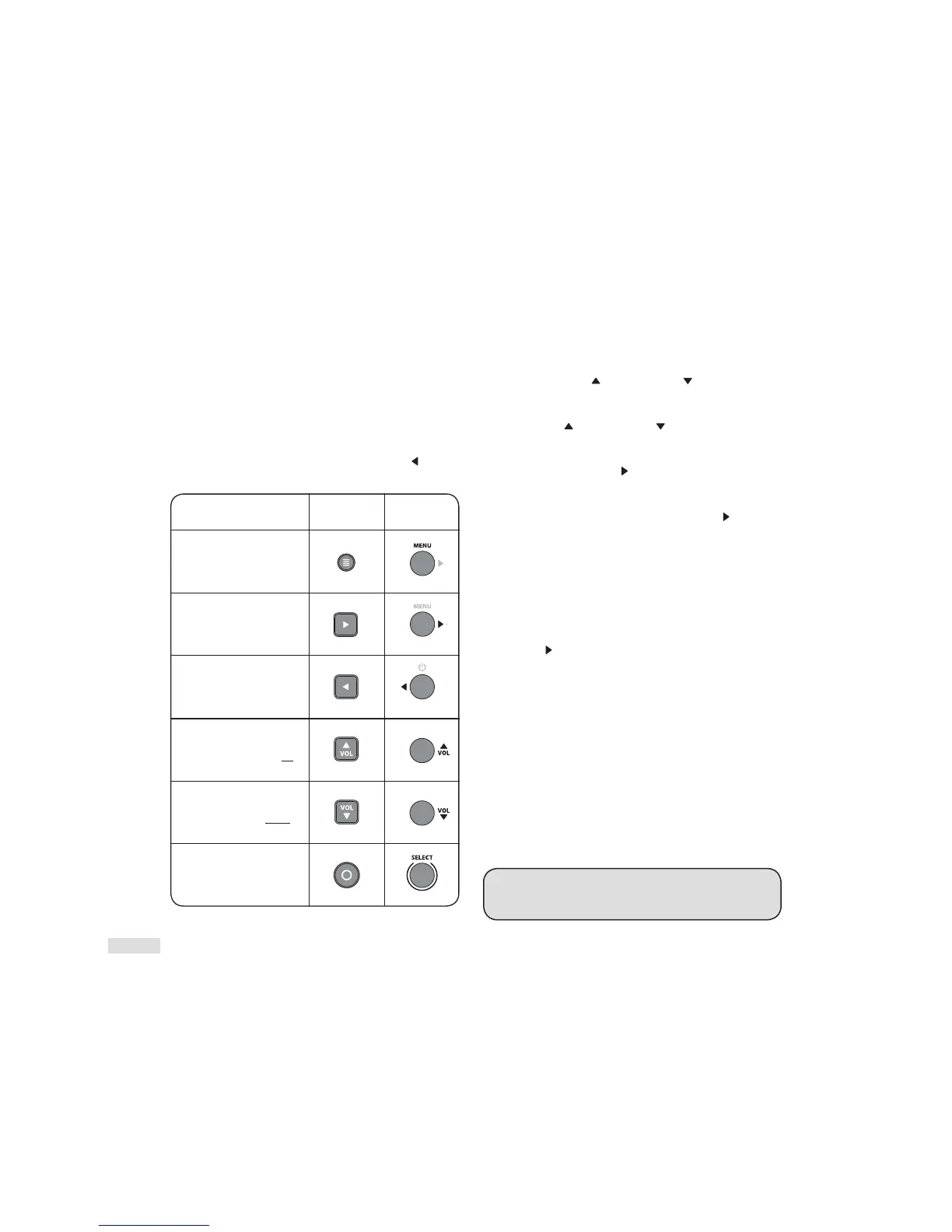
How to Use the Navigation Buttons
MENU OPTIONS
Menu Option: MODE
‘MUSIC’: Scroll to select ‘MUSIC’. To choose ‘MUSIC’, press
‘Select’ then ‘Scroll Up’
or ’Scroll Down’ to activate any/
all of the additional mode options.
‘MOVIE’: Scroll to select ‘MOVIE’. To choose Movie press
‘Select’ ‘Scroll Up’
or ’Scroll Down’ to activate any/all of
the additional mode options.
‘LOUDNES’ [LOUDNESS]: Enter the ‘SUROUND’ submenu
by pressing the ‘Scroll Right’
directional button. To activate
press ‘Select’ for ‘ON’, to deactivate press ‘Select’ for ‘OFF’.
‘BASS’: Enhance (+) or decrease (-) bass output in 2-dB
increments. Activate by pressing the ‘Scroll Right’
directional
button, find your desired setting, press ‘Select’ and the
Soundscape will respond with ‘SET’.
‘TREBLE’: This mode allows you to enhance (+) or decrease
(-) treble output in 2 dB increments. Activate by pressing the
‘Right’ directional button, find your desired setting, press
‘Select’ and the Soundscape will respond with ‘SET’.
‘SUROUND’ [SURROUND]: Enter the ‘SUROUND’ submenu to
engage Paradigm’s Virtual Surround Sound
by pressing the
‘Scroll Right’
directional button. This menu allows you to turn
Soundscape’s surround channels ‘ON’ or ‘OFF’.
‘SUROUND’ > ‘ON’ [SURROUND ON]: This option configures
the
Soundscape (when it detects 5.1-channel encoded content)
to fully reproduce all 5.1-channels of information including
simulated surround channels.
Activate the option by pressing
the ‘Select’ button and the Soundscape will respond with ‘SET’.
‘SUROUND’ >‘OFF’ [SURROUND OFF]: This option configures
the
Soundscape (when it detects 5.1-channel encoded
content) to down-mix to 3.1-channel output (left/center/right
channels + external subwoofer) and does not use simulated
surround channels. All content originally intended for the
surround channels is routed to the left/center/right channels.
Activate the option by pressing the ‘Select’ button and the
Soundscape will respond with ‘SET’.
TIP! Both multichannel and stereo sound can be heard as
surround.
When not in Surround Mode, the Soundscape’s
default Mode is ‘Stereo’.
‘Menu’ button enters top
level menu or exits the
menu system.
‘Right’ arrow button goes
down deeper into a menu.
‘Left’ arrow button and
for exiting the menu.
‘Up’ button increases
the value of a setting
(i.e. volume) or scrolls up
through options
‘Down’ button decreases
the value of a setting (i.e.
volume) or scrolls down
through options
‘Select’ button chooses/
sets options and exits
menu level.
REMOTE
CONTROL
TOP PANEL
HOW TO USE THE
NAVIGATION BUTTONS



 To Next Page