EN-17
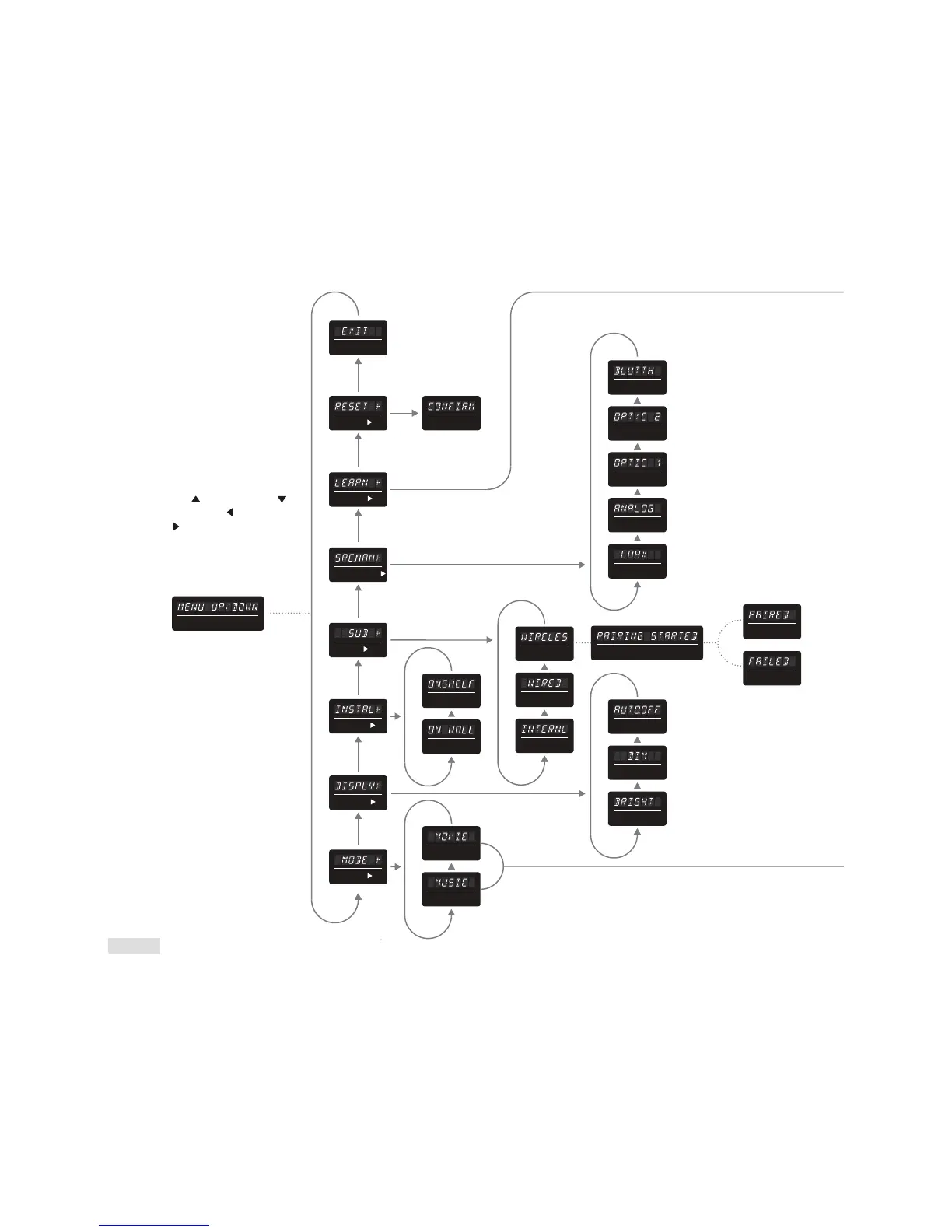
MENU UP / DOWN (scrolling)
PAIRING STARTED (scrolling)
COAXIAL
OPTIC 2
OPTIC 1
CONFIRM
ONSHELF
ON WALL
AUTOOFF
DIM
BRIGHT
ANALOG
EXIT
RESET
LEARN
SOURCE NAME
SUB
INSTALL
DISPLAY
MODE
MUSIC
BLUETOOTH
PAIRED
FAILED
WIRELESS
WIRED
INTERNAL
MOVIE
MENU FLOW
CHART
The Menu system can
be reached by pressing
‘Menu‘ on the remote
control or by pressing and
holding the ‘Menu’ button
on the top-panel controls
for approximately three
seconds.
To navigate Soundscape’ s
menu system use the ‘Scroll
Up’
/ ’Scroll Down’ /
’Scroll Left’
/ ‘Scroll Right’
directional buttons.
Use the ‘Select’ button to
choose a function.



 To Next Page