EN-22
Menu Option: LEARN
TIP! Before beginning the ‘LEARN’ process make sure you
have the second remote (i.e. the one you wish to program)
nearby.
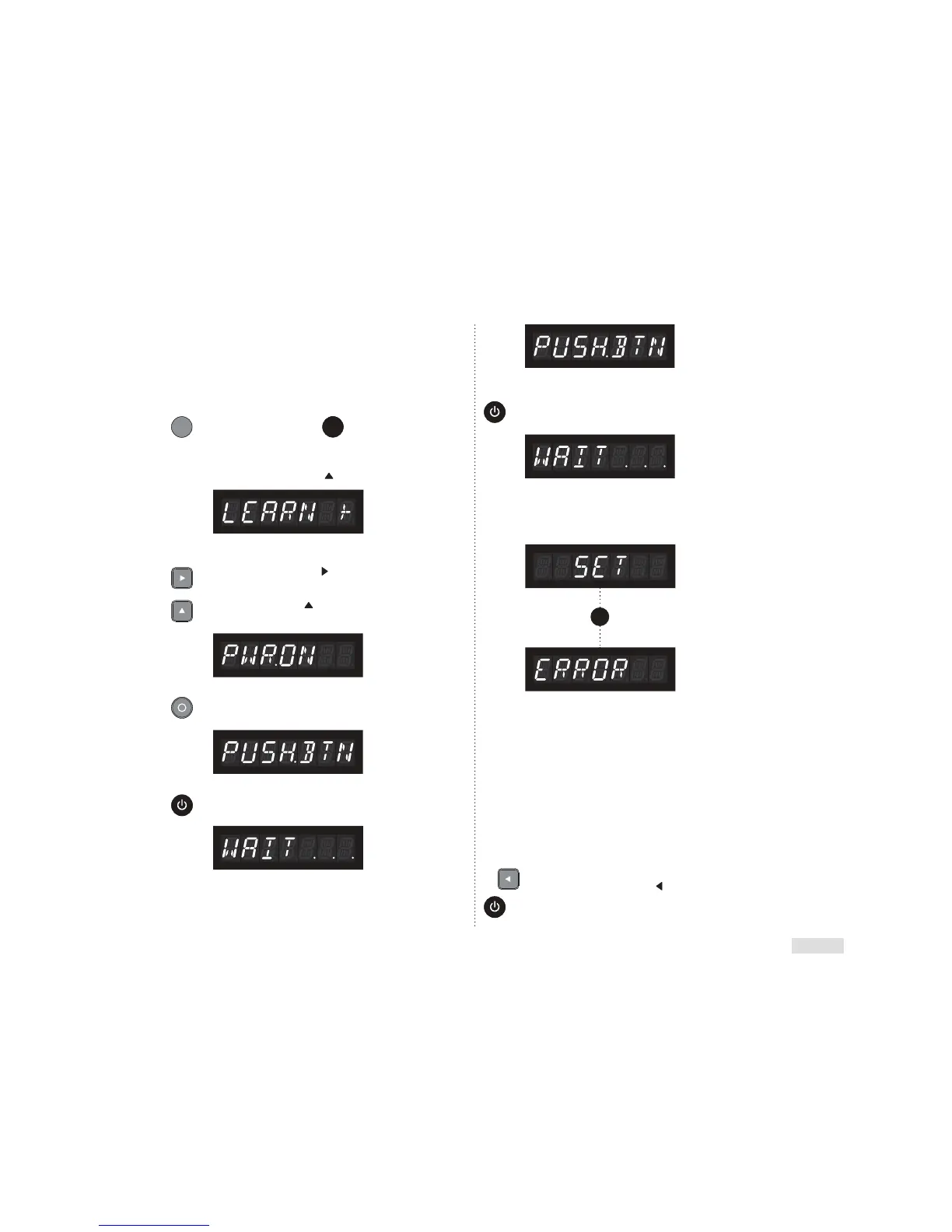
EXAMPLE GIVEN BELOW: Learning ‘Power On’ Function
= Soundscape Remote = 2nd Remote
User Action:
In the Menu ‘Scroll Up’’
to ‘LEARN’ (IR Learning)
Result:
User Action:
Press the ‘Scroll Right’
directional button to
enter the ‘LEARN’ sub-menu.
Press the ‘Scroll Up’
directional button to
‘PWR.ON’ (Power On).
User Action:
Press Select to choose ‘PWR.ON’.
Result:
User Action:
Immediately push Power Toggle button on 2nd remote.
Result:
User Action:
Wait for Soundscape to process new IR coding from
2nd remote.
Result:
User Action:
Again, immediately push the ‘Power Toggle’ button
on 2nd remote.
Result:
User Action:
Again, wait for Soundscape to process new IR coding
from 2nd remote.
OR
The LCD screen will read ‘SET’ if the ‘Power Toggle’
function has been learned by the Soundscape.
User Action:
If IR learning has failed, the LCD will read ‘ERROR’,
repeat the IR Learning process.
NOTE: an ‘ERROR’ warning may also indicate that
your Soundscape does not recognize your remote’s
IR coding (see note on page 21).
User Action:
To ensure the action was successful exit the menu
by pressing the ‘Scroll Left’
directional button
2 times. Now press the ‘Power Toggle’ on the 2nd
remote to check functionality
Result:
Option
Chosen
(Example):
Result:
2x



 To Next Page