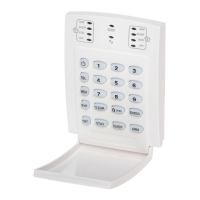
8 User’s Manual
3.4.2 Key [STAY/11] - Stay arming:
Please refer to section3.3 on page7 for an
explanation of stay arming. Press the [STAY/11] key
steadily for 2 seconds. This will automatically “Stay”
arm the system.
3.5 DOUBLE STAY ARMING:
After Stay Arming and during the exit delay, press
and hold the [STAY/11] key to switch any delayed
zones to “instant” zones. Regular arming cancels
“double stay” arming.
3.6 FAST EXIT WHILE IN STAY MODE:
3.6.1 Fast Exit and Stay Arm
To exit the already Stay armed premises and remain
Stay armed, press key [STAY/11] for two seconds.
The system will switch to exit delay mode (“ready”
LED flashes). At the end of the exit delay period, the
system will return to “Stay” arming mode.
3.6.2 Fast Exit and Regular Arm
To exit the already Stay armed premises and switch
to regular arming, press key [10] for two seconds.
The system will switch to regular arming (keys [11]
and [12] flash) with an exit delay. At the end of the
exit delay period, the system is regular armed.


 To Next Page