1110
3. VIDEO MODE
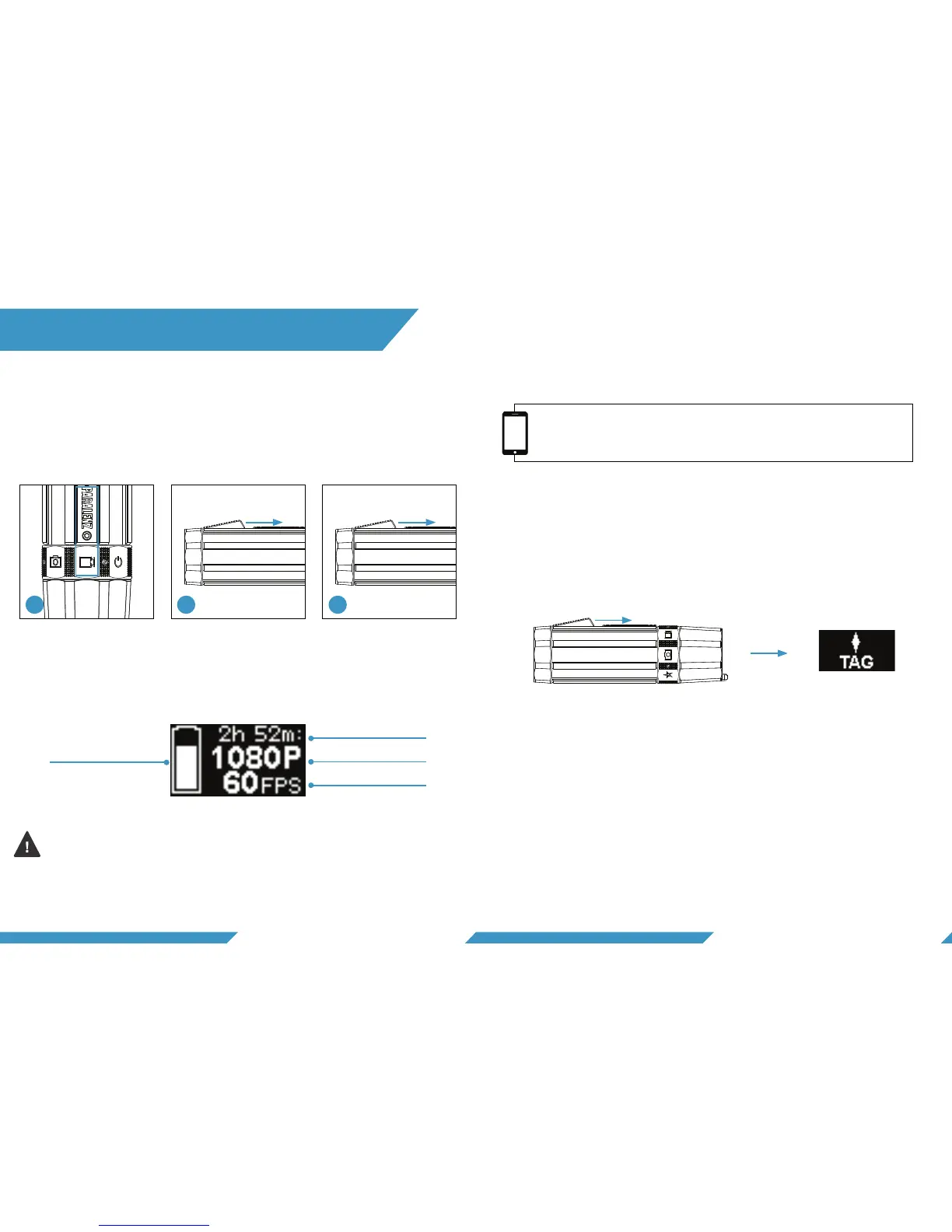
1) Select the video mode on the selector ring.
2) Hold the activation switch for 1 second to start recording.
3) To stop recording, hold the activation switch for 1 second.
To make tags, click the activation button while recording a
video. When a tag has been inserted ‘TAG’ will appear on the
display.
The video screen will appear when the video mode is selected.
If you use flashlights or floodlights when diving, turn off DCC™.
Click three times to turn off/on the DCC™. The screen will show
the DCC™ status. For more information on DCC™ go to section 6.3.
1 sec.
Click
1 sec.
Start Stop
3.4 MAKE TAGS IN VIDEO
3.2 VIDEO SCREEN
Battery level
Time
Resolution
Frames per second
3.1 RECORD VIDEO
If you record for a long time, a tag will let you find that spot in a
long video. The Paralenz app lets you find tags in a long video.
Go to paralenz.com/dive-log-app to download the app.
3.3 WHAT IS A TAG?
1 2 3


 To Next Page