1514
5. CUSTOM MODE
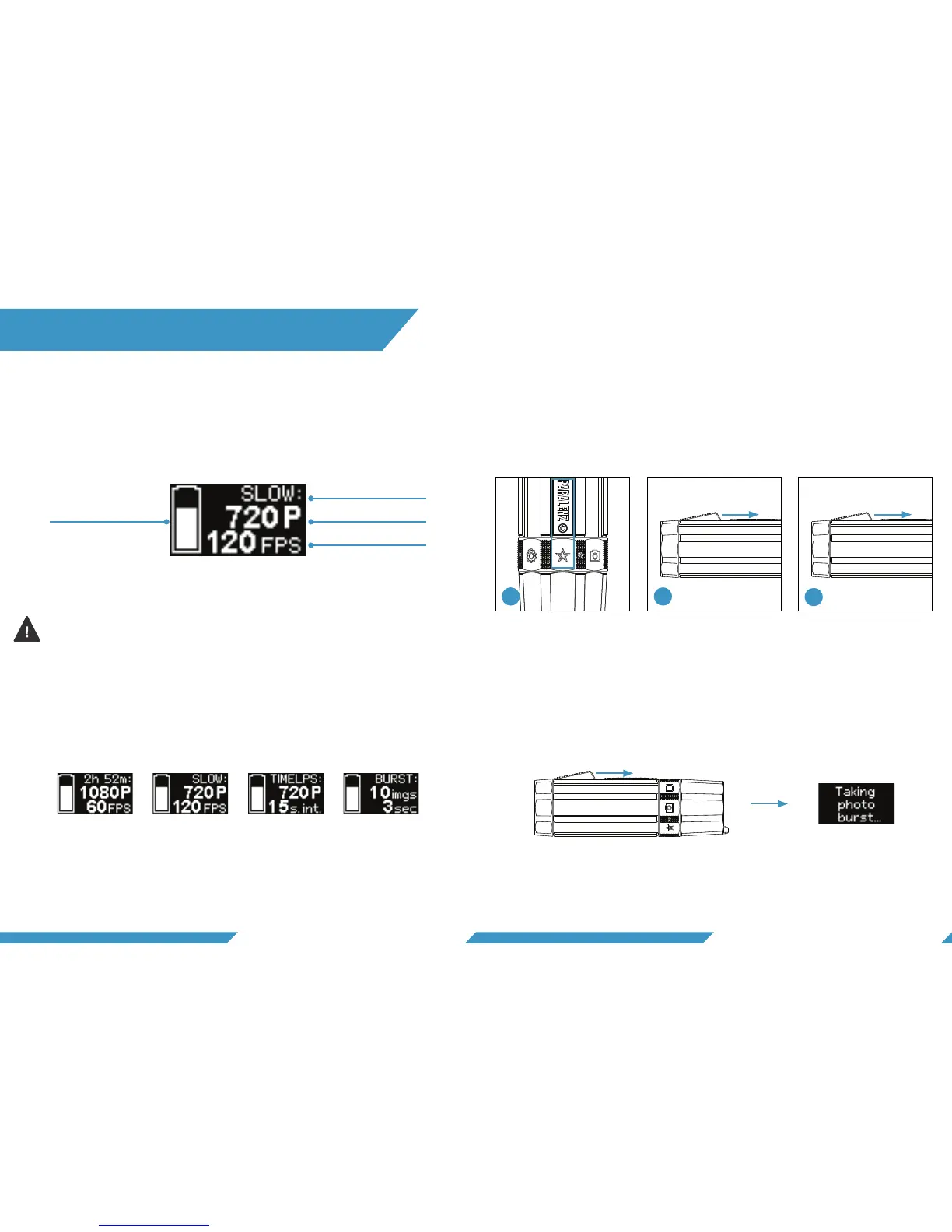
The custom mode-screen will appear when the mode is
selected.
To take a photo burst, click the activation switch. A screen will
appear indicating that the camera is taking a photo burst. The
camera is ready to use again when that screen disappears.
If you use flashlights or floodlights when diving, turn off DCC™.
Click three times to turn off/on the DCC™. The screen will show
the DCC™ status. For more information on DCC™ see section 6.4.
The screen can have 1 of 4 different modes assigned to it: video,
slow motion, time lapse and photo burst. Go to settings to see
how to switch between different custom modes (See chapter 6
– Camera settings).
5.3 TAKE A PHOTO BURST
5.1 MODE SCREEN APPEARANCE
Mode
Battery level Resolution
Frames per second
Video Slow motion Time lapse Photo burst
To record a video, slow motion or time-lapse 1) the custom-
mode icon on the selector ring should be selected (make sure
that the right custom mode is selected. 2) Hold the activations
button for 1 second to start the recording. 3) To stop a record-
ing, hold the activation button for 1 second.
1 sec. 1 sec.
Start Stop
5.2 RECORD VIDEO, SLOW MOTION
OR TIME-LAPSE
Click
2
3
1


 To Next Page