Page 302 · Robotics with the Boe-Bot
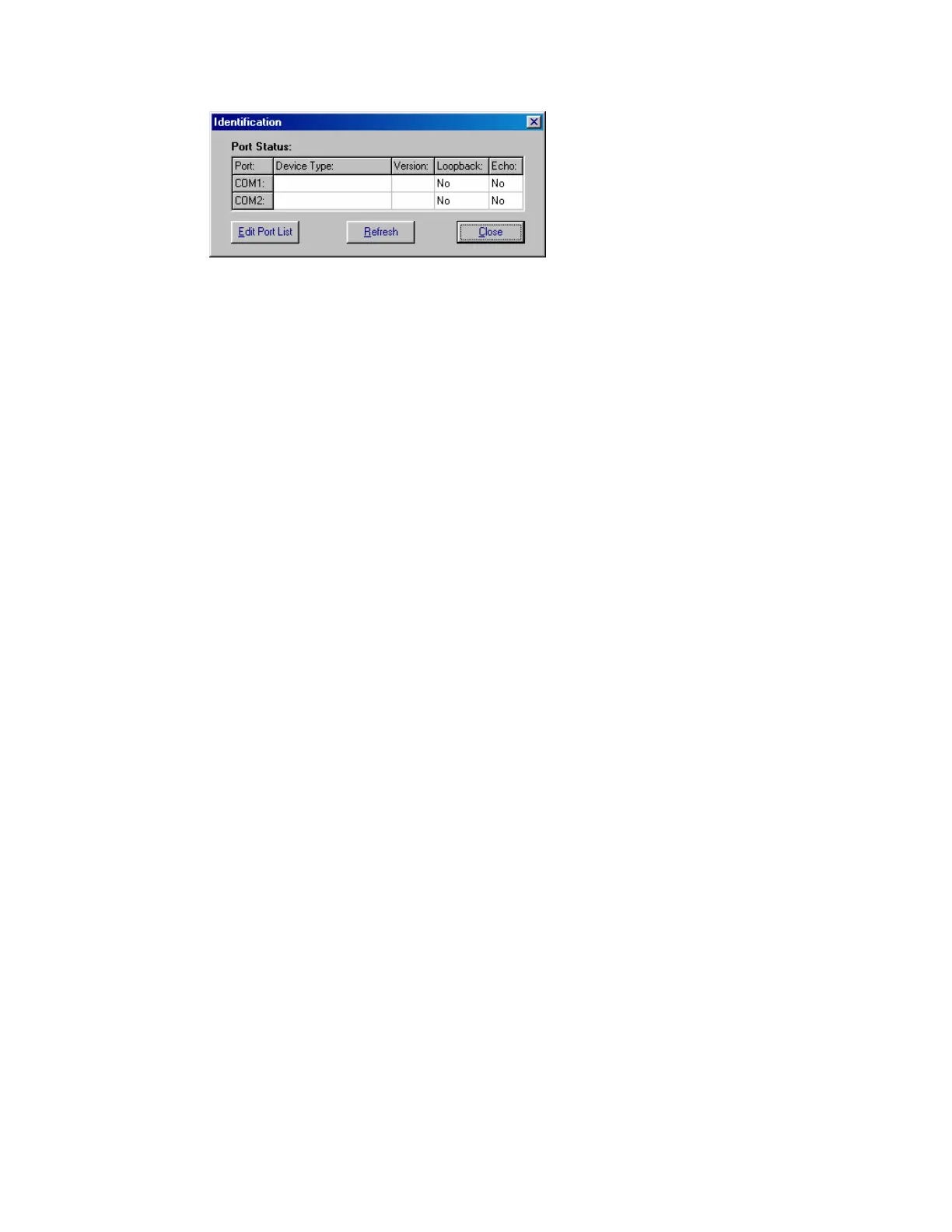
Figure A-1
Identification Window
Example: BASIC Stamp
2 not found on COM
ports.
If you know the number of the COM port, but it does not appear in the Identification
Window:
√ Use the
Edit Port List button to add that COM port. When you return to the
Identification window, click the
Refresh button to find out if the BASIC Stamp 2
is now detected.
√ Close the Identification window.
√ In the BASIC Stamp Editor, Click
Edit and select Preferences. Click the Editor
Operation tab, and set the Default COM Port to AUTO.
√ Try the
Run → Identify test again.
If you are unsure of which COM port your BASIC Stamp is connected to, or if you are
using a USB to serial port adaptor, you may need to look in your computer's Device
Manager to find the list of COM ports in use.
√ Click on your computer desktop’s Start button.
√ To view the list of COM ports in use, make the selections listed next to your
operating system :
Windows® 98:
Control Panel → System → Hardware → Device Manager
→ Ports(COM & LPT1).
Windows® 2000:
Settings → Control Panel → System → Hardware →
Device Manager → Ports (COM & LPT).
Windows® XP:
Control Panel → Printers and Other Hardware.
In the
See Also box select System.
Select
Hardware → Device Manager → Ports
Windows® XP Pro:
Settings → Control Panel → System → Hardware →
Device Manager → Ports (COM & LPT).


 To Next Page