5
EN
®
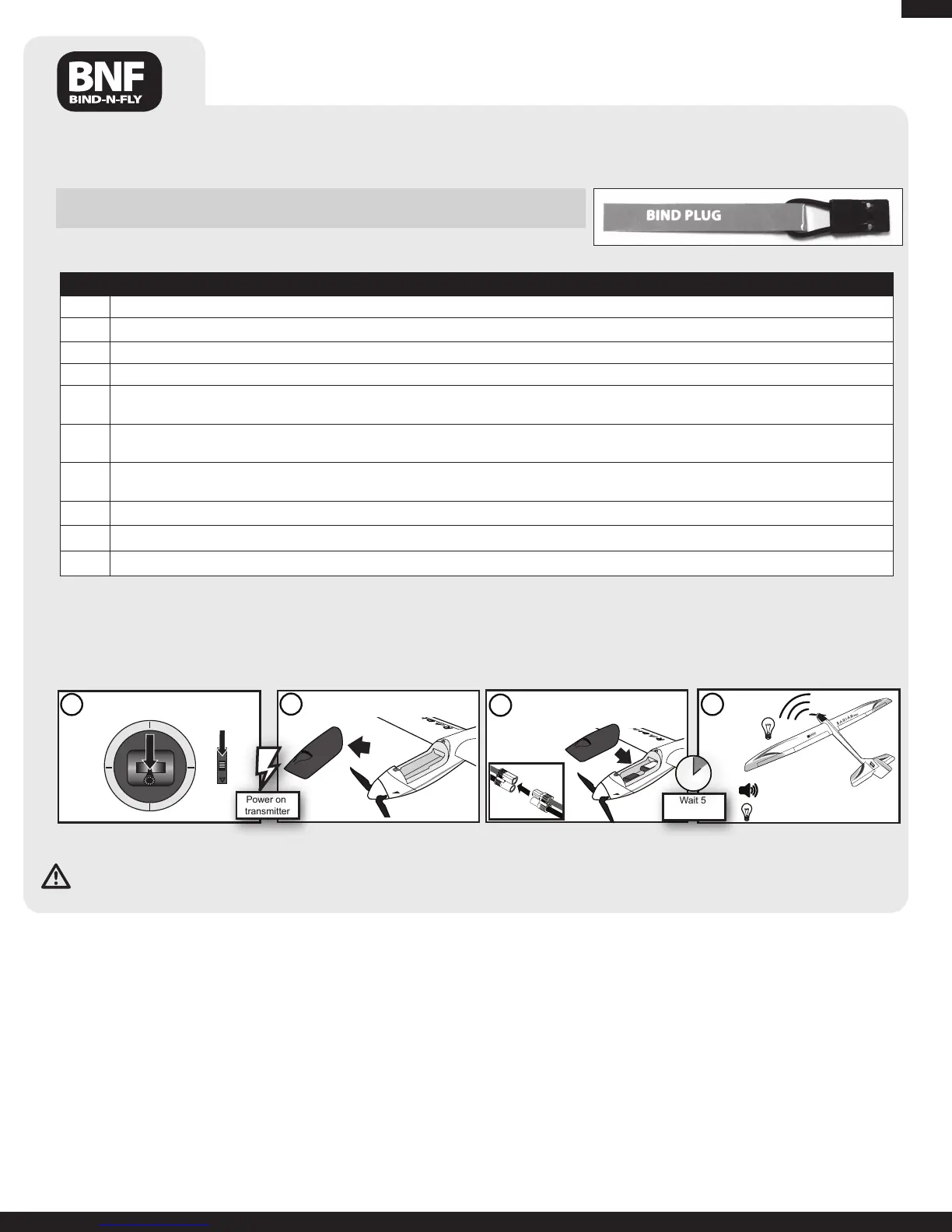
Binding Procedure Reference Table
1. Read transmitter instructions for binding to a receiver (location of transmitter’s Bind control).
2. Make sure transmitter is powered off.
3. Install a bind plug in the receiver bind port in the battery compartment.
4. ConnecttheightbatterytotheESC.ThereceiverLEDwillbegintoashrapidly.
5. Move the transmitter controls to neutral (flight controls: rudder, elevators and ailerons) or to low positions
(throttle, throttle trim, and flight control trims).*
6. Power on the transmitter while holding the transmitter bind button or switch. Refer to your transmitter’s manual for binding button or switch
instructions.
7. Whenthereceiverbindstothetransmitter,theESCsignalswithaseriesofsounds.Theseriesofsoundsisalongtone,thenthree(3)short
tones(beeps)thatconrmtheLVCissetfortheESC.
8. Remove the bind plug from the receiver in the battery compartment.
9. Safelystorethebindplug(someownersattachthebindplugtotheirtransmitterusingtwo-partloopsandclips).
10. The receiver should keep the binding to the transmitter until another binding is done.
* The throttle will not arm if the transmitter’s throttle control is not put at the lowest position.
If you encounter problems, obey binding instructions and refer to transmitter troubleshooting guide for other instructions. If needed, contact the ap-
propriateHorizonProductSupportofce.
BindingistheprocessofprogrammingthereceiverofthecontrolunittorecognizetheGUID(GloballyUniqueIdentier)codeofasinglespecictransmitter.You
needto‘bind’yourchosenSpektrum™DSM2technologyequippedaircrafttransmittertothereceiverforproperoperation.
Note: Any JR
®
orSpektrumDSM2™transmittercanbindtotheSpektrumAR600receiver.
Please visit www.bindnfly.com for a complete list of compatible transmitters.
Transmitter and Receiver Binding
Note:WhenusingaFutabatransmitterwithaSpektrumDSM2module,youmustreversethethrottlechannel.
Note: Always disconnect the Li-Po from the receiver of the aircraft when not flying. Failure to do so will render the battery unusable.
Before Flight
CAUTION:Whenarmed,themotorwillturnthepropellerinresponsetoanythrottlemovement.
Whentheaircraftdoesnotrespond,bindingorrebindingmayberequired.
1
Lower throttle and throttle trim
to lowest settings.
4
Continuous LED
Series of tones
2
Remove battery hatch from nose
of aircraft.
3
Power on
transmitter
Wait 5
seconds
Install flight battery in battery cavity.
Secure flight battery with 2 hook and
loop straps.



 To Next Page