9
EN
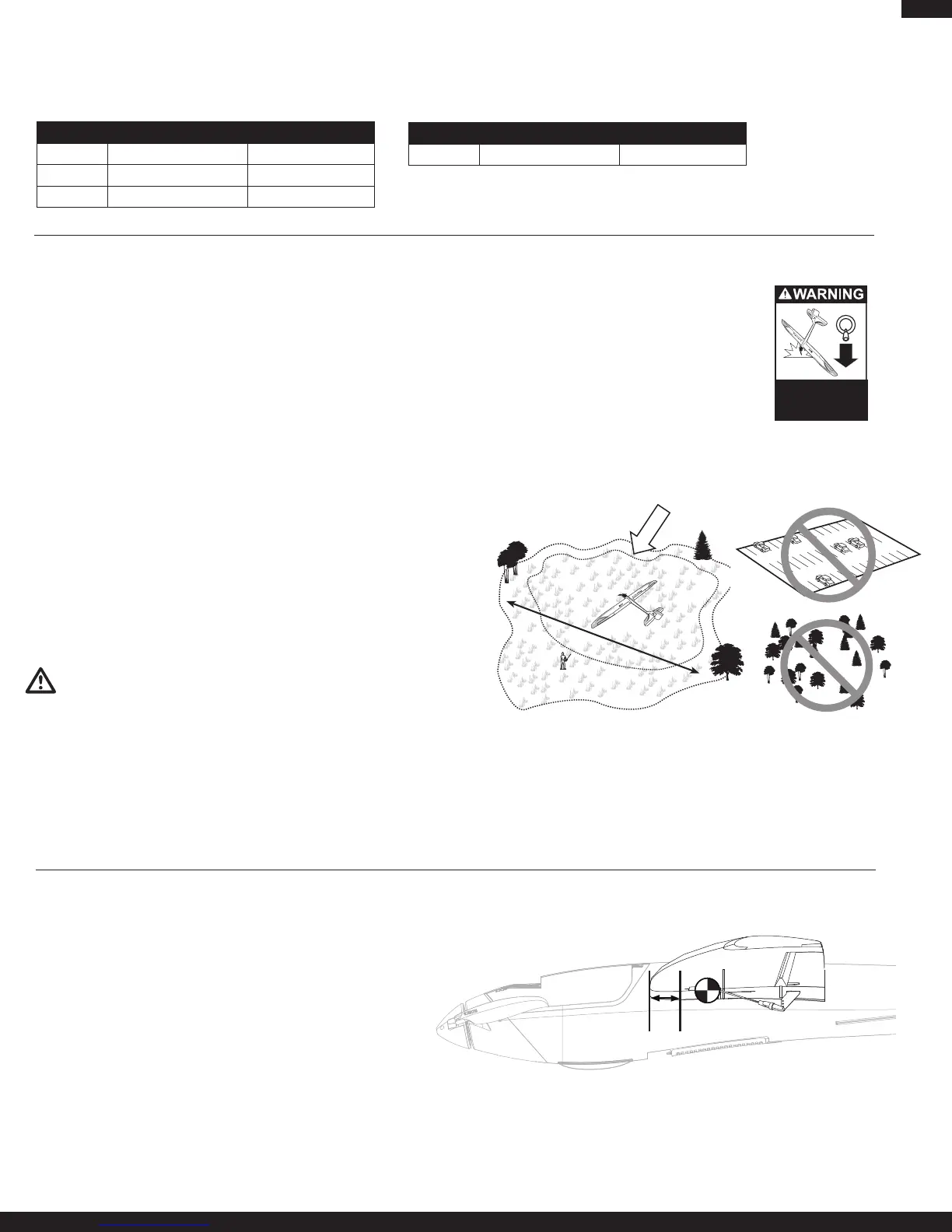
AdjustmentofCGisnotrequiredwhentheightbatteryissecuredin
the fuselage using the front-to-rear and side hook and look straps.
Range Check your Radio System
After final assembly, range check the radio system with the Radian Pro. Refer
to your specific transmitter instruction manual for range test information.
Before Each Flying Session
• Alwaysmakesureyouhavefullychargedthetransmitterbatteriesormake
sure your transmitter has fresh batteries before you fly.
• AlwaysmakesureyourRadianProisproperlytrimmedpriortoeachight.
• Alwaysmakesurethereceiver,ESC,andbatteryaresecuredinthefuse-
lage.
• Turnonthetransmitterbeforepluggingintheightbattery.Withtheaircraft
on the ground and motor running, you should walk away approximately 100
feet and still have full control of all functions while following the specific
rangetestfeatureofyourDSM2transmitter.Ifthisisnotthecase,donot
y.ContacttheappropriateHorizonProductSupportofce.
• Alwaysmakesureallcontrolsfunctionperthetransmitterinputyougive.
This includes ailerons, rudder, elevator and throttle.
• Alwaysmakesuretheservoreversingswitchesonthetransmitterareset
correctly.
• Alwaysmakesurethedualratesswitchisattheratesettingwhereyou
plantoy.WerecommendLOWratesforyourinitialying.
CAUTION: Always remove the flight battery from the aircraft when you
are done flying, or when you are on the way to the flying field.
Flying
Always choose a wide-open space for flying your ParkZone Radian Pro. It is
ideal for you to fly at a sanctioned flying field. If you are not flying at an ap-
proved site, always avoid flying near houses, trees, wires and buildings. You
should also avoid flying in areas where there are many people, such as busy
parks, schoolyards, or soccer fields. Consult local laws and ordinances before
choosing a location to fly your aircraft. For more information about sailplane
flying, thermals and slope lift, refer to www.horizonhobby.com.
Flaps
The flaps on the Radian Pro are primarily used for
glide path control. The flaps allow for more drag and
additional lift to allow the plane to fly slower and
descendatasteeperrate.Withtheapslowered,
the Radian Pro can land in much smaller areas than
would be able otherwise. The flaps cause the Ra-
dian Pro to pitch up if deployed at higher speeds. If
using a transmitter without elevator/flap mixing it is ad-
visable to deploy the flaps at lower airspeeds to prevent the pitch up when
theapsarelowered.Withtheapsdeected,aileroneffectivenessisslightly
reduced.
Repairs
ThankstotheZ-foam™constructionoftheRadianPro,repairstothefoam
can be made using virtually any adhesive (hot glue, regular CA, epoxy, etc).
Whenpartsarenotrepairable,seetheReplacementPartsListfororderingby
item number.
Note: Repair of the horizontal stabilizer requires use of foam-safe CA.
Fly in this area
(upwind of pilot)
Standhere
600
feet (182.8 m)
Always
decrease throttle at
propeller strike.
Flying Tips and Repairs
Control Surfaces
Adjusting Center of Gravity (CG)
70mm (2.75 in) from
leading edge of the
wing at the fuselage
Measure all control surfaces at the widest point of each control surface to check these suggested rates.
Low rate is 70% of high rate travel.
For information on advanced sailplane setups for the Radian Pro, please visit the product page for the Radian Pro on www.horizonhobby.com
High Rate Low Rate
Aileron 15mm up/12mm down 11mm up/8mm down
Elevator 11mm up/down 7mm up/down
Rudder 27mm left/right 20mm left/right
1/2 Flap Full Flap
Flap 17mm 35mm
If using 3 position switch for flaps



 To Next Page