To stop recording, press • again.
Pre-programmed
aerobatics
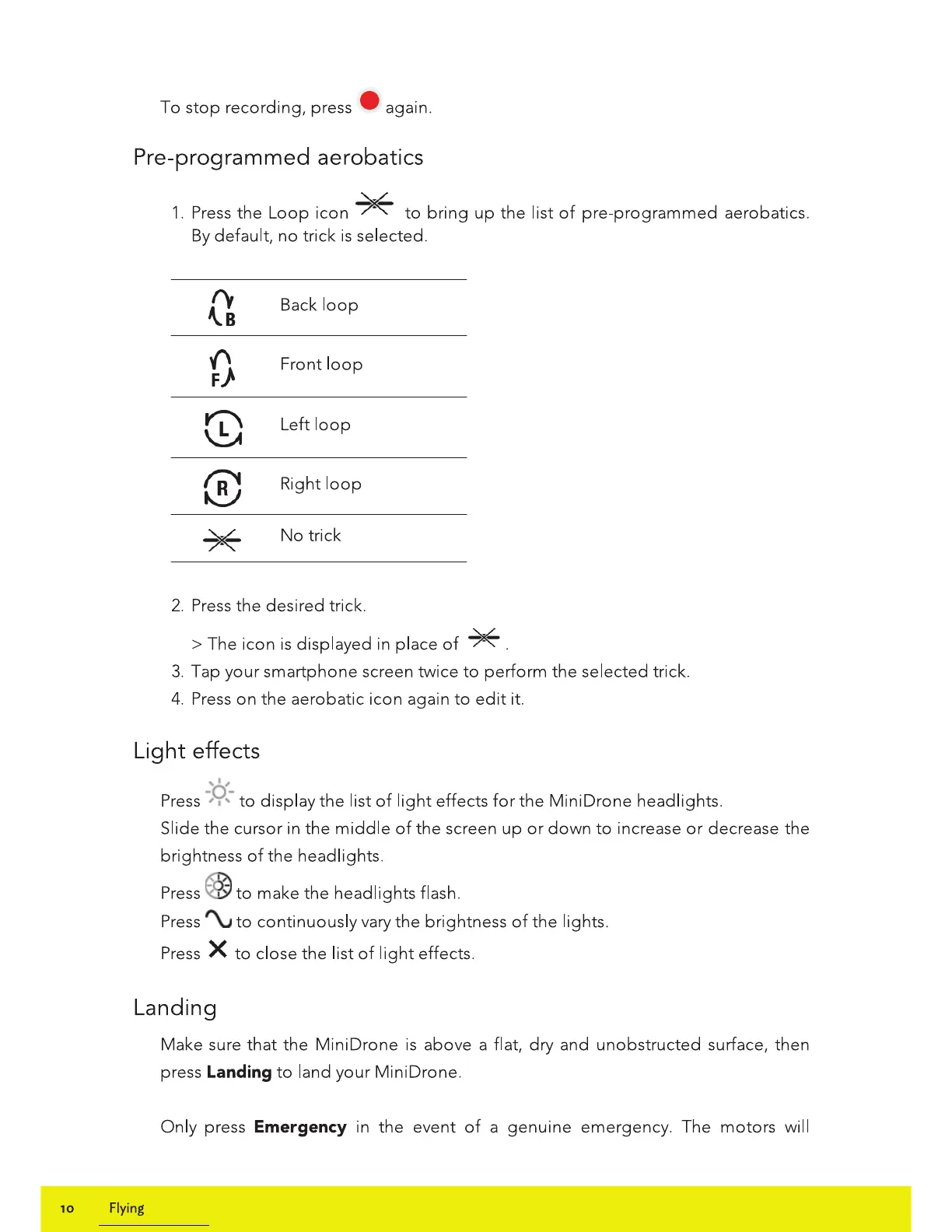
1.
Press
the
Loop
icon
~
to
bring
up
the
list
of
pre-programmed aerobatics.
By
default,
no
trick is selected.
Q
Back
loop
0
Front
loop
8
Left
loop
fR4
~
Right
loop
~
No
trick
2.
Press
the desired trick.
>The
icon is displayed in place
of
*.
3.
Tap your smartphone screen twice
to
perform the selected trick.
4.
Press
on the aerobatic icon again
to
edit
it.
Light
effects
Press
-}:!..-
to
display the list
of
light
effects
for
the
Mini Drone headlights.
Slide
the
cursor in
the
middle
of
the
screen
up
or
down
to
increase
or
decrease the
brightness
of
the headlights.
Press
@
to
make
the
headlights flash.
Press
I\.,
to
continuously vary
the
brightness
of
the lights.
Press
X
to
close
the
list
of
light
effects.
Landing
10
Flying
Make sure that
the
MiniDrone is above a flat,
dry
and unobstructed surface, then
press
Landing
to
land your MiniDrone.
Only press
Emergency in the event
of
a genuine emergency. The motors will















 To Next Page