GUÍA DE INICIO RÁPIDO
Esta guía del MiniDrone le proporciona las princi-
pales instrucciones. Podrá encontrar la documen-
tación completa en nuestro sitio web
www.parrot.
com/es/support/airborne-night-drone
.
CARGAR LA BATERÍA
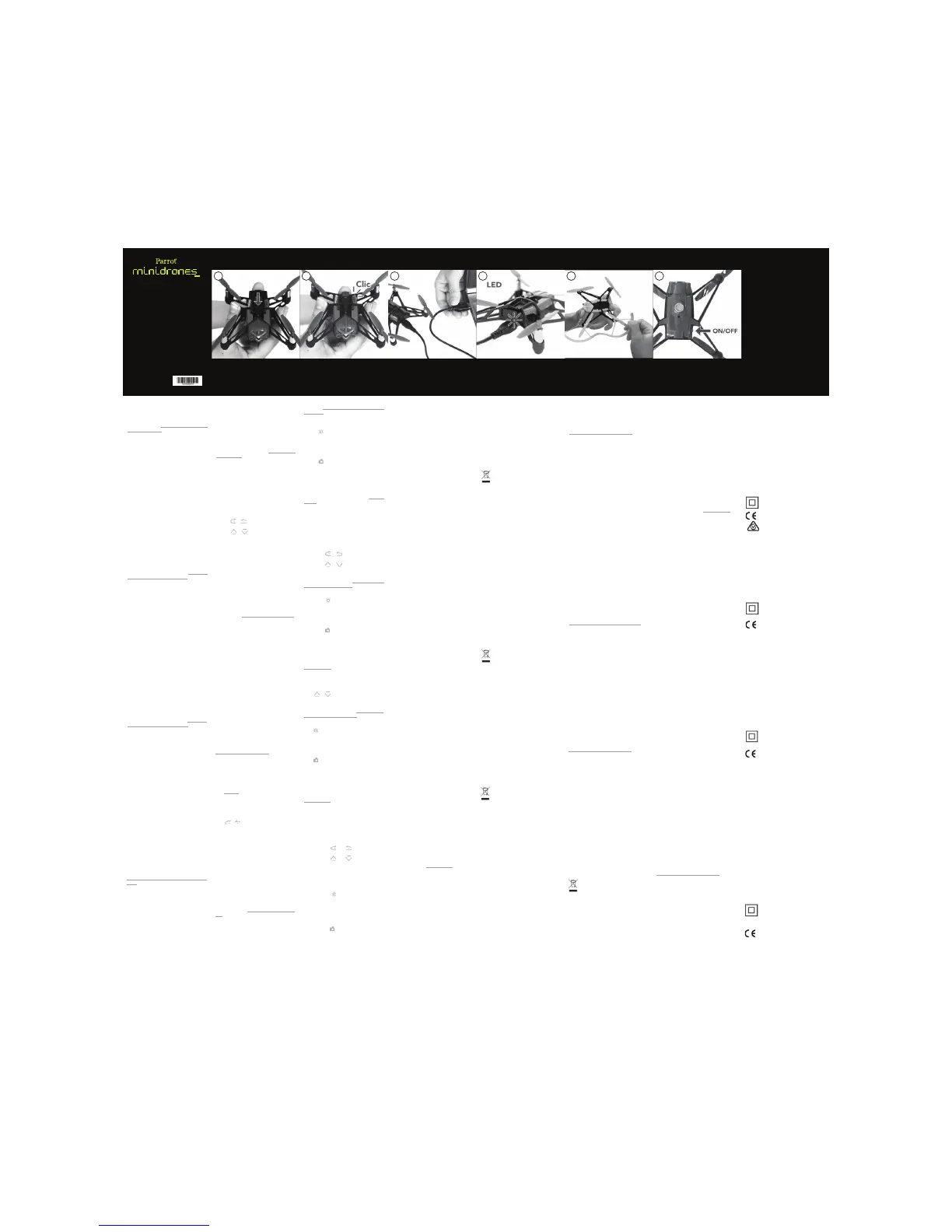
1. Inserte la batería en la ranura indicada (fotos
A y B).
2. Conecte el MiniDrone (fotos C y D):
• Con un cargador con una potencia mínima
de 2,4 A. El tiempo de carga es de aproxi-
madamente 25 minutos.
• Con un ordenador utilizando el cable USB.
El tiempo de carga de la batería es de
aproximadamente 1 hora y 30 minutos.
Para extraer la batería, levante la pestaña en la
parte superior de la batería y deslícela hacia atrás.
DESCARGAR LA APLICACIÓN
Inicie sesión en App Store
SM
o Google Play
TM
y
descargue la aplicación gratuita FreeFlight3.
INSTALAR LAS CARENAS
Las carenas del MiniDrone permiten protegerlo
en caso de colisión. Encaje las carenas bajo cada
hélice (foto E).
ENCENDER EL MINIDRONE
El botón On/Off se sitúa debajo del MiniDrone
(foto F).
CONECTAR UN SMARTPHONE
Para utilizar el MiniDrone, se necesita un smart-
phone o una tableta compatible con Bluetoo-
th
®
4.0. Compruebe la compatibilidad de su
smartphone en:
www.parrot.com/es/compatibility.
1. Active la función Bluetooth
®
en su smart-
phone.
2. Inicie la aplicación FreeFlight3. La conexión se
establecerá automáticamente entre el smart-
phone y el MiniDrone.
PILOTAJE
Pulse Take Off para hacer despegar el MiniDrone.
Pulse en el joystick derecho mientras inclina el
smartphone hacia adelante o hacia atrás para di-
rigir el MiniDrone hacia adelante o hacia atrás, y
hacia la izquierda o la derecha para hacerlo girar
a la izquierda o la derecha.
Pulse
o para hacer girar el MiniDrone ha-
cia la derecha o hacia la izquierda.
El MiniDrone es un aeromodelo diseñado con
fines recreativos y de ocio. El piloto debe, en todo
momento, mantener el contacto visual con el Mi-
niDrone y controlar su trayectoria. El MiniDrone
se debe utilizar siguiendo la normativa vigente
de aviación civil de su país. Los lugares de uso
deben adaptarse a su evolución para garantizar
permanentemente la seguridad de las personas,
los animales y los bienes materiales. Utilizar el Mi-
niDrone en algunos lugares públicos (por ejemplo
en las estaciones, los aeropuertos...) o en la vía
pública, puede no estar permitido.
Para utilizar el MiniDrone en lugares interiores,
instale las carenas para proteger el MiniDrone de
posibles choques con otros objetos.
Las hélices del MiniDrone cuando vuela pueden
causar daños en personas u objetos. No toque el
MiniDrone durante el vuelo. Espere a que el movi-
miento de las hélices cese completamente antes
de manipular el MiniDrone.
Utilice únicamente los accesorios especificados
por el fabricante.
En caso de que penetre arena o polvo en el Mi-
niDrone, puede ocurrir que éste ya no funcione
correctamente, de manera irreversible.
No utilice el MiniDrone con malas condiciones
meteorológicas (lluvia, fuerte viento o nieve) o
cuando las condiciones de visibilidad sean insu-
ficientes (noche).
Mantenga el MiniDrone alejado de líneas de alta
tensión, edificios u otras zonas potencialmente
peligrosas.
No utilice este dispositivo cerca de líquidos. No
coloque el MiniDrone en el agua o sobre una
superficie húmeda, esto podría causar daños ir-
reversibles.
Evite someter al MiniDrone a cambios de altitud
demasiado bruscos.
No deje el MiniDrone al sol.
GARANTÍA
Si desea conocer las condiciones de la garantía,
consulte las condiciones generales de venta del
distribuidor donde haya comprado el MiniDrone.
CÓMO RECICLAR ESTE PRODUCTO
El símbolo en el producto y su documenta-
ción indica que no se debe eliminar al final
de su vida útil con los residuos domésti-
cos. La eliminación incontrolada de resi-
duos puede perjudicar el medio ambiente, sepá-
relos de otro tipo de residuos y recíclelos de
forma responsable. Se invita a los particulares a
ponerse en contacto con el distribuidor que le
haya vendido el producto o a informarse en su
ayuntamiento para saber dónde y cómo pueden
reciclarlo.
DECLARACIÓN DE CONFORMIDAD
Parrot SA de 174 quai de Jemmapes, 75010 París,
Francia, declara bajo su responsabilidad que el
producto descrito en esta guía de usuario cumple
con las normas técnicas EN 301489-17, EN300328,
EN71-1, EN71-2, EN62115 según las directivas
establecidas para los equipos de radio, teleco-
municaciones (1999/5 / CE R & TTE), y la directiva
sobre seguridad general (2001/95 / CE).
www.parrot.com/uk/ce/?airborne-night-drone
MARCAS REGISTRADAS
Parrot, Parrot MiniDrones y el logotipo de Parrot,
son marcas de PARROT SA.
App Store es una marca de servicio de Apple Inc.
Google Play es una marca comercial de Google
Inc.
Las marcas registradas y logotipos de Bluetooth
®
son marcas registradas propiedad de Bluetooth
SIG, Inc. y cualquier uso de dichas marcas por
Parrot SA se realiza bajo licencia. Todas las demás
marcas comerciales mencionadas en esta guía
están protegidas y son propiedad de sus respec-
tivos dueños.
AVISO DE PRIVACIDAD
Guardar y publicar la imagen de una persona sin
su consentimiento puede constituir un atentado
contra su vida privada y es susceptible de com-
prometer su responsabilidad. Solicite autoriza-
ción antes de filmar personas, especialmente, si
desea conservar sus grabaciones y/o publicarlas
en Internet. No difunda imágenes denigrantes
que puedan comprometer la reputación o la di-
gnidad de una persona.
BATERÍA
Leer detenidamente la hoja de instrucciones que
se incluye con esta batería. El incumplimiento de
todas las instrucciones podría dañar permanente-
mente la batería y lo que la rodea, además de cau-
sar lesiones corporales. No utilizar nunca ningún
otro cargador excepto un cargador aprobado
LiPo. Utilizar siempre un cargador balanceador de
baterías LiPo o un balanceador de baterías LiPo.
No cargar nunca la batería a través de un cable
de descarga. No realizar nunca una carga lenta,
ni por debajo de 2,5V por pila. La temperatura de
la batería nunca debe superar los 60 °C (140 °F).
No desmontar ni alterar el cableado del cuerpo ni
perforar las pilas. No situar nunca la batería sobre
materiales combustibles ni dejarla sin vigilancia
Pulse o para hacer subir o bajar el Mi-
niDrone.
Consulte los tutoriales en vídeo de pilotaje del
MiniDrone en nuestro sitio web
www.parrot.com/
es/support/airborne-night-drone
.
EFECTOS LUMINOSOS
Pulse para mostrar la lista de los efectos lumi-
nosos. El slider permite ajustar la intensidad de
las luces. Los botones permiten activar el inter-
mitente u ola.
TOMAR UNA FOTO
Pulse para hacer una foto.
INFORMACIÓN GENERAL
ACCESORIOS Y PIEZAS DE REPUESTO
Los accesorios y piezas de repuesto están dispo-
nibles en las tiendas distribuidoras de Parrot o en
store.parrot.com.
PRECAUCIONES DE UTILIZACIÓN Y MANTENI-
MIENTO
El MiniDrone no es apto para menores de 14
años.
durante la carga. Cargar siempre en un lugar se-
guro a prueba de incendios. Comprobar siempre
de que la tensión de salida del cargador corres-
ponde al voltaje de la batería. Mantener siempre
fuera del alcance de los niños. El uso inadecuado
de la batería puede derivar en un incendio, una
explosión u otro peligro.
Los bornes de la batería no deben ser
cortocircuitados. El producto sólo debe
ser conectado a un equipo de Clase II
que lleve el símbolo correspondiente.
KURZANLEITUNG
Diese Anleitung für die MiniDrone enthält die
wichtigsten Bedienungsanweisungen. Die kom-
pletten Bedienungsunterlagen finden Sie auf un-
serer Website:
www.parrot.com/de/support/airborne-night-
drone
LADEN DES AKKUS
1. Legen Sie den Akku in das dafür vorgesehene
Fach ein (Fotos A und B).
2. Schließen Sie die MiniDrone an (Fotos C und
D):
• An ein Ladegerät mit einer Leistung von
mindestens 2,4 A. Die Ladezeit beträgt ca.
25 Minuten.
• Per USB-Kabel an einen Computer. Die La-
dezeit des Akkus beträgt ca. 1,5 Stunden.
Zum Entfernen des Akkus die über dem Akku be-
findliche Lasche anheben, den Akku nach hinten
schieben und herausnehmen.
HERUNTERLADEN DER ANWENDUNG
Melden Sie sich im App Store
SM
oder bei Google
Play
TM
an und laden Sie die kostenlose Anwen-
dung FreeFlight3 herunter.
INSTALLATION DES AUSSENRUMPFS
Der Außenrumpf der MiniDrone schützt sie bei
einem Zusammenstoß. Klipsen Sie den Außenru-
mpf unter jedem Propeller an (Foto E).
EINSCHALTEN DER MINIDRONE
Der Ein-/Aus-Schalter befindet sich unter der Mi-
niDrone (Foto F).
ANSCHLIESSEN EINES SMARTPHONES
Für die Benutzung der MiniDrone benötigen Sie
ein Smartphone oder Tablet, das Bluetooth
®
4.0
unterstützt. Prüfen Sie die Kompatibilität Ihres
Smartphones auf
www.parrot.com/de/compati-
bility
.
1. Aktivieren Sie an Ihrem Smartphone die Blue-
tooth
®
-Funktion.
2. Starten Sie die Anwendung FreeFlight3. Die
Verbindung zwischen dem Smartphone und
der MiniDrone wird automatisch hergestellt.
STEUERUNG
Drücken Sie auf Take Off, damit die MiniDrone
abhebt.
Drücken Sie auf den Joystick rechts und neigen
Sie Ihr Smartphone dabei nach vorn oder hinten
bzw. nach links oder rechts, um die MiniDrone in
ALLGEMEINE INFORMATIONEN
ZUBEHÖR UND ERSATZTEILE
Zubehör und Ersatzteile sind bei Ihrem Par-
rot-Händler oder auf
store.parrot.com erhältlich.
VORSICHTSMASSNAHMEN UND PFLEGE
Die MiniDrone ist nicht für Kinder unter 14 Jahren
geeignet.
Bei der MiniDrone handelt es sich um ein
Modellflugzeug, das zu Erholungs- und
Freizeitzwecken entworfen wurde. Die Person,
die die MiniDrone steuert, muss sie zu jedem
Zeitpunkt im Auge behalten und den Flugweg
überwachen. Bei der Verwendung der MiniDrone
müssen die Regeln der Zivilluftfahrt des jeweiligen
Nutzungslandes befolgt werden. Die Nutzung-
sorte müssen der Flugbewegung der MiniDrone
entsprechend angepasst sein, sodass die Si-
cherheit von Personen, Tieren und Gegenständen
jederzeit gewährleistet ist. Es ist möglich, dass die
Verwendung der MiniDrone in bestimmten öffent-
lichen Bereichen (z.B. Bahnhöfen, Flughäfen usw.)
oder auf öffentlichen Straßen nicht erlaubt ist.
Montieren Sie bei einer Benutzung der MiniDrone
in geschlossenen Räumen den Außenrumpf, um
das Gerät bei einem etwaigen Zusammenstoß mit
anderen Gegenständen zu schützen.
Die Propeller der MiniDrone können während
des Flugs Personen oder Gegenständen Schä-
den zufügen. Berühren Sie die MiniDrone nicht
während des Flugs. Warten Sie, bis die Propeller
vollständig stillstehen, bevor Sie die MiniDrone
anfassen.
Verwenden Sie nur das vom Hersteller angegebe-
ne Zubehör.
Wenn Sand oder Staub in die MiniDrone ein-
dringt, kann es sein, dass diese unwiderruflich
nicht mehr korrekt funktioniert.
Verwenden Sie die MiniDrone nicht unter
schlechten Witterungsbedingungen (Regen,
starker Wind, Schnee) oder bei unzureichenden
Sichtbedingungen (nachts).
Halten Sie die MiniDrone von Hochspannungslei-
tungen, Gebäuden oder anderen potenziellen
Gefahrenzonen fern.
Verwenden Sie das Gerät nicht in der Nähe flüs-
siger Substanzen. Lassen Sie die MiniDrone nicht
auf dem Wasser oder einer feuchten Oberfläche
landen, da dies unwiderrufliche Schäden am
Gerät verursachen könnte.
Setzen Sie die MiniDrone nicht zu großen
Höhenschwankungen aus.
Setzen Sie die MiniDrone keiner Sonneneins-
trahlung aus.
GARANTIE
Informationen zu den Garantiebedingungen en-
tnehmen Sie bitte den Allgemeinen Geschäftsbe-
dingungen des Händlers, bei dem Sie die Mini-
Drone gekauft haben.
ORDNUNGSGEMÄSSE ENTSORGUNG DES PRODUKTS
Die Kennzeichnung auf dem Produkt bzw.
auf den dazugehörigen Unterlagen gibt
an, dass es nach Beendigung seiner Le-
bensdauer nicht mit dem normalen
Haushaltsmüll entsorgt werden darf. Entsorgen
Sie dieses Gerät bitte getrennt von anderen
Abfällen und recyceln Sie es umweltverträglich,
um der Umwelt nicht durch unkontrollierte Mül-
lbeseitigung zu schaden. Private Nutzer sollten
den Händler, bei dem das Produkt gekauft wurde,
oder die zuständigen Behörden kontaktieren, um
in Erfahrung zu bringen, wie Sie das Gerät umwel-
tverträglich recyceln können.
KONFORMITÄTSERKLÄRUNG
Parrot SA, 174 Quai de Jemmapes, 75010 Paris,
Frankreich, erklärt unter alleiniger Verantwortung,
dass das in dieser Bedienungsanleitung beschrie-
bene Produkt mit den technischen Normen
EN 301489-17 (v2.2.1), EN 301489-1 (v1.9.2) EN
300328 (v1.8.1), EN 301893 (V1.7.1), EN 71-1, EN
71-2, EN 71-3, EN 62115, EN 62321 gemäß Richtli-
nie R&TTE 1999/5/EG, Richtlinie 2001/95/EG über
die allgemeine Produktsicherheit und Richtlinie
RoHS 2011/65/EG übereinstimmt.
Die Konformitätserklärung steht unter folgender
Adresse zur Verfügung:
www.parrot.com/uk/ce/?airborne-night-drone
EINGETRAGENE MARKEN
Parrot, Parrot MiniDrones und das Logo von Par-
rot sind Handelsmarken von PARROT SA.
App Store ist eine Dienstleistungsmarke der Fir-
ma Apple Inc.
Google Play und Android sind Marken der Firma
Google Inc.
Alle anderen in diesem Handbuch erwähnten
Marken gehören ihren jeweiligen Eigentümern.
AKKU
Die Nichtbeachtung der Anweisungen kann
dauerhafte Schäden am Akku sowie an seiner
Umgebung verursachen und zu Verletzungen
führen. Verwenden Sie stets ein LiPo-Ladegerät.
Laden Sie den Akku niemals mittels eines Entla-
dungskabels. Führen Sie niemals Ladungen im
langsamen Vorgang bzw. unter 2,5 V durch. Die
Temperatur des Akkus darf 60 °C (140 °F) nicht
die entsprechende Richtung zu lenken.
Drücken Sie auf
oder , um die MiniDrone
nach rechts oder links zu wenden.
Drücken Sie auf
oder , um die MiniDrone
auf- bzw. abwärts zu bewegen.
Sehen Sie sich die Video-Lernhilfen zur Steuerung
der MiniDrone auf unserer Website unter www.
parrot.com/fr/support/airborne-night-drone an.
LICHTEFFEKTE
Drücken Sie auf , um die Liste der verfügba-
ren Lichteffekte aufzurufen. Die Lichtintensität der
Scheinwerfer kann anhand des Sliders eingestellt
werden. Die Tasten ermöglichen die Aktivierung
des Blink- oder Wellen-Modus.
FOTOS AUFNEHMEN
Drücken Sie auf , um ein Foto zu machen.
überschreiten. Nehmen Sie niemals die Gehäu-
severkabelung auseinander und verändern Sie
sie nicht. Beschädigen Sie niemals die Zelle des
Akkus. Legen Sie den Akku niemals auf brennbare
Stoffe und lassen Sie ihn während des Ladevor-
gangs niemals unbeaufsichtigt. Nehmen Sie La-
dungen immer an einem feuersicheren Ort vor.
Stellen Sie immer sicher, dass die Ausgangsspan-
nung des Ladegeräts mit der Spannung des Ak-
kus übereinstimmt. Halten Sie ihn stets außerhalb
der Reichweite von Kindern. Eine unsachgemäße
Verwendung des Akkus kann Brand, Explosionen
oder weitere Gefahren verursachen.
Die Pole des Akkus dürfen keinen
Kurzschluss erleiden. Das Produkt darf
ausschließlich an Material der Klasse II
angeschlossen werden, welches das
links abgebildete Symbol trägt.
QUICK START GUIDE
This MiniDrone quick start guide gives you just
the main instructions. You will find full documenta-
tion on our Website
www.parrot.com/uk/support/
airborne-night-drone
.
CHARGING THE BATTERY
1. Insert the battery into the appropriate com-
parment (photos A and B).
2. Connect the MiniDrone (photos C and D):
• To a 2.4 A minimum charger (not provided).
The charging time is approximately 25 mi-
nutes.
• To your computer using the USB cable (pro-
vided). The charging time is approximately 1
hour and 30 minutes.
To remove the battery, lift the black part located
above the battery and slide it backwards.
DOWNLOADING THE APPLICATION
Connect to the App Store
SM
or on Google Play
TM
and download the FreeFlight3 app free of charge.
ATTACHING THE SHIELDS
The shields protect the MiniDrone in the event
of a collision with another object. Clip the shields
under each propeller (photo E).
SWITCHING ON THE MINIDRONE
The On/Off button is located under the Mini-
Drone (photo F).
CONNECTING A SMARTPHONE
You need a smartphone or a tablet which supports
Bluetooth
®
4.0 to be able to use the MiniDrone.
Check the compatibility with your smartphone on
the support page of our website
www.parrot.com/
uk/compatibility
.
1. Activate the Bluetooth
®
function on your
smartphone.
2. Launch the FreeFlight3 app. The MiniDrone
will automatically connect to your smart-
phone.
FLYING
Press on Take Off for the MiniDrone to take off.
Press on the right joystick while tilting your smart-
phone forwards or backwards to fly your Mini-
Drone forwards or backwards, and towards the
left or right to make it turn left or right.
Press on
or to rotate the MiniDrone to the
right or left.
Press on
or to fly the MiniDrone upwards
always maintain direct visual contact with the Mi-
niDrone and monitor its trajectory. The MiniDrone
must be used in accordance with the civil avia-
tion rules in your country. You should only use it
in open spaces so you are always able to ensure
the safety of person, animals and property. There
are some public places (stations, airports etc.) and
roads where you may not be permitted to use
your MiniDrone.
To use your MiniDrone indoors, use the shields
to protect the MiniDrone in case it collides with
another object.
In flight, the propellers of the MiniDrone can
cause injury to people and property. Don’t touch
the MiniDrone while it’s flying! Wait until the pro-
pellers have completely stopped before handling
the MiniDrone.
Only use accessories specified by the manufac-
turer.
If sand or dust gets into the MiniDrone, irrever-
sible damage may be caused and it will not be
able to operate properly.
Do not use the MiniDrone in adverse meteoro-
logical conditions (rain, strong wind, snow) or in
poor visibility conditions (at night).
Keep the MiniDrone away from high voltage
power lines, buildings or any other potentially
dangerous areas.
Do not use this device close to any liquid subs-
tances. Do not land the MiniDrone on water nor
on any damp surface, it might cause irreversible
damage.
Avoid subjecting the MiniDrone to any sudden
significant changes in altitude.
Do not leave the MiniDrone in direct sunlight.
WARRANTY
For the warranty conditions please refer to the
retailer’s General Conditions of Sale where you
purchased your MiniDrone.
RECYCLING THIS PRODUCT
The symbol on this product and on its literature
shows that at the end of its life, it is not to be dis-
posed of with household waste. The uncontrolled
disposal of waste is harmful to the environment:
please separate this from other types of waste and dis-
pose of responsibly. Private individuals are invited to
contact the retailer who sold them the product or to ask
advice from their local authority to find out how and where
it can be recycled.
DECLARATION OF CONFORMITY
Parrot SA, 174 quai de Jemmapes, 75010 Paris,
France, declares under their sole responsibility
that the product described in this user guide
complies with EN 301489-17, EN300328, EN71-
1, EN71-2, EN62115 technical standards fol-
lowing the provision of the Radio Equipment,
Telecommunication Equipment directive (1999/5/
EC R&TTE), and of the General Safety directive
(2001/95/EC).
The Declaration of Conformity is available on our
website:
www.parrot.com/uk/ce/?airborne-night-drone
REGISTERED TRADEMARKS
Parrot, Parrot MiniDrones and the Parrot logo are trade-
marks of PARROT SA.
App Store is a service mark of Apple Inc.
Google Play is a trademark of Google Inc.
The Bluetooth
®
word mark and logos are registered trade-
marks owned by Bluetooth SIG, Inc. and any use of such
marks by Parrot SA is under license.
All other trademarks mentioned in this guide are protec-
ted and are the property of their respective owners.
FCC AND IC COMPLIANCE CERTIFICATION
This equipment has been tested and found to comply with
the limits for a Class B Digital Device, pursuant to Part 15
of the FCC Rules / with Industry Canada Licence-exempt
RSS standard(s). These limits are designed to provide rea-
sonable protection against harmful interference in a re-
sidential installation. This equipment generates, uses and
can radiate radio frequency energy and, if not installed
and used in accordance with the instructions, may cause
harmful interference to radio communications. However,
there is no guarantee that interference will not occur in a
particular installation. If this equipment does cause harm-
ful interference to radio or television reception, which can
be determined by turning the equipment off and on, the
user is encouraged to try to correct the interference by
one or more of the following measures:
Reorient or relocate the receiving antenna.
Increase the distance between the equipment and recei-
ver.
Connect the equipment to an outlet on a circuit different
from that to which the receiver is connected.
Consult the dealer or an experienced radio/TV technician
for help.
This equipment complies with Part 15 of the FCC Rules
/ with Industry Canada Licence-exempt RSS standard(s).
Operation is subject to the following two conditions:
This equipment may not cause harmful interference.
This equipment must accept any interference received, in-
cluding interference that may cause undesired operation.
Modifications not authorized by the manufacturer may
void the user’s authority to operate this device.
CAUTION : EXPOSURE TO RADIO FREQUENCY
RADIATION
The installer of this radio equipment must ensure
that the antenna is located or pointed such that it does
not permit RF field in excess of Health Canada limits for
the general population; consult Safety Code 6, obtainable
from Health Canada’s website at
www.hc-sc.gc.ca.
The user is required to apply for localized Radio-communi-
cation Station Licence in Singapore. Applicants can apply
online for the localized Radio-communication Station Li-
cence through www.business.gov.sg/licences.
NOTICE REGARDING THE RIGHT TO PRIVACY
Recording and circulating the image of a person without
their authorisation could constitute an infringement of
their image and privacy rights and incur your liability. Ask
for authorisation before filming individuals, particularly if
you want to keep your recordings and/or circulate them
on the Internet. Do not circulate any degrading images
or which could undermine the reputation or dignity of an
individual.
BATTERY
Failure to comply with instructions may cause permanent
damage to the battery, its environment and may cause in-
jury. Always use a LiPo battery charger. Never charge via a
discharge lead. Never trickle charge or below 2.5 V. Never
allow the battery temperature to exceed 60°C (140°F). Ne-
ver disassemble or modify the wiring in the battery pack or
puncture the battery cell. Never place the battery on top
of combustible materials or leave it unattended during
charging. Always charge in a fireproof location. Always
make sure that the charger output voltage corresponds to
the battery voltage. Always keep out of the reach of child-
ren. Incorrect use of the battery can cause fires, explosions
or other damage.
The battery terminals should not be allowed to
short-circuit. The product should be connected
only to class II appliances which display the
symbol.
or downards.
Go to
www.parrot.com/uk/support/airborne-
night-drone
to watch the piloting tutorials for the
MiniDrone.
LIGHTING EFFECTS
Press on to display the lighting effects list. The
slider enables you to adjust the intensity of the
lights. The buttons enable you to activate flashing
and wave modes.
TAKING A PICTURE
Press on to take a picture.
GENERAL INFORMATION
ACCESSORIES AND SPARE PART S
Accessories and spare parts are available from
your Parrot retailer or from our website
store.par-
rot.com
.
PRECAUTIONS FOR USE AND MAINTENANCE
The MiniDrone is not suitable for children under
14 years of age.
The MiniDrone is a model aircraft designed for
recreational and leisure purposes. The pilot must
GUIDE DE DÉMARRAGE
Ce guide du MiniDrone vous fournit les princi-
pales instructions. Vous trouverez la documen-
tation complète sur notre site web
www.parrot.
com/fr/support/airborne-night-drone
.
CHARGER LA BATTERIE
1. Insérez la batterie dans l’emplacement prévu
à cet effet (photos A et B).
2. Connectez le MiniDrone (photos C et D):
• Avec un chargeur d’une puissance minimum
de 2.4 A. Le temps de charge est d’environ
25 minutes.
• Avec un ordinateur en utilisant le câble USB.
Le temps de charge de la batterie est d’en-
viron 1 heure 30 minutes.
Pour retirer la batterie, soulevez la languette si-
tuée au-dessus de la batterie, et faites la glisser
vers l’arrière.
TÉLÉCHARGER L’APPLICATION
Connectez-vous sur l’App Store
SM
ou sur
Google Play
TM
et téléchargez l’application gratuite
FreeFlight3.
INSTALLER LES CARÈNES
Les carènes du MiniDrone permettent de le pro-
téger en cas de collision. Clipsez les carènes sous
chaque hélice (photo E).
ALLUMER LE MINIDRONE
Le bouton On/Off est situé en dessous du Mini-
Drone (photo F).
CONNECTER UN SMARTPHONE
Pour utiliser le MiniDrone, vous devez disposer
d’un smartphone ou d’une tablette supportant le
Bluetooth
®
4.0. Vérifiez la compatibilité de votre
smartphone sur
www.parrot.com/fr/compatibility.
1. Activez la fonction Bluetooth
®
sur votre
smartphone.
2. Lancez l’application FreeFlight3. La connexion
s’établit automatiquement entre le smart-
phone et le MiniDrone.
PILOTAGE
Appuyez sur Take Off pour faire décoller le Mini-
Drone.
Appuyez sur le joystick de droite tout en inclinant
le smartphone vers l’avant ou l’arrière pour diri-
ger le MiniDrone vers l’avant ou l’arrière, et vers la
gauche ou la droite pour le faire tourner à gauche
moins de 14 ans.
Le MiniDrone est un aéromodèle conçu à des
fins récréatives et de loisirs. Le pilote doit, à tout
instant, conserver un contact visuel avec le Mini-
Drone et contrôler sa trajectoire. Le MiniDrone
doit être utilisé conformément aux règles de
l’aviation civile de votre pays. Les lieux d’utilisa-
tion doivent être adaptés à son évolution pour
assurer en permanence la sécurité des personnes,
des animaux et des biens. L’utilisation du Mini-
Drone dans certains lieux du domaine public (par
ex : gare, aéroports…..) ou sur la voie publique
peut ne pas être autorisée.
Pour utiliser le MiniDrone à l’intérieur, installez les
carènes afin de protéger le MiniDrone en cas de
collision avec un autre objet.
Les hélices du MiniDrone en vol peuvent causer
des dommages à des personnes ou à des objets.
Ne touchez pas le MiniDrone en vol. Patientez
jusqu’à l’arrêt total des hélices avant de manipu-
ler le MiniDrone .
Utilisez uniquement les accessoires spécifiés par
le constructeur.
Si du sable ou de la poussière pénètre dans le
MiniDrone , celui-ci peut ne plus fonctionner cor-
rectement, de manière irréversible.
N’utilisez pas le MiniDrone dans des conditions
météorologiques défavorables (pluie, vent fort,
neige) ou lorsque les conditions de visibilité sont
insuffisantes (nuit).
Maintenez le MiniDrone à l’écart de lignes de
haute tension, bâtiments ou toute autre zone po-
tentiellement dangereuse.
N’utilisez pas cet appareil à proximité de subs-
tances liquides. Ne posez pas le MiniDrone sur
l’eau ou sur une surface humide, cela pourrait
causer des dommages irréversibles.
Evitez de faire subir au MiniDrone des change-
ments d’altitude trop importants.
Ne laissez pas le MiniDrone au soleil.
GARANTIE
Pour connaître les conditions de garanties, mer-
ci de vous référer aux Conditions Générales de
Vente du revendeur auprès de qui vous avez
acheté le MiniDrone.
COMMENT RECYCLER CE PRODUIT
Le symbole sur le produit et sa documen-
tation indique qu’il ne doit pas être élimi-
né en fin de vie avec les déchets ména-
gers. L’élimination incontrôlée des déchets
pouvant porter préjudice à l’environnement,
veuillez le séparer des autres types de déchets et
le recycler de façon responsable. Les particuliers
sont invités à contacter le revendeur leur ayant
vendu le produit ou à se renseigner auprès de leur
mairie pour savoir où et comment ils peuvent le
recycler.
DÉCLARATION DE CONFORMITÉ
Parrot SA, 174 quai de Jemmapes, 75010 Paris,
France, déclare sous son unique responsabilité
que le produit décrit dans le présent guide uti-
lisateur est en conformité avec les normes tech-
niques, EN 301489-17, EN300328, EN71-1, EN71-
2, EN62115 suivant les dispositions de la directive
R&TTE 1999/5/CE et la directive de sécurité géné-
rale de produits 2001/95/CE.
La déclaration de conformité est disponible à
l’adresse suivante :
www.parrot.com/fr/ce/?airborne-night-drone
DÉCLARATION DE CONFORMITÉ CANADA
Le présent appareil est conforme aux CNR d’In-
dustrie Canada applicables aux appareils radio
exempts de licence. L’exploitation est autorisée
aux deux conditions suivantes : (1) l’appareil ne
doit pas produire de brouillage, et (2) l’utilisateur
de l’appareil doit accepter tout brouillage radioé-
lectrique subi, même si le brouillage est suscep-
tible d’en compromettre le fonctionnement.
MARQUES DÉPOSÉES
Parrot, Parrot MiniDrones ainsi que le logo Parrot
sont des marques déposées de PARROT SA.
App Store est une marque de service d’Apple Inc.
Google Play est une marque de Google Inc.
Le nom et le logo Bluetooth
®
sont des marques
déposées de Bluetooth SIG, Inc. et toute utilisa-
tion de ces derniers par Parrot S.A. est faite sous
licence. Toutes les autres marques mentionnées
dans ce guide sont la propriété de leurs titulaires
respectifs.
MISE EN GARDE CONCERNANT LE RESPECT DE
LA VIE PRIVÉE
Enregistrer et diffuser l’image d’une personne
sans son autorisation peut constituer une atteinte
à sa vie privée et être susceptible d’engager votre
responsabilité. Demandez l’autorisation avant de
filmer des personnes, notamment, si vous souhai-
tez conserver vos enregistrements et/ou les diffu-
ser sur Internet. Ne diffusez pas d’images dégra-
dantes ou pouvant porter atteinte à la réputation
ou à la dignité d’une personne.
BATTERIE
Le non respect des instructions peut entrainer des
dommages permanents de la batterie, son envi-
ronnement, et provoquer des blessures. Toujours
utiliser un chargeur pour batterie LiPo. Ne jamais
ou à droite.
Appuyez sur
ou pour faire pivoter le Mini-
Drone vers la droite ou la gauche.
Appuyez sur
ou pour faire monter ou des-
cendre le MiniDrone.
Consultez les tutoriels vidéo de pilotage du Mi-
niDrone sur notre site web
www.parrot.com/fr/
support/airborne-night-drone
.
EFFETS LUMINEUX
Appuyez sur pour faire apparaître la liste des
effets lumineux. Le slider permet de régler l’inten-
sité des phares. Les boutons permettent d’activer
le mode clignotant ou vague.
PRENDRE UNE PHOTO
Appuyez sur pour prendre une photo.
INFORMATIONS GENERALES
ACCESSOIRES ET PIÈCES DE RECHANGE
Des accessoires et pièces de rechange sont dis-
ponibles auprès de votre revendeur Parrot ou sur
store.parrot.com.
PRÉCAUTIONS D’UTILISATION ET ENTRETIEN
Le MiniDrone ne convient pas aux enfants de
charger via un fil de décharge. Ne jamais effectuer
de chargement à régime lent, ou en dessous de
2,5 V. La température de la batterie ne doit jamais
excéder les 60 °C (140 °F). Ne jamais désassem-
bler ou modifier le câblage du boîtier, ou percer la
cellule de la batterie. Ne jamais placer la batterie
sur des matériaux combustibles ou la laisser sans
surveillance pendant le chargement. Toujours
charger la batterie dans un endroit à l’épreuve du
feu. Toujours s’assurer que la tension de sortie du
chargeur corresponde à la tension de la batterie.
Toujours tenir hors de portée des enfants. Une
mauvaise utilisation de la batterie peut provoquer
des incendies, des explosions ou d’autres dégâts
.
Les bornes de la batterie ne doivent pas
être mises en court-circuit. Le produit
doit uniquement être connecté au ma-
tériel de classe II portant le symbole ci-
contre.
Tutorials, FAQS,
spare parts,
support:
parrot.com/help/airborne-night
Quick Start Guide
Guide de démarrage
Guía de inicio rápido
Kurzanleitung
Guida di avvio rapdia
Quick start gids
Guia de início rápido
AIRBORNE NIGHT DRONE
Here we go!
FEDCBA


 To Next Page
 Loading...











