EasyManua.ls Logo

Patriot Lighting DJ2003 - User Manual

Patriot Lighting DJ2003
7 pages
Print Icon
To Next Page IconTo Next Page
Loading...
SKU Number: 356-1221
356-1223
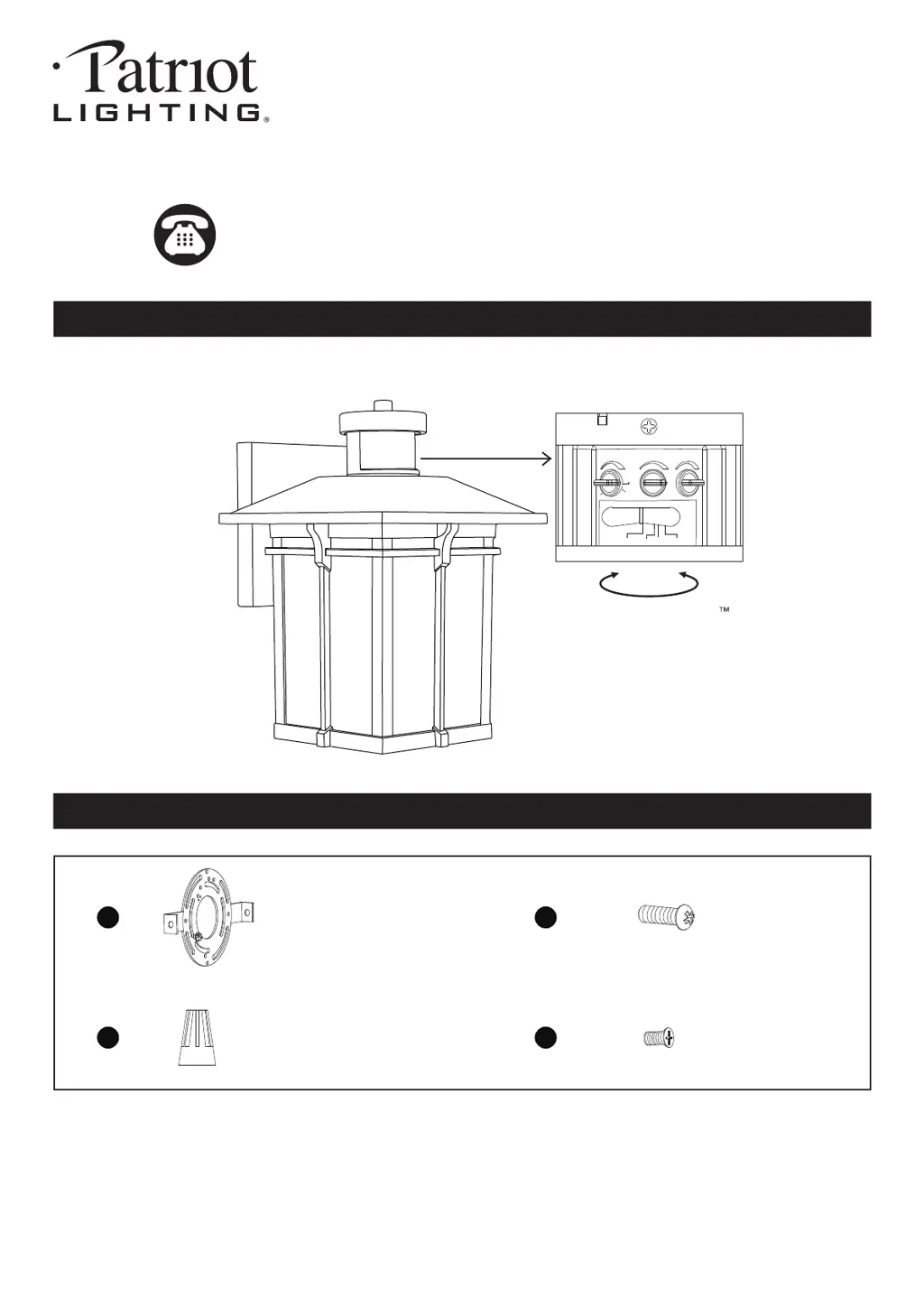
PACKAGE CONTENTS
211201
Questions, problems, missing parts?
Before returning to your retailer, call our customer service at 1-800-887-6326
Monday – Friday 9:00 a.m. – 5:00 p.m. CST
Mounting Plate Unit
X1
Mounting Screw
X2
Wire Connector
X3
AA
CC
BB
DD
HARDWARE CONTENTS Note: Hardware not shown actual size.
1-LIGHT OUTDOOR MOTION
SENSING WALL LIGHT
Model Number: DJ2003
DJ2002
Rotate to access QuickSet
sensor settings
Auto PC
Test
3min
3H
Custom
Time Low Level Sens
5s
Set screw
X2

Questions and Answers

  • R
    Ryan BarberAug 7, 2025
    What to do if Patriot Lighting Outdoor Light comes on for no reason?
    • J
      jessicamontoyaAug 7, 2025
      If your Patriot Lighting Outdoor Light comes on for no apparent reason, it might be triggered by street or sidewalk traffic. Try adjusting the "Sens" knob to reduce the sensitivity. Also, heat sources like heaters, dryer vents, or heated swimming pools can cause false triggering, so eliminate the heat source or relocate the fixture.
  • J
    John ThomasAug 15, 2025
    Why is my Patriot Lighting Outdoor Light blinking?
    • H
      Heather AllisonAug 15, 2025
      If your Patriot Lighting Outdoor Light is blinking, it could be due to a non-dimmable bulb or poor bulb quality. Try using a normal incandescent lamp to see if the light function works correctly; otherwise, change the bulb. Also, passing cars or reflective objects might be interfering with the sensor, so relocating the fixture may help.
  • P
    paynekimberlyAug 21, 2025
    Why does my Patriot Lighting DJ2003 Outdoor Light stay on?
    • S
      Scott PottsAug 21, 2025
      If your Patriot Lighting Outdoor Light stays on, it could be due to several reasons. The fixture might be installed in a shaded area, in which case you should relocate it. On cloudy days, the light may stay on longer than expected, but no action is needed. Check if the "Time/Test" knob is in test mode; if so, rotate it counterclockwise to your desired time. Ensure it's not in manual override mode by turning the light off, then on after 5 seconds. Heat sources like heaters or dryer vents can also cause this; eliminate the heat source or relocate the fixture. Also, check that the switch is set to the mode you want.
  • C
    Catherine McconnellAug 29, 2025
    How to fix Patriot Lighting Outdoor Light if it isn't on?
    • T
      Tammy ColeAug 29, 2025
      If your Patriot Lighting Outdoor Light isn’t turning on, make sure the " Time/Test " knob is set to the "Test" position. Check that the wall switch or circuit breaker is on. Test the light bulb in a working fixture, as it may be burned out. Ensure the light bulb is tightened properly. Verify that all wire connections are correct and secure. Also, too much sunlight or another light source shining on the sensor might be the cause. Relocate the fixture away from western facing wall or eliminate the other light source, block it, or relocate the fixture.

Summary

Package Contents

Hardware Contents

Safety Information

General Safety Precautions

Covers warnings, cautions, and electrical safety for installation and operation.

Preparation

Tools Required for Assembly

Lists necessary tools for product assembly, not included with the package.

Assembly Instructions

Important To Know

Key operational points and compatibility information for the fixture before installation.

Installation Steps

Step-by-step guide for physically installing the lighting fixture onto the outlet box.

Control Panel Position

Details on accessing and adjusting the sensor control panel settings and modes.

Function and Operation Modes

Test Mode

Explains the test mode for sensor functionality and light behavior.

Auto Mode

Details the automatic operation mode, including dusk-to-dawn and motion sensing.

PC Mode

Describes the photocell mode for dusk-to-dawn operation without motion sensing.

3 H Mode

Explains the 3-hour mode for extended low-level brightness after motion.

Custom Mode

Details the custom mode for personalized dimming and motion-sensing schedules.

Manual Override Mode

Instructions for manually overriding the sensor to keep the light on all night.

Customization Options

Shut-off Delay Adjustment

Adjusts the duration the light stays on high-level brightness after motion stops.

Motion Sensor Sensitivity

Sensitivity Notes

Important factors affecting sensor sensitivity and optimal mounting location.

Care and Maintenance

Troubleshooting Guide

Five-Year Limited Warranty

Patriot Lighting DJ2003 Specifications

General IconGeneral
BrandPatriot Lighting
ModelDJ2003
CategoryOutdoor Light
LanguageEnglish

Related product manuals