Motherboard User’s Guide
38
Setting Up a BootaSetting Up a Boota
Setting Up a BootaSetting Up a Boota
Setting Up a Boota
bb
bb
b
le RAID le RAID
le RAID le RAID
le RAID
ArAr
ArAr
Ar
rr
rr
r
aa
aa
a
yy
yy
y
This section explains how to configure a bootable NVIDIA RAID array.
Setting Up the BIOS
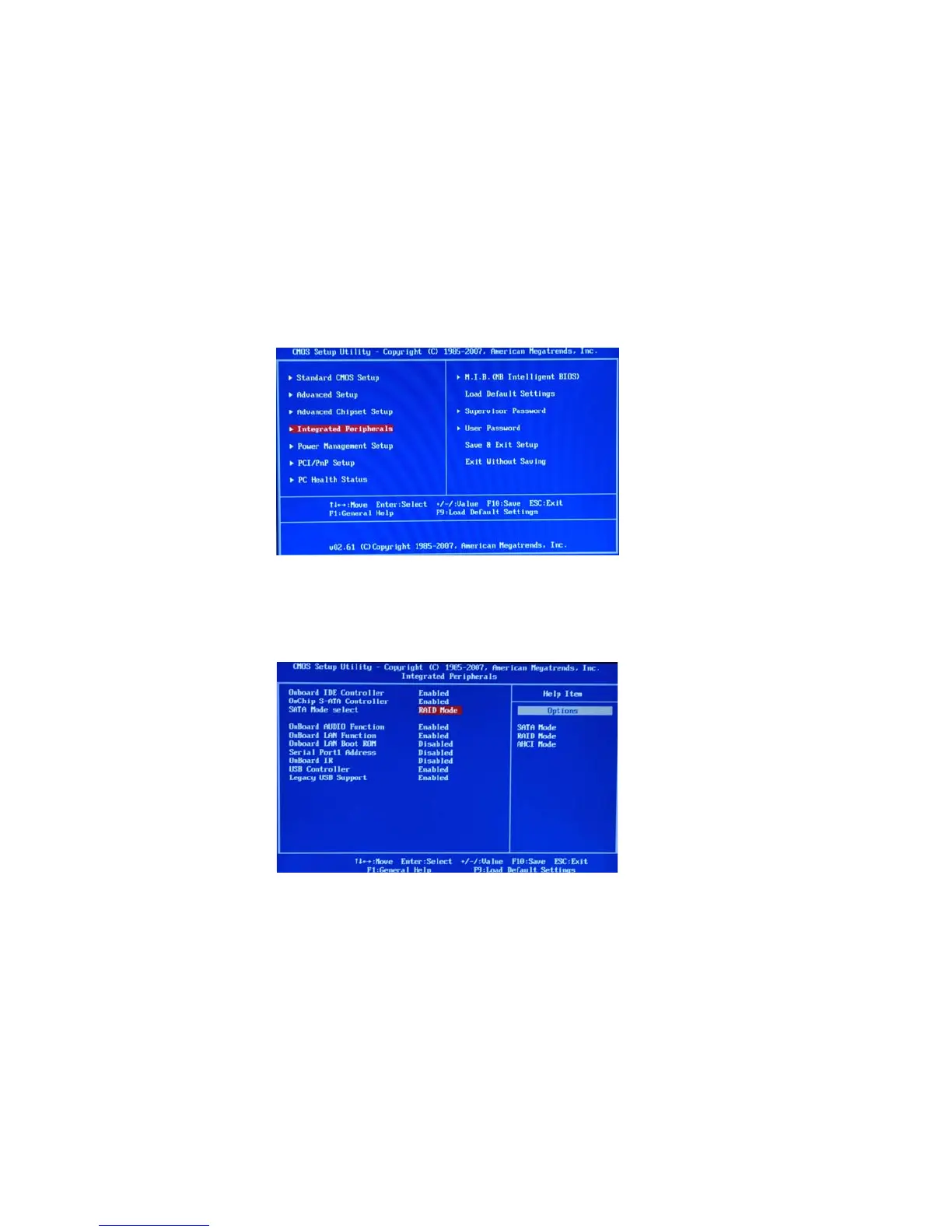
Use the arrow keys to select Integrated Peripherals (see Figure 1.4), then press
Enter.
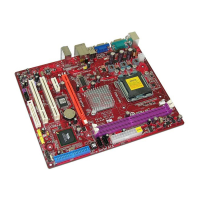
The Integrated Peripherals screen (or a screen similar to it) appears.
Figure 1.5 Integrated Peripherals Screen
From the Integrated Peripherals Window, globally set SATA Mode select to RAID
Mode (see Figure 1.5).
Start your computer, then press Delete to enter the BIOS setup.
The BIOS CMOS Setup Utility screen appears.
Figure 1.4 BIOS CMOS Setup Utility Main Screen
1
2
3


 To Next Page